• I want to thank all the members that have upgraded your accounts. I truly appreciate your support of the site monetarily. Supporting the site keeps this site up and running as a lot of work daily goes on behind the scenes. Click to Support Signs101 ...

graphtec FC9000

signrios

New Member
I have a graphtec FC9000 and all of a sudden, 2 rollers on the right side won’t hold material tightly. When lever is down. media still moves
the 2 left side ones hold tight. i moved the rollers to the right side but still same issue. roller assembly doesn't seem broken
any ideas?

thanks
 

signheremd

New Member
I have a graphtec FC9000 and all of a sudden, 2 rollers on the right side won’t hold material tightly. When lever is down. media still moves
the 2 left side ones hold tight. i moved the rollers to the right side but still same issue. roller assembly doesn't seem broken
any ideas?

thanks
First thing I would do is clean the rubber rollers and the grit rollers and especially get off any stuck on vinyl bits. If that doesn't work, then remember the rubber rollers are a replaceable item. If you get new ones, do all of them at once so they are identical in size. There is a pen and a C-clip holding them in and those little parts can go shooting off or fall into the machine during replacement - so be careful when removing and reinstalling them. You can order parts through any Graphtec distributor. Also, check to make sure the tension springs haven't popped loose. These machines are pretty bulletproof, so one of these things should fix your problem
 
  • Agree
Reactions: 1 user

signrios

New Member
wheels are in good condtion and springs are in place, i guess something broke internally. will break one apart over the weekend.
for cut vinyl its working properly.
but for contour cuts its leaving small margin around stickers.
 

Adam Vreeke

Knows just enough to get in a lot of trouble..
If you look over the crossbar and where the rollers are, there are little levers for each pinch roller (smaller version of the big lever to push down all the rollers). Make sure all those little levers are pushed down.
 
  • Agree
Reactions: 4 users

Joseph44708

I Drink And I Know Things
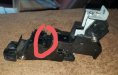
This could be your problem, circled in red.
 

Attachments

  • 20210513_180229.jpg
    20210513_180229.jpg
    1.8 MB · Views: 66
  • I Appreciate You
Reactions: 1 user

Joseph44708

I Drink And I Know Things
That could be it, need to make some time and see if its fixable.

thanks
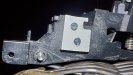
This is how I fixed mine three years ago and still working great.
ACM material and Machine screws.
 

Attachments

  • 20210513_181149.jpg
    20210513_181149.jpg
    124.6 KB · Views: 31
  • 20230630_220022.jpg
    20230630_220022.jpg
    1.1 MB · Views: 35
  • Agree
Reactions: 1 user

Hawkeye Signs

New Member
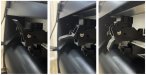
We also experienced a situation where the roller didn't hold the material properly on one side. After a while, we noticed that the levers on the rollers were in the up position. Someone had accidentally bumped into them. Each roller has three positions for different material thicknesses. Make sure all the levers are in the same position, which is usually the down position.
 

Attachments

  • FC9000 Lever.jpeg
    FC9000 Lever.jpeg
    144 KB · Views: 20
  • Agree
Reactions: 2 users

signrios

New Member
We also experienced a situation where the roller didn't hold the material properly on one side. After a while, we noticed that the levers on the rollers were in the up position. Someone had accidentally bumped into them. Each roller has three positions for different material thicknesses. Make sure all the levers are in the same position, which is usually the down position.
Thanks for your input
 
Top