• I want to thank all the members that have upgraded your accounts. I truly appreciate your support of the site monetarily. Supporting the site keeps this site up and running as a lot of work daily goes on behind the scenes. Click to Support Signs101 ...

Discussion Has Chromaluxe Changed their Formulation for Aluminum Semi-Gloss Panels

RGBPrints

New Member
Greetings,

For the last 2.5 yrs we've been using Chromaluxe panels, Glossy, Semigloss, Matte, Outdoor, and Clear. And for the most part, in this time we've had very little issue, with only the occasional 'one-off' defective or problematic panel.

But now our last two received Semi-Gloss shipments have been of panels that come out of the press heavily fogged and covered in residue. The residue appears to be removed when cleaned with Isopropyl but the colours of the entire panel are visibly and measurably less vibrant, less bright and lacking in contrast.

When we received the first problem panels, a pallet of 100 8'x4', and after realizing that every panel was giving us this problem, we managed to RMA them back to Chromaluxe. Thankfully we had some stock of older panels that kept us pressing until replacements could be shipped.

The new shipment, this time two full pallets, once again exhibit the same fogging and print quality issues.

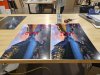
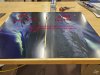
Testing the new panels against the few remaining older (2024) panels.
I printed identical files at the same time on our Epson F7200. Then pressed the panels individually using the same preheat and press times that we've been using for the last 2 yrs.
20250529_164507-Edit.jpg
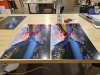
As pulled from press no Cleaning.

20250530_102657-Edit.jpg 20250529_164351-Edit.jpg

We've tried extending the preheating of the panels, extending the press time, shortening the press time and as of yet nothing we've tried as has made any improvement.

Has anybody else noticed this happening with panels received in the 6 months?

Anybody figure out a solution that we haven't?

We are currently waiting to hear back from Chromaluxe.
 

Attachments

  • 20250529_164351-Edit.jpg
    20250529_164351-Edit.jpg
    219.9 KB · Views: 117
  • Sad
Reactions: 1 user

Andrew Heiner

New Member
We are seeing this with the matte panels currently. Nothing changed... and we have old stock to compare them to as well and they are just not the same.
Our regular supplier "discontinued" the mattte finish and this is a new batch from a new supplier. Regardless I am sending them all back as these are not going to work.

I have noticed that sometimes if a panel is really old the humidity can be a little weird. As in the panels will soak up more humidity and require a longer prepress / dry.

What did you find out?
 

RGBPrints

New Member
We are seeing this with the matte panels currently. Nothing changed... and we have old stock to compare them to as well and they are just not the same.
Our regular supplier "discontinued" the mattte finish and this is a new batch from a new supplier. Regardless I am sending them all back as these are not going to work.

I have noticed that sometimes if a panel is really old the humidity can be a little weird. As in the panels will soak up more humidity and require a longer prepress / dry.

What did you find out?
Well unfortunately we didn't find out much. We were asked to send back some samples of the 'fogging' panels so they could take a look.

We printed 3 copies of two different images. These were printed all simultaneously off the same printer using the same RIP profile.

Next we pressed the the images, one of each to the newly received panels. The remaining prints were pressed to old stock we had on hand. Each old stock panel was from different batch as evidenced by the batch numbers etched on the back. Each panel was pressed using the same time and temp and on the same press. The old stock panels came out of the press clear and vibrant. The new panels came out of the press 'foggy' and coated in residue.

We shipped all the panels to Chromaluxe and waited.

After a couple of weeks they informed us that their techs were able to clean the panels and that the fogging issue was obviously an inking/printing inconsistency on our end. This of course completely disregarded the fact that the prints were all produced at the same time from the same printer and pressed identically on the same press. The fact that there was a noticeable visible and measurable difference in contrast and vibrancy after 'cleaning' was not addressed.

Looks like this is the new Chromaluxe.

I would also note that in the last 3yrs the only fogging we ever noticed was on the Matte panels. We only do a very small amount, maybe 1-2%, of Matte, so it wasn't really something we were concerned about and just figured that that was a normal property of the Matte finish.

After pressing literally thousands and thousands of clear and vibrant Glossy and Semi-Gloss panels I can confidently say something about the newest batches is different. Hell, even pealing the protective plastic is different, maybe its New Adhesive? Maybe the formulation of the coating was 'tweaked'. Who knows? not Chromaluxe and not us.
 

Dan Berg

New Member
What is your prepress process? Looks like the standard moisture in the coating. The larger the panel the more moisture shows up. 16x20 and larger we prepress for at least 2 minutes at 400 degrees. We are starting to move to 350 for 5 minutes and are chipped edge issues have gone away. I just repressed a 30x40 and you should have seen the steam come out from that prepress. Even after prepress we still get the occasional moisture mottling. Always wipes off with a soft cloth. I cannot answer what the difference in vibrancy is, that's a new one. Dan Berg Berg's Print Studio
 

irtuna

New Member
We received a batch of gloss that had this fogging issue too. I haven't noticed any issues with color, but we never had the opportunity to compare an old
Our old stock would come out perfect and wouldn't require any additional cleaning.
The newer batch, it seemed like anything dark would come out heavily fogged and required additional work to get cleaned.
Once we worked through the bad batch and reordered, it looks like they've resolved the issue as far as gloss.

Unfortunately, the only other metal suppliers that we're aware of are Duraluxe and Beautysub.
We had issues with Duraluxe transfers sticking to the metal, and the white point of Beautysub is far too warm to directly compare to the others.
 

RGBPrints

New Member
What is your prepress process? Looks like the standard moisture in the coating. The larger the panel the more moisture shows up. 16x20 and larger we prepress for at least 2 minutes at 400 degrees. We are starting to move to 350 for 5 minutes and are chipped edge issues have gone away. I just repressed a 30x40 and you should have seen the steam come out from that prepress. Even after prepress we still get the occasional moisture mottling. Always wipes off with a soft cloth. I cannot answer what the difference in vibrancy is, that's a new one. Dan Berg Berg's Print Studio
Hi Dan,
Neither our pre-press processes nor equipment have changed from what we had been using successfully for the past couple years with absolutely NO fogging on Semi-Gloss or Glossy panels. Starting though towards the end of 2024 we started getting fogging on our semi-gloss.
Now in the past year, with a lot of back and forth with Chromaluxe Unisub it looks like some changes are being implemented. Unfortunately those changes will be addressing other quality control issues we had been noticing over the course of the last year, and not the fogging issue.

Having said that though we have noticed that with our most recent shipment while the fogging is still present it is noticably easier clean.

Thanks for the suggestions. Usually any differences we would occasionally get could be attributed to swings in humidity and temperature. But with this issue it was definitely coming from manufacturing.
 
Last edited:

RGBPrints

New Member
We received a batch of gloss that had this fogging issue too. I haven't noticed any issues with color, but we never had the opportunity to compare an old
Our old stock would come out perfect and wouldn't require any additional cleaning.
The newer batch, it seemed like anything dark would come out heavily fogged and required additional work to get cleaned.
Once we worked through the bad batch and reordered, it looks like they've resolved the issue as far as gloss.

Unfortunately, the only other metal suppliers that we're aware of are Duraluxe and Beautysub.
We had issues with Duraluxe transfers sticking to the metal, and the white point of Beautysub is far too warm to directly compare to the others.
Ha. So strange. We never did see any problems with Glossy, though we do use significantly more Semi than Glossy so maybe it was always just a matter of getting lucky.
With their changes being implemented before Christmas 2025 hopefully panels rolling out of their facility are getting better.
 

marginwalker

New Member
We've recently begun having lots of issues with Chromaluxe panels specifically with semi-gloss and glossy as well. Prints are coming out of the press with the foggy residue on the surface of the print. This residue, while somewhat persistent within the process, on matte and semigloss media has always been easily removed with an alcohol dampened rag. Recently, the haze has begun to contaminate other portions of the print when cleaning off. If a print has high contrast areas, or a border, the cleaning process will stain into the white and low density portions. This seems to be persistent after pressing the prints, well beyond the material’s initial cooling stage. This staining has been noted to still occur days after the prints have been pressed.

After reading through everyone's notes, it appears that pre-pressing the material does help eliminate the fog from being an issue. However cleaning at any later date will still produce staining. In my mind, this is clearly something going on with the coating. Something is going on with it's ability to retain the ink. I'm still working on getting an answer from UW, but this totally coincides with their acquisition/updating their coating lines to "increase quality." We're having lots of quality control issues right now in general with them.

Even going so far as to test out Duralux panels. Just grasping for something remotely reliable at this point.
 
  • Agree
Reactions: 1 user

RGBPrints

New Member
We've recently begun having lots of issues with Chromaluxe panels specifically with semi-gloss and glossy as well. Prints are coming out of the press with the foggy residue on the surface of the print. This residue, while somewhat persistent within the process, on matte and semigloss media has always been easily removed with an alcohol dampened rag. Recently, the haze has begun to contaminate other portions of the print when cleaning off. If a print has high contrast areas, or a border, the cleaning process will stain into the white and low density portions. This seems to be persistent after pressing the prints, well beyond the material’s initial cooling stage. This staining has been noted to still occur days after the prints have been pressed.

After reading through everyone's notes, it appears that pre-pressing the material does help eliminate the fog from being an issue. However cleaning at any later date will still produce staining. In my mind, this is clearly something going on with the coating. Something is going on with it's ability to retain the ink. I'm still working on getting an answer from UW, but this totally coincides with their acquisition/updating their coating lines to "increase quality." We're having lots of quality control issues right now in general with them.

Even going so far as to test out Duralux panels. Just grasping for something remotely reliable at this point.
Yeah this sounds very much like our problem as well. Frustrating. For us we've found that while it seems like good product from our small test samples, Duralux just doesn't have quite the same color vibrancy as Chromluxe.

We're still in the process of trying to convince UW that this is a problem on their end, and that obviously they've changed something since the acquisition.
 

Dan Berg

New Member
The coating has moisture in it which causes the fogging. Some more than others. In my previous post I forgot to mention that we cover our panels with polypoplin fabric to wick the moisture.
We used to get it by the roll from Conde Systems. Not sure if the new Conde carries it or not but any fabric store should have it. Prepress with the fabric and you should see the problem taken care of.
 
Top