Printer101
New Member
I have VS 300i
First time using tiling feature to print 185"x40" decal.
I created decal in illustrator with cutline around it.
I printed 7 tiles, each has individual crop marks. Laminated everything. So far so good.
I cut 2 of the tiles , "cut image boundaries " checked in versa works . "Crop marks" checked . It was perfect.
Came to work today to finish cutting.
Doing all the same thing but instead of cutting the image , my printer is cutting a box around it.
Turned printer off.
I check printer cut settings / align- it is perfect. It is not the issue.
Crop marks checked in versa works.
I unchecked "cut image boundaries " to see if it was the issue. Still it cuted and inch away of my cutline on each side.
What to do ? Why is it happening
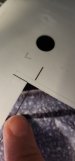
Im attaching the pic to show cut line around the image.
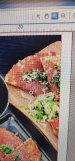
And pic of my cut lines in versa works
First time using tiling feature to print 185"x40" decal.
I created decal in illustrator with cutline around it.
I printed 7 tiles, each has individual crop marks. Laminated everything. So far so good.
I cut 2 of the tiles , "cut image boundaries " checked in versa works . "Crop marks" checked . It was perfect.
Came to work today to finish cutting.
Doing all the same thing but instead of cutting the image , my printer is cutting a box around it.
Turned printer off.
I check printer cut settings / align- it is perfect. It is not the issue.
Crop marks checked in versa works.
I unchecked "cut image boundaries " to see if it was the issue. Still it cuted and inch away of my cutline on each side.
What to do ? Why is it happening
Im attaching the pic to show cut line around the image.
And pic of my cut lines in versa works