• I want to thank all the members that have upgraded your accounts. I truly appreciate your support of the site monetarily. Supporting the site keeps this site up and running as a lot of work daily goes on behind the scenes. Click to Support Signs101 ...

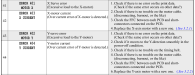
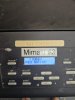
anyone know the reason behind the 404 and 402 errors for the Y Motor for a JFX200 2513?

hamedsalehi1

New Member
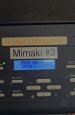
Hi everyone. I'm having an issue with my Mimaki JFX200-2513 printer. I'm getting a motor Y error, specifically error 401. I went ahead and replaced the motor with a new one, but the problem persists and it's still stuck on the error. Pressing Enter just starts the same cycle over again. I've also tried entering maintenance mode by holding Function and Remote while powering on, but that isn't working either. Does anyone have any suggestions on what to check next?

Just to add a bit more detail, I've checked the belts and gears, and they seem to be moving and working properly. I've also cleaned the encoder on the back and thoroughly inspected the wires and cables for any signs of burning, but I couldn't find any issues there.
 

Attachments

  • WhatsApp Image 2026-05-18 at 4.16.24 PM.jpeg
    WhatsApp Image 2026-05-18 at 4.16.24 PM.jpeg
    238.2 KB · Views: 17
  • JFX200 402 error.JPG
    JFX200 402 error.JPG
    30.2 KB · Views: 15
  • Agree
Reactions: 1 user

hamedsalehi1

New Member
no I checked all physically problem and is very things is very smooth I can not put here video to show all pulleys is very good and when push inter key and get the motor and residence to move sometimes work sine show need to residence to work and not must very smoothly
 

Smoke_Jaguar

Man who touches printers inappropriately.
I would check the linear rails the carriage moves on, they should be well lubricated. Something is causing you to pull too much current and dragging parts can add up quickly with resistance.

This is from the service manual:

1779171194398.png
 

hamedsalehi1

New Member
hi thanks I check this before and last item see i change motor but still have error ,I check the linear rails the carriage moves on is ok and smoothly move but I don't know
 

Smoke_Jaguar

Man who touches printers inappropriately.
Do the rails have grease on them? If you wipe your finger across the rail, it should leave an oily residue on your fingers. If the rails are dry, they will cause a lot of drag while still feeling smooth.
 

hamedsalehi1

New Member
No, contrary to what you are suggesting, I actually think that when the motor begins its test cycle and I hold it by hand to prevent it from moving, it sometimes works, though it eventually throws the error again shortly after. At the exact moment I hold it and restrict its movement, things seem okay, but the issue returns soon after. I am concerned that it might be moving too freely or smoothly, which could be causing this to happen."
 

hamedsalehi1

New Member
ok thanks do you have any real picture real in hand this part my printer is not this part mybe this is caused problem thanks if can get picture of this for me it is z
 

Attachments

  • f311ae10caba547693f9e795595e9c3a.jpg
    f311ae10caba547693f9e795595e9c3a.jpg
    28.8 KB · Views: 7
  • d072f0c52f003555c3ffe5ec24cbdaab (1).png
    d072f0c52f003555c3ffe5ec24cbdaab (1).png
    497.8 KB · Views: 7
Top