• I want to thank all the members that have upgraded your accounts. I truly appreciate your support of the site monetarily. Supporting the site keeps this site up and running as a lot of work daily goes on behind the scenes. Click to Support Signs101 ...

Color Profile Issue With Roland VG3 640

Sign Source 1

New Member
Hoping someone can point me in the right direction here. We have a Roland VG3-640 with CMYKLcLmOG ink configuration. Using Versaworks. With the orange ink configuration, some of our prints that should be red often come out more orange than red. We have issues with a few other colors due to the orange / green inkset, but reds are often the most noticeable. Is there a way to disable the orange / green inks and just print cmyk on certain jobs? I've tried to download cmyk profiles into versaworks, but it will not allow me to due to the ink configuration of our machine. I know we can print a pms chart out and match to the color we need (this is what we currently are doing), but I am trying to see if there is an easier way. Thanks for the help.
 
  • Agree
Reactions: 1 user
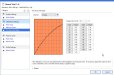
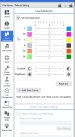
If the printer is inked with orange and green, you cannot turn the orange off. If you only had an orange, you can actually turn it off. However, you can go into the queue settings or the job settings and pull down the slider for the orange, see attached.. Do keep in mind that profiles are just general starting spots. Hopefully you have gone to the Roland profile center and downloaded the proper profiles for your media. Sometimes a Generic profiles just have way too much ink.
Also you can copy a profile through the Media Settings and try manually to turn down the orange or whatever colors.
If you have a photo spectrometer and proflie software like i1, you can build your own.
 

Attachments

  • IMG_6712.jpeg
    IMG_6712.jpeg
    392.5 KB · Views: 17
  • IMG_6713.jpeg
    IMG_6713.jpeg
    567.3 KB · Views: 17
  • Agree
Reactions: 1 users

MrDav3C

New Member
Might be worth importing a job with the issues into Versaworks and then generating a variation job using different media settings / colour profiles if you haven't already.

I presume that you are performing the batch automatic correction for each media profile you create on the printer?

Unfortunately I can't be of much more help as I have an SG3 so only run CMYK
 

NoosaNet

New Member
How do you turn the orange off? My machine only has Orange and Lk. I have the same trouble on some jobs with red.
 

OPI_Matt

Graphic Artist, Sign Shop, & Vinyl/Wrap
To turn off the orange ink on a Roland TrueVIS VG2-640 printer, follow these steps:
  1. Open VersaWorks 6 and select the VG2 with orange ink as your printer.
  2. Open Media Explorer and select the 7C (7 color) profiles.
  3. Click on the eyeball icon to display the 7C profiles in the quality settings tab.
  4. Close Media Explorer and re-open your VG2 queue to confirm that the media types available under the quality tab include the 7C profiles.
    This process ensures that the printer uses the correct ink colors for your printing needs, avoiding the orange ink that can cause issues with certain media types.

Did a quick search and found how to turn it off. Hope that helps.
 
Top