SummitSignsandmore
New Member
Happy thanksgiving to all. I'm running a new PrismJet54 that I purchased in August from signwarehouse (my second printer, my first printer I ran for 16 years before this upgrade). I'm not having any luck hearing back from their tech department and thought I would ask here. I'm printing a box truck I printed 1 full side, the front and the back with no issues this week. The last side im printing started to act up. The section of wrap that I'm printing has 80% cyan prolly 20% black on the first 4'x80" panel.
This week I ran a ton of black and yellow prints with no issue. The issue is only with Cyan in a longer run. It started out with some banding halfway through the print (similar to the pic).
I did a manual clean and a heavy clean. When I ran some more vinyl it began to spit cyan.
I did another manual clean and a light clean on the machine. I stepped away from printing the wrap and the next few job I ran had minimal to no cyan, they ran perfectly.
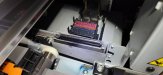
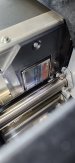
I was hoping the bug may have been worked out, I continued back to printing the wrap again and I got this same banding about 4' into the print job. (looks like I'm getting a build up on the printhead of wet ink) For someone that know what they are looking at I believe the problem can be diagnosed maybe by the image of the print head I included. There are 2 long cyan areas on the print head that don't look right to me.
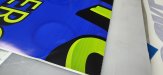
This week I ran a ton of black and yellow prints with no issue. The issue is only with Cyan in a longer run. It started out with some banding halfway through the print (similar to the pic).
I did a manual clean and a heavy clean. When I ran some more vinyl it began to spit cyan.
I did another manual clean and a light clean on the machine. I stepped away from printing the wrap and the next few job I ran had minimal to no cyan, they ran perfectly.
I was hoping the bug may have been worked out, I continued back to printing the wrap again and I got this same banding about 4' into the print job. (looks like I'm getting a build up on the printhead of wet ink) For someone that know what they are looking at I believe the problem can be diagnosed maybe by the image of the print head I included. There are 2 long cyan areas on the print head that don't look right to me.