• I want to thank all the members that have upgraded your accounts. I truly appreciate your support of the site monetarily. Supporting the site keeps this site up and running as a lot of work daily goes on behind the scenes. Click to Support Signs101 ...

Editing Programs

Graphic Extremes

Knows To Little
I am just wondering what photo and vector programs everyone is using..

I am running into a problem to get an exact color match and Illustrator doesn't let you use decimals in the LAB values.. It rounds to the closest number. Makes it real hard to do exact color matching.

After a google search Affinity by Canva says it does the decimal places for LAB colors..

After all the money you spend on Adobe you would think they would support this feature.. Why can't companies use standard numbers for colors.. Guess using the decimals makes it hard for people to copy their color..
 

Boudica

I'm here for Educational Purposes
Any thing can work with Adobe. If the exported PDF settings work.

.... Unless that's changed. I swear it's different month to month. If it's just printing, ask them for a high quality jpg or a tiff.
 

Pauly

Printrade.com.au
I am just wondering what photo and vector programs everyone is using..

I am running into a problem to get an exact color match and Illustrator doesn't let you use decimals in the LAB values.. It rounds to the closest number. Makes it real hard to do exact color matching.

After a google search Affinity by Canva says it does the decimal places for LAB colors..

After all the money you spend on Adobe you would think they would support this feature.. Why can't companies use standard numbers for colors.. Guess using the decimals makes it hard for people to copy their color..
I've never had to rely on decimals. Nearest number is fine If it was such an issue, adobe wouldn't be used as widely.
Colour matching should be on on the RIP anyway. thats what it's for.
 
  • Agree
Reactions: 1 user

FrankW

New Member
How much color deviation will result in missing decimals at Lab-Values?
 
  • Agree
Reactions: 1 user

Think713

New Member
I am just wondering what photo and vector programs everyone is using..

I am running into a problem to get an exact color match and Illustrator doesn't let you use decimals in the LAB values.. It rounds to the closest number. Makes it real hard to do exact color matching.

After a google search Affinity by Canva says it does the decimal places for LAB colors..

After all the money you spend on Adobe you would think they would support this feature.. Why can't companies use standard numbers for colors.. Guess using the decimals makes it hard for people to copy their color..

Digital color matching is always a pain. Especially with latex printers because they are environment dependent on consistency. Ive worked on some printers that will print different variations of colors depending on the day and if humidity is too high, by the hour.
I use adobe products, but for color matching we also just manually print color samples, and create swatches until we land on the right color. And for clients that this is an absolute must, we save working matching files and samples from prior jobs and always match to an approved sample.
 
  • Agree
Reactions: 1 user

Graphic Extremes

Knows To Little
Photoshop and InDesign both support the decimals in LAB colors just Illustrator doesn't.

Rounding a color number from lets say 34.63 shows a difference if rounded down or up to the nearest whole number. That is the only reason I ask. Free Affinity software allows for the two decimals for lab values.. Funny how free software has it but paid software does not.

I check ONYX Thrive to see if they support LAB with decimal points for colors. It seems the support single decimal for color changes.

As for Pantone, I have all of their color books and the do not have a color that matches exactly. Reading the color with X-Rite the color is between two of the colors.

This job is such a pain, Customer says that the person who made the original design came up with a custom color for them, but he passed away over five years ago.. Customer states that the original color code was never given to them, or if it was they have lost the color code.

This job no one has been able to color match the color code. If I can do it, I will have sixty vehicles to wrap over the next four months. All new trucks are ordered waiting delivery..

I will figure this out one way or another, will start printing swatch pages out.
 

jfiscus

Rap Master
Your PC's software's color profiles may be getting in your way?
You may need to be working in RGB in Illustrator to get better colors, depending on exactly what color they are looking for.
The RIP will sometimes do a better job of importing certain colors in each mode, depending on your software's color profiles.
 

Think713

New Member
Photoshop and InDesign both support the decimals in LAB colors just Illustrator doesn't.

Rounding a color number from lets say 34.63 shows a difference if rounded down or up to the nearest whole number. That is the only reason I ask. Free Affinity software allows for the two decimals for lab values.. Funny how free software has it but paid software does not.

I check ONYX Thrive to see if they support LAB with decimal points for colors. It seems the support single decimal for color changes.

As for Pantone, I have all of their color books and the do not have a color that matches exactly. Reading the color with X-Rite the color is between two of the colors.

This job is such a pain, Customer says that the person who made the original design came up with a custom color for them, but he passed away over five years ago.. Customer states that the original color code was never given to them, or if it was they have lost the color code.

This job no one has been able to color match the color code. If I can do it, I will have sixty vehicles to wrap over the next four months. All new trucks are ordered waiting delivery..

I will figure this out one way or another, will start printing swatch pages out.
What I would do is reverse engineer the color by virtue of a pantone book. They are going to have to (if they havent already) given you a color sample. Any color code you use right now assuming it is indeed correct to the original, will likely NOT print you the actual color that ended up on their vehicles or print work in the past. So if i were you is take a pantone book, and manually match to the pantone book, and then print color swatches until you match that pantone within a 90% accuracy or better. And I say 90% because pantone vibrancy and saturation is pigment determined. I'm sure you know that, but if its the difference of no work vs 60 vehicles I would manually match what they have and rebuild the colors from scratch. Its a little extra leg work, but getting something that prints the way they want will almost gaurunteed not be the color that was actually created.
 

Think713

New Member
Photoshop and InDesign both support the decimals in LAB colors just Illustrator doesn't.

Rounding a color number from lets say 34.63 shows a difference if rounded down or up to the nearest whole number. That is the only reason I ask. Free Affinity software allows for the two decimals for lab values.. Funny how free software has it but paid software does not.

I check ONYX Thrive to see if they support LAB with decimal points for colors. It seems the support single decimal for color changes.

As for Pantone, I have all of their color books and the do not have a color that matches exactly. Reading the color with X-Rite the color is between two of the colors.

This job is such a pain, Customer says that the person who made the original design came up with a custom color for them, but he passed away over five years ago.. Customer states that the original color code was never given to them, or if it was they have lost the color code.

This job no one has been able to color match the color code. If I can do it, I will have sixty vehicles to wrap over the next four months. All new trucks are ordered waiting delivery..

I will figure this out one way or another, will start printing swatch pages out.
I missed some of what you said here. If you have an example of their color that matches perfectly, then you have everything you need. You need to just print test swatches cause chances are its not gonna match. Ive never worked on a wide format printer that printed colors exactly because its process color mixing. You cant match a pantone perfectly without pigments being mixed by weight. So YOUR RIP is going to be the ultimate determiner of what does and doesn't get printed. Which means you need to create a chart of everything in that value range, and pic the one that is spot on. I have to do this all the time. Especially with one of our clients that has a specific Grey/charcoal color that has to be matched because the original vehicles used a 3m non optically clear laminate that slightly tinted the color towards yellow. Everytime they bring in a new van I have to reprint the swatches and almost 100% of the time I have to rematch the color to match the original grey. Between print heads, environment, static etc... Its likely your perfect matched color on a book isnt gonna match until you print samples... Test, dont guess.
Granted my situation is because we run HP latex printers. Epsons are leaps and bounds better with color representation. So if you are on a roland or epson you will likely have an easier time matching.

Just my 2cents tho.
 

jfiscus

Rap Master
The physical printer also plays a decent part in what color is actually printed. I would say 5% of the color difference may be from the actual printer.
We have 4 Epson S60600 printers here, all running the exact same ink, same printheads. All running off of the same RIP, same profiles, very good head alignment.
Colors from each printer are VERY consistent; you can print repair panels 6 months from now and they will be a dead match.
HOWEVER, each printer prints the same file SLIGHTLY different.
Enough that we keep track of which machine printed which piece, when we need a reprint or repair.
 
  • Agree
Reactions: 1 user
There has always been a tremendous amount of confusion surrounding best practices in the reproduction of named spot colors (including but not limited to Pantone, Toyo, paint brands, etc). Like other RIPs, Onyx supports the creation of custom spot colors (see attached screengrab) and is able to accurately define them in LAB to two decimal places. Illustrator is limited to custom colors using whole numbers, while InDesign supports two decimal places - but the printed result from the named spot color would be identical out of Onyx.

The fastest way to getting an accurate result will be achieved through a custom ICC profile which accurately characterizes the printer gamut and contains a sufficient number of patches (1,500+).

Here is a good tutorial on the subject:
https://colorbase.com/blog-how-to-c...spotcolors&utm_campaign=newsl_may16&utm_id=48
 

Attachments

  • Onyx Color Matching Table UD.jpg
    Onyx Color Matching Table UD.jpg
    165 KB · Views: 37
Last edited:
  • Agree
  • Love
Reactions: 3 users

Think713

New Member
The physical printer also plays a decent part in what color is actually printed. I would say 5% of the color difference may be from the actual printer.
We have 4 Epson S60600 printers here, all running the exact same ink, same printheads. All running off of the same RIP, same profiles, very good head alignment.
Colors from each printer are VERY consistent; you can print repair panels 6 months from now and they will be a dead match.
HOWEVER, each printer prints the same file SLIGHTLY different.
Enough that we keep track of which machine printed which piece, when we need a reprint or repair.
We also do this with our latex printers. We keep track of our important jobs that run fleets across each one and make sure each future vehicle is printed on the corresponding printer for this same reason.
 
  • Agree
Reactions: 1 user

Think713

New Member
You should only be using the Pantone Bridge in CMYK, Anything else is a crap shoot.
Thats debatable because you aren't going to get certain saturation and hues in a CMYK file. You can push your gamut in RGB. We use almost exclusively RGB files at our shop because we can get more colors. The CMYK match is great still but CMYK colors never come out as bold as we want them. Even if we print on vivid profiles, we still seem to lose a little punch when printing in CMYK.
There has always been a tremendous amount of confusion surrounding best practices in the reproduction of named spot colors (including but not limited to Pantone, Toyo, paint brands, etc). Like other RIPs, Onyx supports the creation of custom spot colors (see attached screengrab) and is able to accurately define them in LAB to two decimal places. Illustrator is limited to custom colors using whole numbers, while InDesign supports two decimal places - but the printed result from the named spot color would be identical out of Onyx.

The fastest way to getting an accurate result will be achieved through a custom ICC profile which accurately characterizes the printer gamut and contains a sufficient number of patches (1,500+).

Here is a good tutorial on the subject:
https://colorbase.com/blog-how-to-c...spotcolors&utm_campaign=newsl_may16&utm_id=48

I've tried to do this, and didn't get great results. I assume that was probably user error. But I always default that the printer is just doing what its gonna do because of the differences on an almost day to day basis... Its very frustrating with HP printers. I would like to move away from latex if im being totally honest.
 
I've tried to do this, and didn't get great results. I assume that was probably user error. But I always default that the printer is just doing what its gonna do because of the differences on an almost day to day basis... Its very frustrating with HP printers. I would like to move away from latex if im being totally honest.
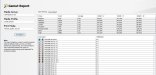
Attached is a screenshot from a report in Onyx Media Manager that provides a predictive delta-E value for all of the named spot colors that are referenced in the spot color tables. These include the entire Pantone library, Toyo, Onyx, and custom spot colors. Note that this is based off of a custom ICC profile from a current model Latex Gen4 printer printing at 12-pass. 92-percent of Pantone Coated colors are predicted to print to the media within 2 dE00 of the reference color, with an average miss of less than 1 dE. The ICC profile is based on a patch set of 1617 patches so there are sufficient data points to interpolate color matches from.

Current Gen4 Latex printers are also far more color stable/ repeatable over time than previous generations of Latex.
 

Attachments

  • Onyx Gamut Report.jpg
    Onyx Gamut Report.jpg
    443.4 KB · Views: 21
  • Agree
Reactions: 1 users

Solventinkjet

DIY Printer Fixing Guide
Thats debatable because you aren't going to get certain saturation and hues in a CMYK file. You can push your gamut in RGB. We use almost exclusively RGB files at our shop because we can get more colors. The CMYK match is great still but CMYK colors never come out as bold as we want them. Even if we print on vivid profiles, we still seem to lose a little punch when printing in CMYK.
This is why a lot of manufacturers have their own custom input profiles for their printers now. The printers can print a wider gamut than the old SWOP CMYK input profiles so using RGB is what allows you to take advantage of those colors. The only problem with using RGB is that a massive amount of it's gamut is still outside what the printer can print so you might choose a color outside the gamut and then the RIP has to try to find a best match which isn't always great. If your printer manufacture offers a custom input profile, you can use that instead. That lets you use the full gamut of the printer but also cuts out anything outside of gamut.
 
  • Agree
Reactions: 1 users

Think713

New Member
Attached is a screenshot from a report in Onyx Media Manager that provides a predictive delta-E value for all of the named spot colors that are referenced in the spot color tables. These include the entire Pantone library, Toyo, Onyx, and custom spot colors. Note that this is based off of a custom ICC profile from a current model Latex Gen4 printer printing at 12-pass. 92-percent of Pantone Coated colors are predicted to print to the media within 2 dE00 of the reference color, with an average miss of less than 1 dE. The ICC profile is based on a patch set of 1617 patches so there are sufficient data points to interpolate color matches from.

Current Gen4 Latex printers are also far more color stable/ repeatable over time than previous generations of Latex.
Im almost certain our latex printers are not gen4, but that does look like a nice feature. Where can I find out more about this?
 
Im almost certain our latex printers are not gen4, but that does look like a nice feature. Where can I find out more about this?
The screenshot is taken from Onyx Media Manager, Reports and Tools Tab, and is called Gamut Report. Note that it is a round trip through the ICC Profile, and the data is predictive and not based on actual print measurements. It does provide a great way to compare gamuts between print modes or printers, as well as provide a solid baseline for what to expect when printing named spot colors.
 
  • Agree
Reactions: 1 user
Top