
Tanner_PTTGI
New Member
Hello All,
This is Tanner with Paint the Town Graphics. We have been running an Epson SureColor R5070 for just over a year. We had a computer fail and replaced, resulting in losing our Onyx settings and system preferences.
Our banding issues are exclusively on Avery Dennison 1105EZ/RS. We run 3M 40C all the time without issue, so we're thinking it's the Avery Profile and heat settings. Whenever we run a large field of solid color on Avery, horizontal and vertical defects are prevalent.
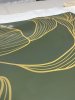
The first image below shows issues with both horizontal banding and vertical defects. The issues are much more noticeable in person. With the orientation of the photo, the vertical defect runs left to right, and is slightly lighter and desaturated in between the yellow shapes. the horizontal banding is more visible on the left side of the printer as it comes out.
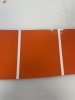
Here is another section of a different print that had a solid color
We have tried multiple heat settings, as recommended by Grimco. We also ran a print head alignment, cleaned all areas that needed maintenance, checked humidity range, and tried numerous other tests. We run all our prints at 600/14pass. Any feedback would be much appreciated!
This is Tanner with Paint the Town Graphics. We have been running an Epson SureColor R5070 for just over a year. We had a computer fail and replaced, resulting in losing our Onyx settings and system preferences.
Our banding issues are exclusively on Avery Dennison 1105EZ/RS. We run 3M 40C all the time without issue, so we're thinking it's the Avery Profile and heat settings. Whenever we run a large field of solid color on Avery, horizontal and vertical defects are prevalent.
The first image below shows issues with both horizontal banding and vertical defects. The issues are much more noticeable in person. With the orientation of the photo, the vertical defect runs left to right, and is slightly lighter and desaturated in between the yellow shapes. the horizontal banding is more visible on the left side of the printer as it comes out.
Here is another section of a different print that had a solid color
We have tried multiple heat settings, as recommended by Grimco. We also ran a print head alignment, cleaned all areas that needed maintenance, checked humidity range, and tried numerous other tests. We run all our prints at 600/14pass. Any feedback would be much appreciated!