RockvilleSign
New Member
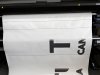
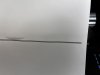
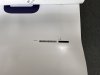
Hey all, we've run into an issue with our latex printer. Attached are a couple of images of these two thin lines that keep printing before and after each run, regardless of having contour cuts embedded in the file or not. The normal registration marks never print when I do have a contour cut (which the rip software recognizes and highlights prior to printing). I have also attached an image of what our registration marks are supposed to look like.
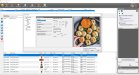
I have loaded up different materials and print profiles, no change. I have imported different print files and reloaded files that had previously printed fine, no change. I have shut down both computer and printer and restarted, no change. There doesn't appear to be anything different or deselected in the rip software options. And I'm not seeing this specific issue listed online for troubleshooting. Please help... This has happened suddenly after sitting over the weekend with no notable cause and we are a small shop with the single printer and plotter.
We are working with an HP Latex 365, Onyx Postershop RIP software version 21.1.0.2353, and Graphtec Pro Studios 4.10. The plotter that reads the registration marks is a Graphtec FC9000
I have loaded up different materials and print profiles, no change. I have imported different print files and reloaded files that had previously printed fine, no change. I have shut down both computer and printer and restarted, no change. There doesn't appear to be anything different or deselected in the rip software options. And I'm not seeing this specific issue listed online for troubleshooting. Please help... This has happened suddenly after sitting over the weekend with no notable cause and we are a small shop with the single printer and plotter.
We are working with an HP Latex 365, Onyx Postershop RIP software version 21.1.0.2353, and Graphtec Pro Studios 4.10. The plotter that reads the registration marks is a Graphtec FC9000