
• I want to thank all the members that have upgraded your accounts. I truly appreciate your support of the site monetarily. Supporting the site keeps this site up and running as a lot of work daily goes on behind the scenes. Click to Support Signs101 ...

Flexi Complete Issue

LandonK

New Member
I been having trouble cutting compound shapes in Flexi Complete and am looking for anyone who is knowledgeable in this area.

On our VE Lxi 8 cutting software, we have been able to cut logos on adjoining panels and have no issues with compound shapes. However, in Flexi Complete, the cutter (FC9000-140) has been cutting everything including the compounds that have been removed.

Has anyone else experienced this and know how to avoid this issue?
 

signheremd

New Member
Are you selecting the part you want to cut? In Cut/Plot the machine tries to cut all colors sent over onto whatever vinyl you loaded - if you are not selecting, then it likely is grabbing everything in that file. I think there is a button for "Selection Only" somewhere, but could not locate it.
 

monroesigns

New Member
Are you selecting the part you want to cut? In Cut/Plot the machine tries to cut all colors sent over onto whatever vinyl you loaded - if you are not selecting, then it likely is grabbing everything in that file. I think there is a button for "Selection Only" somewhere, but could not locate it.
Lower left in the pic attached.
 
  • Agree
Reactions: 1 user

LandonK

New Member
Oh yeah, the fourth button left to right on the bottom of the first screen of Cut/Plot window - has a letter "T" with a red fence around it...
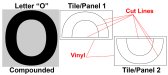
Cutting everything is not our problem. We make all of our artwork one color and cut it as one giant shape. Think of a letter "O" that you would cut in half into two panels. The "O" is compounded, but instead of cutting one shape Flexi cuts it as if it is cutting two uncompounded circles - so it's cutting the part of the panel that adjoins to the second half of the "O" multiple times across the center.
 

Attachments

  • O for cut.jpg
    O for cut.jpg
    263.7 KB · Views: 15

Attila Nagy

New Member
You did not say designed elsewhere. Last time I have seen that It was a corel export issue in the 80's. try different format.
What software the files came from and what format?
 

LandonK

New Member
For years, I have created "vector" artwork in Adobe Illustrator CS5 and saved the artwork in an AI or EPS file format. I then use my VE LXi Version 8.6 (very old version of Flexi) to open these AI or EPS files and size and cut them.
Every few years I would try to upgrade to a new version of Flexi (version 12, version 22 & the new Flexi Complete) and I always have this compound shape cutting issue.
I've never understood why version 8.6 (old as dirt) works properly with compounds but, later versions do not. I assume, I'm just missing something, but don't know what....
 

LandonK

New Member
I've contacted Vinyl Express, Sign Warehouse and SAI Flexi directly, but no one seems to have a solution for this. I'm hoping someone in the industry has figured a work around...
 

Attila Nagy

New Member
I had this problem with about every 2nd Corel update with Gerber Composer and Casmate as well. just needed to change the export format. once EPS worked other times .ai better. or picking the exact import filter instead of leaving it to *.* and let the software decide automatically.
 
Top