• I want to thank all the members that have upgraded your accounts. I truly appreciate your support of the site monetarily. Supporting the site keeps this site up and running as a lot of work daily goes on behind the scenes. Click to Support Signs101 ...

Suggestions Help needed to find a paint shop that uses latex inks

Vassago

Been here a while..
Another few issues to make sure are correct.. Resolution and file type. If pictures of any type are included - make sure the resolution is high enough to get what you want - most pictures will come out at about 72dpi on screen.. Looks great.. When printed, it'll look rubbish.. Aim for at least 300dpi for pictures.. As you've seen.. Low resolution can be fine for signs as they're usually viewed from a distance, but close up stuff.. Needs high resolution.

Likewise, file types are important - anything sent as a picture - jpg, bmp, etc needs high resolution to cope with the size. Try to use vector files for text, lines, circles, etc - comes out at the maximum resolution the printer can print (unless they set it lower as it's cheaper)
 

ossodiseppia

New Member
Yeah, as others mentioned, low quality print settings. A solvent printer will provide a lot more detail. I mean... I was printing out some pretty great quality 15 years ago with a basic 4-color Mutoh eco-sol printer (if memory serves, this was only 8-pass)

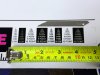
The details in this photo might not look "that" great -- until you notice the pick tool in there for size comparison. That was from a 2009 entry-level Mutoh eco-sol printer. We've come a long way since then.

For ink-jet printers, the only thing with better resolution than eco-solvent (that I know of) is pigment -- i.e. what a photography studio would use -- but pigment-based isn't a long term, outdoor solution (those inks are usually water-based). So my vote is for eco-sol all day. You just won't find many trade suppliers offering eco-sol because those inks cost so much more than UV / Latex -- and this industry is just too competitive to make eco-sol viable for mass production.

I'd almost suggest textured laminates for some cool effects -- but those are very thick, expensive, and basically only useful for flat applications.

Thank for the comment. Every sticker that I print will end up "inside" somewhere. It might be in the engine compartment, interior or trunk. They will applied to cars that have been restored and living a pampered life. There is very little chance the will be exposed to sunlight day after day.

As I mentioned, I've tried solvent based, latex and UV. I have run into many websites that state they use eco-solvent inks. Maybe thy just say that to get customers. I prefer a glossy laminate as the stickers look a little crisper. That's just my taste
 

ossodiseppia

New Member
Anybody using a modern, properly calibrated, solvent printer and correct media profiles should be able to produce high quality, fine detailed decals. Here I've just grabbed a shot of a dirt bike decal that is on the delivery shelf. Those small letters that say AMERICAN MOTORCYCLIST ASSOCIATION are less than 1mm tall. Note that the solid colors are also smooth without ink puddling or unevenness.
View attachment 181393

That font under the AMA logo is pretty small. You got my attention on that. It looks pretty darn good in your picture.

Please remember, I'm not a customer who orders hundreds of the same sticker. The folks who buy from me are a very small market. I would only be printing enough stickers for 6-12 cars at a time. I's be willing to have a go at the shop you work, but I understand non-merchant members are not allowed to solicit business. :-(
 

ossodiseppia

New Member
Mill dogs? As in puppy mill?
Yes, puppy mill. I am a volunteer with Rocky Mountain Cocker Rescue. Last year we began working with someone who could get dogs from a mill breeder that are too old to sell. Most folks want puppies, but once they get to a certain age, they are less desirable, especially to a store that sells dogs. Last year, we got 19 in three trips. We are already at 25 in two trips this year. We are happy to take the ones that are offered to us without any sort of judgement. In the past, the fate of a puppy that didn't sell or one that had some sort of issue was pretty grim. Many large breeders now relinquish their "stock" or "overstock" to rescues. You might be aware that in the past dogs were destroyed after they were all "used up". Mills breed their dogs twice a year which is far too often. Dogs that are bread like that generally have mammary tumors and uteruses that are so thin, they tear when a vet sterilizes them. We also take the males and females that they no longer want to breed. Sorry, I'm getting waaay of topic.

They just sleep when we drive them home.
 

Attachments

  • IMG_3457.JPG
    IMG_3457.JPG
    2.7 MB · Views: 63
  • IMG_3459.JPG
    IMG_3459.JPG
    2 MB · Views: 30
  • I Appreciate You
  • Sad
Reactions: 1 users

tulsagraphics

New Member
Thank for the comment. Every sticker that I print will end up "inside" somewhere. It might be in the engine compartment, interior or trunk. They will applied to cars that have been restored and living a pampered life. There is very little chance the will be exposed to sunlight day after day.

As I mentioned, I've tried solvent based, latex and UV. I have run into many websites that state they use eco-solvent inks. Maybe thy just say that to get customers. I prefer a glossy laminate as the stickers look a little crisper. That's just my taste
I don't know of any trade suppliers that use solvent-based inks. The inks are just too expensive. (I'm paying about $315 per liter of ink compared to ~$70 per liter with UV -- granted, I'm not using aftermarket inks). I imagine whichever supplier your got those "eco-sol" prints from (the ones you mentioned, not the UV photos) -- if they actually were eco-sol -- probably used low quality production settings, aftermarket inks and cheaper films in order to lower costs and increase their output.

As with any print technology it comes down to the printer configuration and calibration (and media + ink quality to some extent). If a company doesn't require fine detailed work, they'll lower the quality to increase print speed. All prints from all printers will look terrible (up close) when printed that way. Personally, I don't need to produce things that quick, so I always print high quality (more passes per inch) and keep all my media profiles calibrated. The downside is that it takes way longer to print -- but as a smaller shop who isn't on the "trade supplier" stage, I'm printing hundreds of sq.ft. per day, not thousands -- so I can afford to keep my output quality very high. As unclebun said - Most anyone with a modern Eco-sol printer can print really nice decals at high resolution (if they spent the time/money to do so). I'll try to post some close up pics tomorrow just to show you (from an Epson S80600, which is an incredible machine!)
 
Last edited:

tulsagraphics

New Member
Quick follow up:

I've got a very nice eco-solvent printer, and just about to purchase a 2nd printer (This one will be UV). I know my print quality will take a hit on the UV (compared to eco-sol), and your topic got me thinking about that -- so I decided to do some research. Figured I'd post some of my findings here. :)

Getting a bit more technical... which may or may not interest you...

This is a quick comparison of the droplet sizes expected in inkjet printing (determined by the print heads used in a given machine). Basically, the smaller the droplet size, measured in picoliters (pL), the finer the detail. Note: Droplet size doesn't tell the whole story, as some inks cure faster than others (faster drying = less dot spread). So take this chart with a grain of salt. It's just a quick comparison. (I imagine other folks could provide more useful info regarding their real world experience using these print technologies)

Print TechnologyTypical Droplet Size (pL)Primary Characteristic
Aqueous Pigment (e.g. photo printing)1.5 – 6 pLExtremely high resolution, fine detail.
Eco-Solvent4 – 15 pL (Variable)High quality + durability for signage.
Latex10 – 20+ pL (Often Fixed)Good, consistent, eco-friendly.
UV-Curable6 – 20+ pL (Variable)Instant cure, no spread, high versatility.
Hard Solvent40 – 60+ pLLarge, durable, high speed, lower detail.
 
Last edited:
  • Informative
Reactions: 1 user

ossodiseppia

New Member
Another few issues to make sure are correct.. Resolution and file type. If pictures of any type are included - make sure the resolution is high enough to get what you want - most pictures will come out at about 72dpi on screen.. Looks great.. When printed, it'll look rubbish.. Aim for at least 300dpi for pictures.. As you've seen.. Low resolution can be fine for signs as they're usually viewed from a distance, but close up stuff.. Needs high resolution.

Likewise, file types are important - anything sent as a picture - jpg, bmp, etc needs high resolution to cope with the size. Try to use vector files for text, lines, circles, etc - comes out at the maximum resolution the printer can print (unless they set it lower as it's cheaper)

I use illustrator and supply an AI or pdf file. All graphics are vector and no part of them are raster.
 

ossodiseppia

New Member
Quick follow up:

I've got a very nice eco-solvent printer, and just about to purchase a 2nd printer (This one will be UV). I know my print quality will take a hit on the UV (compared to eco-sol), and your topic got me thinking about that -- so I decided to do some research. Figured I'd post some of my findings here. :)

Getting a bit more technical... which may or may not interest you...

This is a quick comparison of the droplet sizes expected in inkjet printing (determined by the print heads used in a given machine). Basically, the smaller the droplet size, measured in picoliters (pL), the finer the detail. Note: Droplet size doesn't tell the whole story, as some inks cure faster than others (faster drying = less dot spread). So take this chart with a grain of salt. It's just a quick comparison. (I imagine other folks could provide more useful info regarding their real world experience using these print technologies)

Print TechnologyTypical Droplet Size (pL)Primary Characteristic
Aqueous Pigment (e.g. photo printing)1.5 – 6 pLExtremely high resolution, fine detail.
Eco-Solvent4 – 15 pL (Variable)High quality + durability for signage.
Latex10 – 20+ pL (Often Fixed)Good, consistent, eco-friendly.
UV-Curable6 – 20+ pL (Variable)Instant cure, no spread, high versatility.
Hard Solvent40 – 60+ pLLarge, durable, high speed, lower detail.
Thank you so much for supplying this information. I do find this information quite useful and informative. Prior to seeing this, I had actualy started thinking about droplets. My thought has been that the the solvent based inks spread not just becasue of the drying time but also becasue they might get absorbed by the media. The absorption might be responsible for some of the spread and most related to drying time. I'm now curious if anyone has looked to see if the inks get absorbed by the media.

BTW, the last printer I used has a flat bed printer that uses gel inks. When I asked aboout it, he said it produced similar results as his HP latex printer.
 

tulsagraphics

New Member
Thank you so much for supplying this information. I do find this information quite useful and informative. Prior to seeing this, I had actualy started thinking about droplets. My thought has been that the the solvent based inks spread not just becasue of the drying time but also becasue they might get absorbed by the media. The absorption might be responsible for some of the spread and most related to drying time. I'm now curious if anyone has looked to see if the inks get absorbed by the media.

BTW, the last printer I used has a flat bed printer that uses gel inks. When I asked aboout it, he said it produced similar results as his HP latex printer.
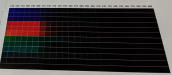
Yes, media type makes a big difference. Every film has different properties. Note: I'm only speaking about eco-sol printing (UV / Latex use different curing / drying methods, and I've never owned either). During calibration, one of the steps is an ink limit test. This is what that looks like. (the idea is to figure out how much ink a material can hold without bleeding or requiring too much dry time) Heater settings also affect this. Pre-heat, platen and post heat are adjusted depending on the material. We want as much control as we can get when it comes to ink absorption / drying time.
 

Attachments

  • chrome_XHVa109oHs.png
    chrome_XHVa109oHs.png
    1.4 MB · Views: 45

unclebun

Active Member
That font under the AMA logo is pretty small. You got my attention on that. It looks pretty darn good in your picture.

Please remember, I'm not a customer who orders hundreds of the same sticker. The folks who buy from me are a very small market. I would only be printing enough stickers for 6-12 cars at a time. I's be willing to have a go at the shop you work, but I understand non-merchant members are not allowed to solicit business. :-(
Anybody who has a printer like the one I use (which is a very common one--Epson S80600) and understands how to use it properly can achieve prints every bit as good as the one I showed you. If I made anything like the ecosolvent prints or the UV prints you showed, they'd have ended up in the trash and I'd have worked on my media profiles and settings to make them better (though the UV printer probably can't make any better than that based on my experience).

We are an ordinary local sign shop, not a large-scale manufacturer, and small orders like you want to do are something we do all the time. It does cost the customer what it takes for us to make them though.
 
  • Agree
Reactions: 1 users

ossodiseppia

New Member
Yes, media type makes a big difference. Every film has different properties. Note: I'm only speaking about eco-sol printing (UV / Latex use different curing / drying methods, and I've never owned either). During calibration, one of the steps is an ink limit test. This is what that looks like. (the idea is to figure out how much ink a material can hold without bleeding or requiring too much dry time) Heater settings also affect this. Pre-heat, platen and post heat are adjusted depending on the material. We want as much control as we can get when it comes to ink absorption / drying time.
Thanks for this. I'm curious if calibrations are run on an as needed basis or, only after some sort of maintenance.
 

unclebun

Active Member
Thanks for this. I'm curious if calibrations are run on an as needed basis or, only after some sort of maintenance.
You have to set up the media on the printer, and make the correct settings on a per-media basis. Then you have to download or create a printer profile for that media. Once those settings are made they should be good. However as the print heads get used up they may drift in color accuracy and recalibration of the printer profile may be necessary.
 
  • Agree
Reactions: 1 user

tulsagraphics

New Member
Thanks for this. I'm curious if calibrations are run on an as needed basis or, only after some sort of maintenance.
As often as necessary. If I'm bringing in a new film I'll create a media profile for it -- or if I've got a job that needs really good color matching (and I'm struggling to match those colors), I'll update the profile. Of course, swapping out a print head would definitely require all new profiles.

Realistically, anyone who has taken the time to create a custom profile, done correctly, is still going to work great for a long time. Updating a custom profile is usually a difference of a 99% color match vs. 97%. We might notice if we're really looking for it, but customers will never notice these tiny differences unless we point it out. It also helps that we're running 9 color printers. As unclebun can tell you -- our S80600 machines blow 4 color (CMYK) machines out of the water (but as mentioned previously, inks cost a lot more). We hit colors that even throw off customers sometimes. A customer specs a color, we hit it, and it looks so good that all the jobs they've received from other shops look "off" by comparison. (as silly as it sounds, this is the kind of thing that really makes my week)

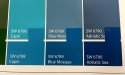
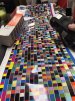
This photo shows the difference between a generic profile and a custom profile.
 

Attachments

  • color-matching.jpg
    color-matching.jpg
    974.7 KB · Views: 38
Last edited:
  • Agree
Reactions: 1 users

ossodiseppia

New Member
As often as necessary. If I'm bringing in a new film I'll create a media profile for it -- or if I've got a job that needs really good color matching (and I'm struggling to match those colors), I'll update the profile. Of course, swapping out a print head would definitely require all new profiles.

Realistically, anyone who has taken the time to create a custom profile, done correctly, is still going to work great for a long time. Updating a custom profile is usually a difference of a 99% color match vs. 97%. We might notice if we're really looking for it, but customers will never notice these tiny differences unless we point it out. It also helps that we're running 9 color printers. As unclebun can tell you -- our S80600 machines blow 4 color (CMYK) machines out of the water (but as mentioned previously, inks cost a lot more). We hit colors that even throw off customers sometimes. A customer specs a color, we hit it, and it looks so good that all the jobs they've received from other shops look "off" by comparison. (as silly as it sounds, this is the kind of thing that really makes my week)

This photo shows the difference between a generic profile and a custom profile.
That's dead nuts on!
 
  • Agree
Reactions: 1 user

ossodiseppia

New Member
I was able to take some better pictures of the issue. Please remember, any of the text or line art that is colored isn't a problem. This only happens when the text is white.

This first picture has a font that is 8.5pt. It has a 0.1pt stroke in black to make it a bit less bold. It was done by a local printer. I have no idea what his setup is.

The second picture was done by someone I found online and I used the same file. Supposedly UV cured ink. Dunno if latex can be UV cured. It's much better, but not as good as I want it to be. I think if I change the stroke to white, it will look much better.

The first red one has 8.11pt text with 0.3pt white stroke to make it a bit bolder. It too is close to what I am looking for.

The last red one has 9pt font with no stroke. It is also quite close.

The last picture is something that pisses me off to no end. I'm not going to say anything else about that.
 

Attachments

  • IMG_3570.JPG
    IMG_3570.JPG
    714.2 KB · Views: 28
  • IMG_3574.JPG
    IMG_3574.JPG
    993.9 KB · Views: 17
  • IMG_3571.JPG
    IMG_3571.JPG
    1 MB · Views: 15
  • IMG_3569.JPG
    IMG_3569.JPG
    820.3 KB · Views: 17
  • IMG_3575.JPG
    IMG_3575.JPG
    1.4 MB · Views: 40

unclebun

Active Member
The only ink that us UV cured is from a UV printer. Latex just dries with heat and air.

The first black with white print sample is from a printer that has its alignment off, and is also running at a low resolution setting. It's overinking as well as misaligned. The second one just looks like a UV print, they always look coarse like that. But it may also be running at a high speed low pass setting. The first red one looks like it needs a better profile, and is also probably running at a low quality setting to get such a lousy uniformity in the red. Same problem with the second red. The last one I guess you are talking about the cutting being misregistered.
 
  • Agree
Reactions: 1 users

tulsagraphics

New Member
This is just my every day print setting on cheap vinyl. 720x720 / 8 pass. Very serviceable for most anything. Could I dial it in further with a 1440dpi profile? Yes, but I doubt I'll ever have to.

I carry 5 or 6 cheap films for temporary things (e.g. yard signs), but I only use 1 profile for all of those (so this profile could be better). Did I mention how much I hate creating profiles? lol
 

Attachments

  • font-size.jpg
    font-size.jpg
    1.1 MB · Views: 50
  • scanning-swatches.jpg
    scanning-swatches.jpg
    488.4 KB · Views: 39
Last edited:

ossodiseppia

New Member
This is just my every day print setting on cheap vinyl. 720x720 / 8 pass. Very serviceable for most anything. Could I dial it in further with a 1440dpi profile? Yes, but I doubt I'll ever have to.

I carry 5 or 6 cheap films for temporary things (e.g. yard signs), but I only use 1 profile for all of those (so this profile could be better). Did I mention how much I hate creating profiles? lol
Those look pretty sharp.

The shop that printed the sticker with the poor cut said he was thinking 16 passes would work fine. Something tells me there might have been a few less than that.
 

tulsagraphics

New Member
Those look pretty sharp.

The shop that printed the sticker with the poor cut said he was thinking 16 passes would work fine. Something tells me there might have been a few less than that.
16 passes is a lot. I think that's what I was running when I bought my first printer many, many years ago (not knowing any better at the time). It was miserably slow -- e.g. 45 minutes to print a single 33x80 retractable print. Oof!

A case could be made for 16 pass -- probably dealing with super tiny text on very small decals (smaller than your examples -- not the type of job I've ever seen). Outside of that, the only reason "I" would print a high number of passes is to increase white ink opacity -- not that I use white on the S80600 anymore -- I learned that $$$ lesson after a single job. At $555/liter (yes $555) it's not even worth entertaining compared to UV. This is one of the reasons why I want to add a UV printer to my shop.
 
Last edited:

Humble PM

Mostly tolerates architects
This is just my every day print setting on cheap vinyl. 720x720 / 8 pass. Very serviceable for most anything. Could I dial it in further with a 1440dpi profile? Yes, but I doubt I'll ever have to.

I carry 5 or 6 cheap films for temporary things (e.g. yard signs), but I only use 1 profile for all of those (so this profile could be better). Did I mention how much I hate creating profiles? lol
How did you get profiler to print gutters?
 
Top