
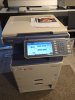
Hello, all. It has been a long time. Getting back into printing again and picked up a package of printers a few smaller home ones, a epson p6000, epson p9000 and a toshiba estudio 2555c. I knew there was issues with all but the guy said the estudio worked well and it did. Then i put my hands on it...and not so much anymore. 
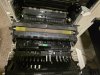
I am quite positive i screwed something up but do not know how or more importantly how to fix it. I needed to change the yellow toner and I had new ones from the deal. So jumping right in before actually figuring out how to do this...never had a toner printer before. I satrted opening doors and on the side of the printer there was a roller and a blck cartrige which at the time i thought was the toner. I may have flicked a few tabs, etc around...not sure. Then I realized I should google. I found the proper toner at the front. Took the old one out, pulled the tab 3 times and slid new one in. Herin lies the problem...When i did a test print both the top and bottom of the paper has yellow toner on it. i went back to the side panel and there was yellow toner on the roller. I wiped it off and tried again..same thing.
Does anyone have any clues on how I can fix this, or did i screw it up way to badly to be worthwhile? so yellow was working but now the toner on rolls...
Attachments

Last edited: