• I want to thank all the members that have upgraded your accounts. I truly appreciate your support of the site monetarily. Supporting the site keeps this site up and running as a lot of work daily goes on behind the scenes. Click to Support Signs101 ...

HP 730 intermittent banding

alybbop

New Member
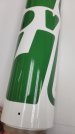
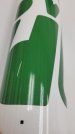
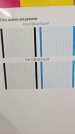
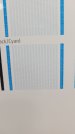
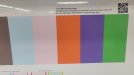
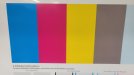
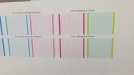
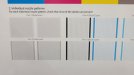
Yesterday I had a light magenta/light cyan head go out. Since replacing I am still having banding, but it seems to be intermittent, sometime very light banding other times quite bad. I have done multiple head cleanings and still having the issue. I have attached my most recent printhead status plot for you to review, as well as a photo of the issue. On the printhead status plot I do notice that the cyan color block does seem to have more grainy appearance than the other colors, although this is hard to make out in the photo. I do notice on PH 3 black/cyan there appear to be some darker lines appearing in the status plot.

Any advise on how to correct the issue?

 

Attachments

  • Bad Print 2.jpg
    Bad Print 2.jpg
    664.5 KB · Views: 24
  • Bad Print 3.jpg
    Bad Print 3.jpg
    711.2 KB · Views: 19
  • Bad Print.jpg
    Bad Print.jpg
    630.7 KB · Views: 14
  • Bad Print 4.jpg
    Bad Print 4.jpg
    645.1 KB · Views: 15
  • PH3.jpg
    PH3.jpg
    927.6 KB · Views: 19

alybbop

New Member
More reference photos
 

Attachments

  • PH 4.jpg
    PH 4.jpg
    698.4 KB · Views: 20
  • PH 5.jpg
    PH 5.jpg
    811.2 KB · Views: 18
  • PH 6.jpg
    PH 6.jpg
    2.1 MB · Views: 17
  • PH 2.jpg
    PH 2.jpg
    1.9 MB · Views: 18
  • PH.jpg
    PH.jpg
    1.4 MB · Views: 26

balstestrat

Problem Solver
You should possibly run the "optimizer depletion test" or what ever it's called in the image quality menu. I'm still slightly suspect on the OP.
Also adding spit bars on the side of your job it's usually very easy to see what color is misbehaving.
 
Top