• I want to thank all the members that have upgraded your accounts. I truly appreciate your support of the site monetarily. Supporting the site keeps this site up and running as a lot of work daily goes on behind the scenes. Click to Support Signs101 ...

HP Latex 360- Is this a maintenance tray issue?

Goooost

New Member
I've been get orange bands in all of my solid yellows and my greens get brown bands too. I thought it was the printheads so I just replaced all of them across the board and it still happened. So next I looked into the maintenance cartridge.
The maintenance cartridge is new, like only a few weeks old and the problem existed before I changed it out.
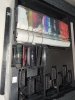
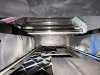
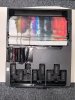
I took out the maintenance cartridge and looked at it. I did see some sludge pooling up in an area that didn't look like it should have so much sludge. Is that normal? I didn't think it would harm anything to carefully wipe that clean with a swab. The subsequent prints looked a lot better so I think that could be the source of the problem. But I dont know what I can or should do to keep this in check. I could periodically pull my cartridge out and wipe away the sludge I guess.
The felt ribbon concerns me, because it seems oversaturated but I dont know if it's supposed to look like that, and if not, I dont know if it looks like that because the mechanism to wind that ribbon doesnt work right or what. In the cavity where the cartridge goes there's a lot of dust build up by that cog wheel. I dont know if this is evidence that it's been grinding the gears instead of spinning them.

 

Attachments

  • IMG_0724.jpeg
    IMG_0724.jpeg
    1.1 MB · Views: 39
  • IMG_0723.jpeg
    2.9 MB · Views: 4
  • IMG_0727.jpeg
    IMG_0727.jpeg
    2 MB · Views: 35
  • IMG_0730.jpeg
    IMG_0730.jpeg
    2 MB · Views: 32
  • IMG_0726.jpeg
    IMG_0726.jpeg
    2.2 MB · Views: 35
  • Agree
Reactions: 1 user

dtfonestop

New Member
Replacing every head and still seeing orange in the yellows (and brown in the greens) is a pretty good sign it isn't the heads. That color shift usually means something at the service station is getting dragged back onto the yellow nozzles — leftover spit, a dirty wipe, or a bit of another color / optimizer.

The fact that the prints looked a lot better after you wiped the sludge out of the maintenance cartridge points the same way. A little pooling in the tray isn't unusual, but if it's building up enough to get picked back up, it will tint yellows and greens exactly like you described.

On the felt ribbon: it should look damp, not soaked and sitting in a puddle. If the web isn't actually advancing, the same dirty section keeps wiping the heads. Next cleaning cycle, watch that cog — the ribbon should step forward a bit each time. Dust packed around the drive gear can make it grind instead of turn, even on a fairly new cartridge, which would also explain the oversaturated felt.

I'd also wipe the spit area around the cartridge slot, not just the cartridge itself, then run a couple of cleanings and another set of solid yellow/green blocks to see if the shift stays gone.

Out of curiosity, what state is the shop in?
 
  • Informative
  • I Appreciate You
Reactions: 1 users
Top