-
I want to thank all the members that have upgraded your accounts. I truly appreciate your support of the site monetarily. Supporting the site keeps this site up and running as a lot of work daily goes on behind the scenes. Click to Support Signs101 ...
You are using an out of date browser. It may not display this or other websites correctly.
You should upgrade or use an alternative browser.
You should upgrade or use an alternative browser.
HP Latex 54 Basic Plus Cutter Loading
- Thread starter Neu2Signs
- Start date

balstestrat
Problem Solver
Your real issue is you have reflective material which is difficult for it to read. Might be worth a try to play with the opos material calibration.
But knife on top of the square.
But knife on top of the square.
Thanks, any other tips for reflective media? do I need to use black vinyl for calibration? It seems the way it is searching for the barcode has changed, it used to go in a square pattern and increase distance outward until it found it. Now it is not doing that, just going really slow, back and forth a few times.Your real issue is you have reflective material which is difficult for it to read. Might be worth a try to play with the opos material calibration.
But knife on top of the square.

mtpzone
New Member
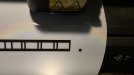
I also have the same cutter.. if not using the barcode it means what you see in this photo.

if you are using the barcode you would be about 1.5" to the left of this position and the barcode would be FURTHER BACK into the machine by about 1"
the Tool is the holder you are using.. 99% of the time would be the drag knife but you could be using a scorer or pen or .... so they call it the "tool" and the "first mark" is the first mark as close to the control panel as possible depending on which roller setup you are using.
if you are using the barcode you would be about 1.5" to the left of this position and the barcode would be FURTHER BACK into the machine by about 1"
the Tool is the holder you are using.. 99% of the time would be the drag knife but you could be using a scorer or pen or .... so they call it the "tool" and the "first mark" is the first mark as close to the control panel as possible depending on which roller setup you are using.
Does the barcode do anything for cutting? It prints on mine but that's how it was.I also have the same cutter.. if not using the barcode it means what you see in this photo. View attachment 182355
if you are using the barcode you would be about 1.5" to the left of this position and the barcode would be FURTHER BACK into the machine by about 1"
the Tool is the holder you are using.. 99% of the time would be the drag knife but you could be using a scorer or pen or .... so they call it the "tool" and the "first mark" is the first mark as close to the control panel as possible depending on which roller setup you are using.
I do not have a barcode serverIf you are using Production manager and have the barcode server running then YES.. you just put the tool anywhere just UNDER/BEFORE the barcode and hit the barcode button on the cutter and it takes it from there.
I do use Flexi and production manager to rip and send to print/cut but that is it. Do I need a barcode for that?so no flexi and production manager? if so then you really don't need to be printing barcodes. but it seems odd that you have the ability to print bar codes but no bar code server