• I want to thank all the members that have upgraded your accounts. I truly appreciate your support of the site monetarily. Supporting the site keeps this site up and running as a lot of work daily goes on behind the scenes. Click to Support Signs101 ...

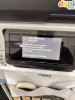
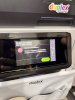
HP630W - Event Code 0022 0025 0230

woloko

woloko!
so, this machine just poped this error, tried restarting all the ways, unplugging for 5min and restarting, still occuring… then does a criticar error and freezes

around 5.50pm right about closing time, hp service only works mon-friday

can someone help me
or am i screwed?

HP takes about 10 days to send someone
 

Attachments

  • IMG_8233.jpeg
    IMG_8233.jpeg
    2.3 MB · Views: 5
  • IMG_8235.jpeg
    IMG_8235.jpeg
    2.2 MB · Views: 5

FyphonSilter

I do spitters...
From the manual, hope this helps...
I'd swap Lc, Lm, Op, Oc cartridges one at a time.

0022-0025-XX30 Pressure sensor PCA (T4)pressure out of range. Pressure sensor PCA (T4) pressure out of range.
Applies to: 0022-0025-0130, 0022-0025-0230. Where index 01 is the board with colors CKYM and index 02 the board with colors LcLmOC.

Description
The Printer system is unable to pressurize to the expected working pressure.

Corrective Actions: Service Technician
Follow the corrective actions below:
1. Check that the Pressure sensor PCA is unbroken and undamaged.
2. Check that the ink tubes are not damage or broken.
3. Run service diagnostic 0022-03 Pressure sensor functional test. See 0022-03 Pressure Sensor Functional Test on page 503.
4. Replace Pressure sensor PCA if it is necessary (IDS Cabling 600/630W (Y0U21-67183).
 

woloko

woloko!
From the manual, hope this helps...
I'd swap Lc, Lm, Op, Oc cartridges one at a time.

0022-0025-XX30 Pressure sensor PCA (T4)pressure out of range. Pressure sensor PCA (T4) pressure out of range.
Applies to: 0022-0025-0130, 0022-0025-0230. Where index 01 is the board with colors CKYM and index 02 the board with colors LcLmOC.

Description
The Printer system is unable to pressurize to the expected working pressure.

Corrective Actions: Service Technician
Follow the corrective actions below:
1. Check that the Pressure sensor PCA is unbroken and undamaged.
2. Check that the ink tubes are not damage or broken.
3. Run service diagnostic 0022-03 Pressure sensor functional test. See 0022-03 Pressure Sensor Functional Test on page 503.
4. Replace Pressure sensor PCA if it is necessary (IDS Cabling 600/630W (Y0U21-67183).
thats really helpful we are going to try it and report back.

how can we change the cartridges, the display blocks any actions with the error appearing, or should we just do it physically by pressing the cartridge to swap just like via menu?
 

woloko

woloko!
Make sure they install the new style part without quick connectors or it will likely leak again. New one has permanent connection.
i’ll keep that in mind when the technician comes… it’s so frustating or am i just unlucky and got somewhat a bad batch?

when we first bought it burned several printheads before a proper tech fixed it.

all the errors/events we get is tech necessary, we were expecting this machine to be more “tech independent” and our operators just swap consumables…

and they take so long to come here, it’s 5-10 days for on site, then they have to order parts and after a other 5-10 days they might fix it… or another loop
 
Top