iam3toed
New Member
Hello, Sign Industry!
I'm 3toed. I make web apps that let us work with AI on our sign projects.
TWO TOOLS I THINK YOU'LL LIKE
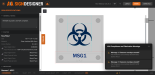
ADA Sign Designer — a visual design tool for ADA-compliant signage. You build the sign on a canvas, and it helps you handle the parts that are easy to get wrong.
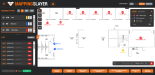
Mapping Slayer — a survey to install tool. Load your architectural PDF floor plans, take pics of the install area, place sign locations, make thumbnails and production files.
HOW THEY WORK TOGETHER
The real power is in using these as a pair. Design your sign types in ADA Sign Designer, export as templates, drop them into Mapping Slayer. Now every location you map gets a live sign preview that shows exactly what that sign will look like with compliant Braille. Need 1000 room signs? Map them, attach a template, and you've got 1000 unique thumbnails ready to review. Production files with detail sheets are generated with a few clicks from Mapping Slayer.
ADA SIGN DESIGNER
This app creates ADA compliant sign templates specifically for use with Mapping Slayer, so that thumbnails and production files can be automated from map data.
The shortlist of what it can do currently:
- Automatic Grade 2 Braille translation
- Live ADA validation against actual code sections
- Clearance zone overlay so you can see if elements are too close
- Supports multi-plate, standoffs, raised graphics, multiple messages
- Three views: Face (front), Side (cross-section showing layers), and Spec (technical callouts with dimensions and materials)
- Built-in color matching library
- Custom font support
You create the design and it tells you when something's out of spec. Think of it as a shop drawing tool that has ADA chops.
https://3toedsoftware.com/apps/ada-sign-designer/ada-sign-designer.html
MAPPING SLAYER
The shortlist of what it can do currently:
- Load multi-page PDFs as floor plans
- Create custom marker types (sign types) with color coding
- Page and Project legends with auto-counts by marker type
- Easily switch marker types in bulk
- Double-sided signs with separate Side A / Side B messages, notes, and photos
- Easily track which signs have been installed or need review
- Auto Map: type a search term, hit the button, and it finds every matching text on the PDF and places a marker at each one. Works across all pages
- Attach reference photos to any location (camera capture or file upload)
- Works great on tablet for photo surveys
- Generate thumbnails and production files
- Create message schedules
- Import message schedules to update mapping
- Generate maps with legends and detail pages like PlanGrid
- Export to Bluebeam Revu
- Track install progress in the field
- Save version history and restore
- Powerful find/replace
https://3toedsoftware.com/apps/mapping-slayer/mapping-slayer.html

AI ACCESSIBILITY
I built these tools to grow with AI, so they're not going to be obsolete in a few years, they'll actually become better. If you use an AI assistant that has browser control, it can use the app while you watch. It can create marker types, map locations, place dots, update messages, design signs from your instruction, generate reports. It's incredible for bulk operations.
The user guides are written so you can share them with any AI chat and it'll learn how to use the tools or teach you how to use them. Claude, ChatGPT, Gemini and Grok are all great teachers. I've used Claude extensively to do actual work.
THANKS FOR READING THIS FAR!
Both tools are in active development and are being used on real projects. If something's broken or you need me to add functionality, just let me know. I love the sign industry, and this is my way of making it better for all of us.
PLEASE let me know if you want to see a demo. I'm SUPER EXCITED to show off what I've made for you guys.
Create an account at 3toedsoftware.com and kick the tires if you're ready to dive in. This is a free open beta through 2026 while I dial it in.
User guides are here if you want the full breakdown:
Mapping Slayer Guide: https://3toedsoftware.com/ms_user_guide.html
ADA Sign Designer Guide: https://3toedsoftware.com/apps/ada-sign-designer/ada_user_guide.html

I'm 3toed. I make web apps that let us work with AI on our sign projects.
TWO TOOLS I THINK YOU'LL LIKE
ADA Sign Designer — a visual design tool for ADA-compliant signage. You build the sign on a canvas, and it helps you handle the parts that are easy to get wrong.
Mapping Slayer — a survey to install tool. Load your architectural PDF floor plans, take pics of the install area, place sign locations, make thumbnails and production files.
HOW THEY WORK TOGETHER
The real power is in using these as a pair. Design your sign types in ADA Sign Designer, export as templates, drop them into Mapping Slayer. Now every location you map gets a live sign preview that shows exactly what that sign will look like with compliant Braille. Need 1000 room signs? Map them, attach a template, and you've got 1000 unique thumbnails ready to review. Production files with detail sheets are generated with a few clicks from Mapping Slayer.
ADA SIGN DESIGNER
This app creates ADA compliant sign templates specifically for use with Mapping Slayer, so that thumbnails and production files can be automated from map data.
The shortlist of what it can do currently:
- Automatic Grade 2 Braille translation
- Live ADA validation against actual code sections
- Clearance zone overlay so you can see if elements are too close
- Supports multi-plate, standoffs, raised graphics, multiple messages
- Three views: Face (front), Side (cross-section showing layers), and Spec (technical callouts with dimensions and materials)
- Built-in color matching library
- Custom font support
You create the design and it tells you when something's out of spec. Think of it as a shop drawing tool that has ADA chops.
https://3toedsoftware.com/apps/ada-sign-designer/ada-sign-designer.html
MAPPING SLAYER
The shortlist of what it can do currently:
- Load multi-page PDFs as floor plans
- Create custom marker types (sign types) with color coding
- Page and Project legends with auto-counts by marker type
- Easily switch marker types in bulk
- Double-sided signs with separate Side A / Side B messages, notes, and photos
- Easily track which signs have been installed or need review
- Auto Map: type a search term, hit the button, and it finds every matching text on the PDF and places a marker at each one. Works across all pages
- Attach reference photos to any location (camera capture or file upload)
- Works great on tablet for photo surveys
- Generate thumbnails and production files
- Create message schedules
- Import message schedules to update mapping
- Generate maps with legends and detail pages like PlanGrid
- Export to Bluebeam Revu
- Track install progress in the field
- Save version history and restore
- Powerful find/replace
https://3toedsoftware.com/apps/mapping-slayer/mapping-slayer.html
AI ACCESSIBILITY
I built these tools to grow with AI, so they're not going to be obsolete in a few years, they'll actually become better. If you use an AI assistant that has browser control, it can use the app while you watch. It can create marker types, map locations, place dots, update messages, design signs from your instruction, generate reports. It's incredible for bulk operations.
The user guides are written so you can share them with any AI chat and it'll learn how to use the tools or teach you how to use them. Claude, ChatGPT, Gemini and Grok are all great teachers. I've used Claude extensively to do actual work.
THANKS FOR READING THIS FAR!
Both tools are in active development and are being used on real projects. If something's broken or you need me to add functionality, just let me know. I love the sign industry, and this is my way of making it better for all of us.
PLEASE let me know if you want to see a demo. I'm SUPER EXCITED to show off what I've made for you guys.
Create an account at 3toedsoftware.com and kick the tires if you're ready to dive in. This is a free open beta through 2026 while I dial it in.
User guides are here if you want the full breakdown:
Mapping Slayer Guide: https://3toedsoftware.com/ms_user_guide.html
ADA Sign Designer Guide: https://3toedsoftware.com/apps/ada-sign-designer/ada_user_guide.html
Last edited: