• I want to thank all the members that have upgraded your accounts. I truly appreciate your support of the site monetarily. Supporting the site keeps this site up and running as a lot of work daily goes on behind the scenes. Click to Support Signs101 ...

Intermittent Banding Roland TruVis VG2640

MPrint

New Member
Intermittent Banding on Roland TruVis VG2640 in use since 2018.

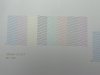
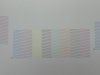
Prints are developing large intermittent bands on several colors. Regular test prints do not show any drop outs. Service mode 'Fill' test print does show some faint banding on some colors. (pic included). We recently had the magenta head replaced and it seems to have the same faint band which some of the other colors have. There have been no error codes.

Emptying and refilling dampers (twice) helped but did not fix the problem. Running unidirectional does reduce but not eliminate the bands. Slowing the head speed helps but the time to print can become intolerable as much of our work is full coverage wall murals.

Our excellent repair person (who also wants to retire) says it's not the dampers and it must be the heads. But one of the bands is showing on a head we replaced 2 months ago.

Any insight is appreciated.

 

Attachments

  • Service mode Fill Test print.jpg
    Service mode Fill Test print.jpg
    243.5 KB · Views: 37
  • IMG_4352.JPG
    IMG_4352.JPG
    2.3 MB · Views: 33
  • IMG_4353.JPG
    IMG_4353.JPG
    2.1 MB · Views: 26
  • IMG_4357.JPG
    IMG_4357.JPG
    1.6 MB · Views: 25
  • IMG_4358.JPG
    IMG_4358.JPG
    2.5 MB · Views: 39

MPrint

New Member
Nozzle check Roland vg2 640
 

Attachments

  • nozzle check 1.JPG
    nozzle check 1.JPG
    1.7 MB · Views: 33
  • nozzle check 2.JPG
    nozzle check 2.JPG
    1.8 MB · Views: 30
  • nozzle check 3.JPG
    nozzle check 3.JPG
    1.8 MB · Views: 34

Wayne Becker

New Member
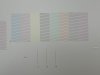
Is that a Nozzle mask test print, or just the nozzle check test print?
You seem to have a funny pattern in the print, have you tried a different profile on your rip software, maybe reset or reload the profile and try again. In some areas it almost looks like you have some ink not drying curing, is your temperature set correctly?
Have a look at your Dither, Error Diffusion and Halftone Options in your media profile, this might have changed.
Then also have a look at your encoder strip, this might be dirty or dusty.
If the magenta head was replaced, you might have some allignment issues, so you might need to full calibration of the media profile on the printer, including bi directional allignment, I know one of the firmware updates, locked tyhe user out of those settings, and you need the access code to get into the service menu.
 

dtfonestop

New Member
The clue I'd chase is that it shows up on a head you just replaced and gets better when you slow down. That usually points upstream of the heads.

First thing, print a big full-coverage block and look at whether the bands sit in the same spot across all the colors. If they line up, that's feed, not ink: redo the media feed calibration on the exact media and take-up setup you use for murals, and check the pinch rollers and that the take-up isn't tugging unevenly on long runs.

If each color bands on its own, think ink starvation. A nozzle check uses almost no ink, so it looks perfect, but a full-coverage mural at speed pulls a lot, and a partly blocked ink path, tired pump or cartridge/pouch that isn't feeding freely can't keep up. That's exactly the kind of thing that gets better at slower speeds and in uni. I'd look at the ink filters and the supply side for those channels before buying more heads.

Do the bands land in the same place on every color?
 

MPrint

New Member
Update on the banding situation shown in preceding posts.

It seems that our print heads were out of alignment. I personally think our wonderful repair person who we love just forgot to do it last time they were here because they were tired.

We had them come back to check it out and do some maintenance and now it is working ok (so far).

Info: This did not immediately arise after the last head replacement but did slowly develop over the following weeks.
 
Top