Hi everyone,
I’m looking for a permanent solution to a color accuracy issue I'm having with my Mimaki CJV130.
The printer is outputting images and vectors much darker than they appear in the design file. For example, dark blues often print almost completely black, and nighttime photos lose all their detail.
My current workaround: Right now, I have to drop the opacity/transparency of the design down to 70% or 85% in my design software just to get the print to look like the original file.
My setup:
Thanks in advance!
I’m looking for a permanent solution to a color accuracy issue I'm having with my Mimaki CJV130.
The printer is outputting images and vectors much darker than they appear in the design file. For example, dark blues often print almost completely black, and nighttime photos lose all their detail.
My current workaround: Right now, I have to drop the opacity/transparency of the design down to 70% or 85% in my design software just to get the print to look like the original file.
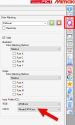
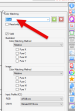
My setup:
- Printer: Mimaki CJV130
- RIP Software: RasterLink
- File Formats: EPS for vectors, TIFF for raster images
Thanks in advance!