• I want to thank all the members that have upgraded your accounts. I truly appreciate your support of the site monetarily. Supporting the site keeps this site up and running as a lot of work daily goes on behind the scenes. Click to Support Signs101 ...

Need Help MUTOH 661uf Flatbed ADA White Buildup Issues.

Hello all,

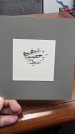
I need some help with an issue my shop is having on our 661uf Flatbed Printer when printing white ADA 1%. In the front right most corner we keep having a black head strike of some sort on the white ink when the print is done and it's moving up to the next section. It only happens in this front right quadrant. When I move my signs to the middle of the bed I don't have the issue happening. It happened for the first time last week while I was pushing through a large rush order (of course it had to be at that time). I've checked the table level, it's all good. I cleaned the print head system, UV light area and the wiper area multiple times. Seems like everything was okay but then I ran a test on 4 pieces and this one got hit again.

Has anyone else had this issue before? It seems really odd. Do you need more info on the problem? If you have any recommendations to try to help remedy this I'd greatly appreciate it.
7231.jpg
 

chrisphilipps

New Member
Check your PG offset values. Below is what they should be set to if you are using Mutoh's ADA settings in VerteLith. If these offsets are wrong it can and will head strike when you do build ups.

User Type 1 PG Offset: 0.0mm
User Type 2 PG Offset: 1.0mm
User Type 3 PG Offset: 1.5mm
User Type 4 PG Offset: 0.5mm
Thanks for the reply Chris.

I went through and found that my Type 4 PG Offset was at 0.7mm so I think that may have been the issue. I will run a few more tests and see if that fixed it.

Additionally, Is it normal for the head strikes to be black ink?
 

chrisphilipps

New Member
Being at 0.7mm on type 4 would actually reduce the risk of head strikes, not increase them. Are the vacuum holes plugged in that section of the bed?

As for the color, it probably isn't black ink, it is probably all the inks mixed.
 

Ssignature

Scott Steinecke
Check level on the platen. Use a very accurate machinist’s level if you can. It’s possible that someone or something knocked it out of spec.
 
Being at 0.7mm on type 4 would actually reduce the risk of head strikes, not increase them. Are the vacuum holes plugged in that section of the bed?

As for the color, it probably isn't black ink, it is probably all the inks mixed.
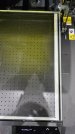
The vacuum holes look fine, here's a photo.

That makes more sense, thank you. 20260317_163101.jpg
 

chrisphilipps

New Member
There are three other possibilities that I can think of.

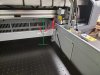
1.) Like Ssignature said above, the bed could be out of spec and raised in that front corner. The automatic bed height mechanism should have compensated for this by setting itself to the highest point, but it is still worth checking. Also it will probably be difficult to tell with a level. You can turn the printer off and move the bed in an out manually. Measure the distance from the bottom of the Y-Rail to the bed in several spots, see attached photo. The numbers should all be the same. If the front corner is higher then it will need to be adjusted to match the rest of the bed.

2.) The material is warping due to the heat of the LED lamp and the vacuum is weaker in that spot. Mutoh has a print environment in VerteLith for heat sensitive materials, you can give that a try.

3.) The automatic bed height laser system is out of spec and is setting the bed to the wrong height. The only way to check this is with a jig that the technician sends a request to Mutoh to get.
 

Attachments

  • 20230111_102612 (1).jpg
    20230111_102612 (1).jpg
    1.2 MB · Views: 10
There are three other possibilities that I can think of.

1.) Like Ssignature said above, the bed could be out of spec and raised in that front corner. The automatic bed height mechanism should have compensated for this by setting itself to the highest point, but it is still worth checking. Also it will probably be difficult to tell with a level. You can turn the printer off and move the bed in an out manually. Measure the distance from the bottom of the Y-Rail to the bed in several spots, see attached photo. The numbers should all be the same. If the front corner is higher then it will need to be adjusted to match the rest of the bed.

2.) The material is warping due to the heat of the LED lamp and the vacuum is weaker in that spot. Mutoh has a print environment in VerteLith for heat sensitive materials, you can give that a try.

3.) The automatic bed height laser system is out of spec and is setting the bed to the wrong height. The only way to check this is with a jig that the technician sends a request to Mutoh to get.
1) I'll check this and get back on what I find.

2) We did think this might be the issue as well. I'll give that print environment a try.

3) Let's hope this isn't the case, thanks for the information.
 
2.) The material is warping due to the heat of the LED lamp and the vacuum is weaker in that spot. Mutoh has a print environment in VerteLith for heat sensitive materials, you can give that a try.
After additional testing and diagnosing this seems to be the issue we're having. How do I find or set up the print environment for heat sensitive materials? We are trying to change up some materials as well and will be doing a few other things to keep working around the issue.
 

chrisphilipps

New Member
After additional testing and diagnosing this seems to be the issue we're having. How do I find or set up the print environment for heat sensitive materials? We are trying to change up some materials as well and will be doing a few other things to keep working around the issue.
Due to the way that Mutoh's public FTP site works, I can't provide the direct link. Follow the below steps to get the file.

Go to Mutoh Public FTP Site (http://files.mutoh.com/portal/s/7815367361538871282)
Select 1-Manuals (Installation and Operation) and Profiles
Select XpertJet
Select the XPJ-661UF
Select Profiles
Select Vertelith
Select 661 UH21
Select XPJ-661UF UH21 VerteLith Environments
Download the XPJ-661UF_1_XPJ-661UF_ADA_Build_Up_Pass_Heat_Sensitive.settings file.

Inside of VerteLith
Go to Manage and select Print Environment
In the lower right corner, select the import print environment button (it looks like a square with a down arrow over it.)
In the print settings section, browse to the downloaded XPJ-661UF_1_XPJ-661UF_ADA_Build_Up_Pass_Heat_Sensitive.settings file and click import.
 
  • Agree
Reactions: 1 user
Top