
-
I want to thank all the members that have upgraded your accounts. I truly appreciate your support of the site monetarily. Supporting the site keeps this site up and running as a lot of work daily goes on behind the scenes. Click to Support Signs101 ...
You are using an out of date browser. It may not display this or other websites correctly.
You should upgrade or use an alternative browser.
You should upgrade or use an alternative browser.
Outside facing interior vinyl decals
- Thread starter KGraphics
- Start date
depends a bit on the graphic - possibilities: 1)clear media, reverse print (depending on graphic you may need to place an opaque something over the print - using multi-layered printing, or just an opaque sticker....) 2)normal media (non-adhesive), laminate a clear adhesive over the print. 3) get a good painter to paint logo in reverse on interior glass....
there are more ways, I am sure some will chime in - depends on your resources and their desired look.
there are more ways, I am sure some will chime in - depends on your resources and their desired look.


flyplainsdrifta
New Member
reverse print on clear vinyl if you have white ink capability. otherwise would need to be second surface reverse print onto white vinyl. but again, all of this very much depends on what printer you use and what material you use.

MarkSnelling
Mark Snelling - Hasco Graphics
I've got some cool solutions - what type of printer do you have? Do you want the image to be clear where there is no ink? Feel free to call me and I can walk you through it. I've got removable, low-tack, and permanent options in "blurry clear" and optically clear finishes. Depending on what type of printer will depend on what film works for what you want. Pretty simple stuff, though.I have two customers that are looking to have their logos on the interior of their windows and facing outside; how can I accomplish this?
M D Gourley
New Member
Many ways as described above.
If you have a 'Print and Cut' machine and want to contour cut text shapes for example, I reverse print on this media, 3M 8518 or Arlon 3200 as these have the clear'ish backing, so when laminated in White, just turn over and you can see the finished print, great for seeing where to trim.
Set up your graphic with the usual 'Crop' marks when printed, and when it's had some time to cure, place some low tack app tape / masking tape just over the 'Crop Marks, careful not to go into the print area.
Run your print through your Laminator using compatible White film with clear adhesive.
Then carefully cut around the edge of the taped area, not going right through, just the top White laminate media...then peel off showing the original printed 'Crop Marks'.
You can then set up the job in the Printer the usual way for contour cutting....you will know at the end if done correctly
I have used this method many times with success on my Roland VP-540
Hope this helps.
If you have a 'Print and Cut' machine and want to contour cut text shapes for example, I reverse print on this media, 3M 8518 or Arlon 3200 as these have the clear'ish backing, so when laminated in White, just turn over and you can see the finished print, great for seeing where to trim.
Set up your graphic with the usual 'Crop' marks when printed, and when it's had some time to cure, place some low tack app tape / masking tape just over the 'Crop Marks, careful not to go into the print area.
Run your print through your Laminator using compatible White film with clear adhesive.
Then carefully cut around the edge of the taped area, not going right through, just the top White laminate media...then peel off showing the original printed 'Crop Marks'.
You can then set up the job in the Printer the usual way for contour cutting....you will know at the end if done correctly
I have used this method many times with success on my Roland VP-540
Hope this helps.

Daniel OTW
New Member
MOST of our "second surface" window graphics are printed on opaque material then we laminate that printed face with double sided adhesive, the back (interior face is either printed in a black flood or duplicate of the artwork. Recently for "see through" graphics, it gets a lot more complicated this had text and it had to be legible from both sides, so we printed a white image layer on clear, then color, then flipped it and printed the opposite side, then laminated the mounting face with double sided adhesive laminate. We have also recently done one sided "see through" graphics on static cling with no glue at all.

dannyd1962
Remote Freelancer
If I wanted to order this from somewhere online, who would you recommend? I only have one committed customer and I don't think it would be cost effective for me to purchase all of the materials for the job since it is smaller than the other. If the other had committed I would have learned to do it, but for just the one it feels silly to invest in since I only do this very part-time.

Unfortunately they don't want the window on the exterior per their window cleaner's request.Print two decals and put one on each side of the window and be done with it.
I've done it the subsurface way but who the fuck cares anymore.....
dannyd1962
Remote Freelancer

Stacey K
I like making signs
And make sure the window isn't tinted. Signs365 and Firesprint both offer the 2-sided prints. Ordering these one-off type things is very cost effective and both sites are easy to use. I have a printer but order plenty from these companies as I too don't always have enough orders for a certain type of material to make it cost effective to print myself. Both have fast, low cost shipping. Firesprint is on this site often.
mitchell.washington
New Member
1. Print or cut the logo as a mirror image.
2. Apply it to the interior side of the window.
3. People outside see the logo correctly through the glass.
2. Apply it to the interior side of the window.
3. People outside see the logo correctly through the glass.
I don't see options for more like lettering/contour cut for either of these sites unless I am missing thatAnd make sure the window isn't tinted. Signs365 and Firesprint both offer the 2-sided prints. Ordering these one-off type things is very cost effective and both sites are easy to use. I have a printer but order plenty from these companies as I too don't always have enough orders for a certain type of material to make it cost effective to print myself. Both have fast, low cost shipping. Firesprint is on this site often.

FireSprint.com
Wholesale Signs, Stickers, Banners-Free Shipping
I would suggest our clear inside mount sticker in that case.

 www.firesprint.com
Clear Inside Mount Stickers | FireSprint.com | Trade-Only Printer
Clear Inside Mount die cut stickers cut to any shape. Fast production and free ground shipping. Clear adhesive vinyl with full color imprint.
www.firesprint.com
Stacey K
I like making signs
If you are talking about the clear on FireSprint (which he suggests)...select Custom and in your design add the contour cut line and then select "I have included a custom..."I don't see options for more like lettering/contour cut for either of these sites unless I am missing that
If it's your first time ordering, you can call them and they will help walk you through it, make sure you have the correct product. They are on here a lot and very helpful.

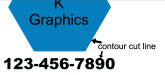
If by lettering you mean cut vinyl lettering such as Oracal 651 words only, I don't think either of them offer that. If you have a logo and you need a phone number underneath it with the double sided vinyl, you can add the phone number and a contour cut around each number. Then just mask it as you normally would and apply. For the phone, either use a thicker font or add a small outline of 1/8" of the same color, in this case black, then I add the contour cut 1/8" inside (or whatever) and then the digits will be cut as they should be just like if you cut them from regular vinyl.
Last edited: