We print and kiss cut stickers with our Mimaki CVJ200-130 using Flexi Complete as a design tool. We would love to be able to perf cut those same stickers on our Graphtec CE8000-60. So far, I cannot find anyone including Chat GPT that can show us how to export the proper cutting file from the Flexi software. Your help if you know the answer would be greatly appreciated.

-
I want to thank all the members that have upgraded your accounts. I truly appreciate your support of the site monetarily. Supporting the site keeps this site up and running as a lot of work daily goes on behind the scenes. Click to Support Signs101 ...
You are using an out of date browser. It may not display this or other websites correctly.
You should upgrade or use an alternative browser.
You should upgrade or use an alternative browser.
Please help with Mimaki / Graphtec issue
- Thread starter jerry@SLH
- Start date


Goatshaver
Shaving goats and eating bushes
I don't know Flexi, but I'm guessing you will need Cut Mater to setup your layouts to print on your CJV and cut layouts to cut on the Graphtec.
That's what I do from my UCJV to my FC9000.
That's what I do from my UCJV to my FC9000.

Attila Nagy
New Member
Why would you want to export. just Cut with Flexi.

Solventinkjet
DIY Printer Fixing Guide
I think Flexi Complete is just the Flexi design software so OP doesn't have the production manager included. If you get the full blown Flexi RIP, you'll be able to add the Graphtec to Flexi and cut directly even without Cut Master.

Geneva Olson
Expert Storyteller
ok so how does it work? i've been working on this for a while now. How do I get flexi to pause to adjust the blade to do the perf cut. (I have a graphtech fc9000)I think Flexi Complete is just the Flexi design software so OP doesn't have the production manager included. If you get the full blown Flexi RIP, you'll be able to add the Graphtec to Flexi and cut directly even without Cut Master.
Attila Nagy
New Member
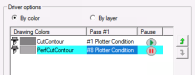
Just here:ok so how does it work? i've been working on this for a while now. How do I get flexi to pause to adjust the blade to do the perf cut. (I have a graphtech fc9000)
This image is not a real setup, only for showing the pause button. You need to change here the Before Cut command to call the condition used for Perforated cut.
Attachments

Last edited:
Geneva Olson
Expert Storyteller
Got it. One of the videos I saw indicated that you do the contour cut. then when it's complete, you adjust the blade holder so that it falls in the channel. Then start the second cut file. (the perf cut). At least that's what I thought was happening.Just here:
This image is not a real setup, only for showing the pause button. You need to change here the Before Cut command to call the condition used for Perforated cut.
Can I do it that way as well?
Attila Nagy
New Member
Yes. Is that what you asked for. It will stop until you confirm the blade holder moved, and continues with Perf Cut.
You could set the Condition for Perf Cut use the same tool position1. and no need to pause.
You could set the Condition for Perf Cut use the same tool position1. and no need to pause.