• I want to thank all the members that have upgraded your accounts. I truly appreciate your support of the site monetarily. Supporting the site keeps this site up and running as a lot of work daily goes on behind the scenes. Click to Support Signs101 ...

Prepping ai graphic for dtg

large display.
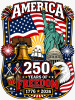
Any help is appreciated. I have been given this chatcpt image for dtg print. When I apply my white base layer I get a lot of artifacts and it will not print solid. Any ideas how I would go about properly prepping this image for dtg?. I have coreldraw 2025
 

Attachments

  • file_00000000bf0071f6810725867338877b.png
    file_00000000bf0071f6810725867338877b.png
    2.2 MB · Views: 42

Boudica

I'm here for Educational Purposes
ask Chat GPT.
you'll have to recreate your own vectors for spot color in Corel. Yep, tedious and time consuming. Charge the customer a set-up fee since they don't care to pay for real artwork.
 
  • Agree
Reactions: 1 users

Bobby H

Arial Sucks.
Geez, it would be one thing if all you had to do was manually trace an outline path around the edge of that image and use it as a clipping path or background shape. If you had to convert the whole thing into clean, vector-based artwork the task would be one hell of a time vampire. Every shape in the image would have to be manually traced, including all the letters. The friggin' AI bots don't know how to do anything with actual unadulterated fonts. All the lettering they generate is mystery meat slop.

Another problem with AI-generated graphics is they all contain various "hallucinations" or just minor glitches. Once you see the errors you can't un-see them. So, not only is there a serious amount of manual vector shape tracing involved. Various amounts of glitch correction work also has to be involved. Converting AI slop images into something that is production ready is a huge pain in the ass.

 
  • Agree
Reactions: 2 users
Top