• I want to thank all the members that have upgraded your accounts. I truly appreciate your support of the site monetarily. Supporting the site keeps this site up and running as a lot of work daily goes on behind the scenes. Click to Support Signs101 ...

Print greenish and pale

grafickistudio1

New Member
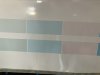
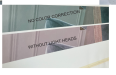
Hey everyone, we are having a problem we can't get hold of. On our hp latex 370 prints come out pretty greenish especially where are gray colors. And all print seems too pale. One of repairman from our country told us to try using no color correction, and I noticed improvements when we are printing vectors, but not much improvement in bitmaps. I got into this job last summer so I'm not that proficient yet especially not on HP, but we all thought that by replacing light heads print will improve, so last month we replaced light cyan and magenta head aswell one C-K head that also started to output green on black parts of print. That black part being green improved a bit, but our prints still come out greenish. I printed van one day apart and parts that continue mismatch color too much as provided in images below. So far we tried using no color correction, using linearization only, switching between fogra27 and gracoal2006 and using CMYK only without light heads. Only thing that has visible improvement is print without light heads. It still mismatch our original print (which isnt all that great neither but it is not green only paleish a bit) but it isnt green when we disable light heads. It was all printed on same profile AVERY MPI 3020 HOP 12 p 120c. Last image is blueback print that came out too pale no where near original image.
 

Attachments

  • image_2026-03-11_095211496.png
    image_2026-03-11_095211496.png
    349.9 KB · Views: 41
  • 1773219182116.png
    1773219182116.png
    692.1 KB · Views: 38
  • image_2026-03-11_095453565.png
    image_2026-03-11_095453565.png
    91.6 KB · Views: 35

balstestrat

Problem Solver
How much usage on the printheads? If over 5L just replace straight away.
And you know, no expired ink as well.
 

balstestrat

Problem Solver
Yeaah. You are just wasting time wondering why things are messed up with expired ink and that Y-M head.
But if you wanna start from something easy, replace that Y-M.

After that if the issue still persist, replace all expired ink and possibly all printheads.
 
Significantly expired light inks can cause neutral colors (such as grays) to drift toward warm or cool tones. Latex 300/ 500 Series printers tend to light inks to a lesser extent than other inks, and thus the light inks can expire and lose optical density from insufficient use.
 
Last edited:

Stacey K

I like making signs
I had a similar experience with expired heads and ink. I replaced all and problem resolved itself. Since then, before I print for the week (or a big job) I print these 3" squares out and compare to my master to make sure everything is looking good. That's per the HP guy on YouTube. Checks all your heads.
1773263347023.png
Edit: Should be 20% instead of 25% - I just rewatched the video
 
Last edited:

grafickistudio1

New Member
I had a similar experience with expired heads and ink. I replaced all and problem resolved itself. Since then, before I print for the week (or a big job) I print these 3" squares out and compare to my master to make sure everything is looking good. That's per the HP guy on YouTube. Checks all your heads.
View attachment 181467
I will try printing this out, can you give me link for the hp guy u reffer to
 

Stacey K

I like making signs
I will try printing this out, can you give me link for the hp guy u reffer to
Took me a while to find it LOL starts at 1:30. I just rewatched it and the light should be at 20%. I don't think that's the video I watched but it's pretty close, maybe this is a newer video.
 
  • Agree
Reactions: 1 user

guillermo

New Member
We had the same issue, exactly the same, I spent a lot of times blaming the original file, but finally we called for service, tech came and we showed him the prints and the original, he looked at us like, "you call me just for this problem, are you serious?, we say (with head down), yes...... he just asked us if we had new printheads, we say yes, he replaced all of them and yes, the problem was solved. It took him just 5 minutes and he made a few hundred dollars.
 
  • Agree
Reactions: 1 user

grafickistudio1

New Member
Took me a while to find it LOL starts at 1:30. I just rewatched it and the light should be at 20%. I don't think that's the video I watched but it's pretty close, maybe this is a newer video.
I printed this out first yesterday with 25 % and now with 20 %s instead. Others are 100% and 50%, on yesterdays print (lower one) I can notice that cyan has a bit problem which now doesnt, but lights definetly have problem. Especially last one which is 20% K and it is green instead of gray. I guess this is ink problem? Or what could it be, since light head is new.
IMG_0564.jpeg IMG_0565.jpeg IMG_0566.jpeg
We had the same issue, exactly the same, I spent a lot of times blaming the original file, but finally we called for service, tech came and we showed him the prints and the original, he looked at us like, "you call me just for this problem, are you serious?, we say (with head down), yes...... he just asked us if we had new printheads, we say yes, he replaced all of them and yes, the problem was solved. It took him just 5 minutes and he made a few hundred dollars.
Two of our heads are like month old and others have less than 2 liters through them except one Y-M head that has like 8L, we will definetly replace that one now.
 

Stacey K

I like making signs
Hmmm, I'm not exactly sure what the issue might be. Like Guillermo, once I changed my heads out (and my expired ink) the problem resolved itself. I would replace all expired ink and maybe run the clean cycle on the light heads and reprint to see if it improves.
 

grafickistudio1

New Member
Hmmm, I'm not exactly sure what the issue might be. Like Guillermo, once I changed my heads out (and my expired ink) the problem resolved itself. I would replace all expired ink and maybe run the clean cycle on the light heads and reprint to see if it improves.
We ordered new 2 heads for Y-M and C-K, and will probably order color. I guess it cant be head on lights since it is month old.
 
  • Agree
Reactions: 1 user

balstestrat

Problem Solver
Just watch out. Now you will be filling the new printheads that have filters inside them with expired ink...
And of course you will lose the new printhead warranty as soon as you plug em in.
 
  • Agree
Reactions: 1 users

grafickistudio1

New Member
Update! Last week repairman came and fixed all the issues. Thing that caused all this was some problem in optimizer head and air system. He told us that printer tried to compensate and turned out greenish, but only with light heads which I dont completly understand but it works now! He told us that expired ink isnt a problem, even one that is 3 years expired.
 
  • Agree
Reactions: 1 user
Top