• I want to thank all the members that have upgraded your accounts. I truly appreciate your support of the site monetarily. Supporting the site keeps this site up and running as a lot of work daily goes on behind the scenes. Click to Support Signs101 ...

Print on Latex 335 & cut on Roland XC 540

otaszan

New Member
Hello guys!

I have an older XC 540 (with Versaworks RIP) and some of the heads are pretty bad and it costs a lot to change them.
I'm using a HP Latex 335 (with SAI basic RIP) for vinyl prints now, but this machine cannot cut.

I think my question is barely common, because I haven't seen a solution on this fantastic forum (or anywhere on the internet).
So I gonna give it a try to see if anyone has done this before:

Do you have a solution how can I print on HP Latex 335 and cut on the XC 540?

I made some test, but it is not working.
(I drew the cut marks on the correct size and position in Illustrator, print the file, then try to cut it on Roland, but it is not recognising the cut marks, so it doesn't work.)
Is there a secret or any tips? Can this kind of print&cut be solved, or should I forget, because this thing doesn't work?

Thank you in advance,
otaszan
 

Alpha Star

New Member
Hello guys!

I have an older XC 540 (with Versaworks RIP) and some of the heads are pretty bad and it costs a lot to change them.
I'm using a HP Latex 335 (with SAI basic RIP) for vinyl prints now, but this machine cannot cut.

I think my question is barely common, because I haven't seen a solution on this fantastic forum (or anywhere on the internet).
So I gonna give it a try to see if anyone has done this before:

Do you have a solution how can I print on HP Latex 335 and cut on the XC 540?

I made some test, but it is not working.
(I drew the cut marks on the correct size and position in Illustrator, print the file, then try to cut it on Roland, but it is not recognising the cut marks, so it doesn't work.)
Is there a secret or any tips? Can this kind of print&cut be solved, or should I forget, because this thing doesn't work?

Thank you in advance,
otaszan
Sounds easy, and you’re right to draw them yourself, but first you will need to make sure the optical registration is working on the XC-540. If it has a working black head, I’d start by printing a job with crop marks turned on and putting it right back in the Roland. Usually, on an old printer, the potentiometer on the cut carriage board needs to be adjusted for it to read the registration marks well. Step 1: find a service manual to get this procedure.
 

ToTo

Professional Support
Easy task. Upgrade your SAI to Full Version and you can can easily control both units from SAI.
 
  • Agree
Reactions: 1 users

otaszan

New Member
Hello. If I print the registration marks on roland then it works. If I draw the registration marks in Illustrator + print on latex and try to cut it on roland then it is not registrating the registration marks. This is the problem. :(
 

SlikGRFX

New Member
This should work. Does it read the first registration mark?

If you have crop marks enabled in versaworks then it should look for the first registration mark when you send the job.
 

otaszan

New Member
Unfortunatelly it is not working.

But I was thinking. The problem clould be that I made 2 different files:
1: pdf with the print area + reg marks
2: pdf without the print area + cutline + reg marks.

What if I send the file with all of the information (print area + cutline + reg marks)?
I'll try it.

What do you think?
 

SlikGRFX

New Member
Does it read the first registration mark? Do you get an error message?

The artwork you send to the Roland should be the original artwork size without registration marks. Then you enable crop marks in versaworks and send the cut data to the cutter.

You will need 2 files. Let’s assume your artwork includes the cut lines.

1. Artwork + manual reg marks to print on HP

2. Artwork to cut on Roland.

Enable Crop Marks (print&cut alignment) under the Marks tab in versaworks.
 
Last edited:

guillermo

New Member
Hello guys!

I have an older XC 540 (with Versaworks RIP) and some of the heads are pretty bad and it costs a lot to change them.
I'm using a HP Latex 335 (with SAI basic RIP) for vinyl prints now, but this machine cannot cut.

I think my question is barely common, because I haven't seen a solution on this fantastic forum (or anywhere on the internet).
So I gonna give it a try to see if anyone has done this before:

Do you have a solution how can I print on HP Latex 335 and cut on the XC 540?

I made some test, but it is not working.
(I drew the cut marks on the correct size and position in Illustrator, print the file, then try to cut it on Roland, but it is not recognising the cut marks, so it doesn't work.)
Is there a secret or any tips? Can this kind of print&cut be solved, or should I forget, because this thing doesn't work?

Thank you in advance,
otaszan
I did it one time, when I forgot to print the crop marks on a job, I had to set it up sacrificing one row of images in order to add the crop marks.

what I did is to print a small rectangle, about 12x20 on that roland and add the crop marks, then I cut some black circles using black vinyl, cut the corners of the printed image, match the corners and apply the cut vinyl circle as close as you can on every corner, using the corresponding corners, then sent the job to roland, process it and try to cut, guess what, it worked, I still have those 4 corners with the crop marks in case I need it in the future.

I now have an HP365, and I will try that one day. (unfortunately my Roland plotters cuts only 46" wide, it is a GX500, but that is the max to cut.

Hope this helps.
 

Joe House

Sign Equipment Technician
I don't think so. The Roland marks are generated by the printer.
The marks are generated by the RIP. The printer just prints what is told to print. In Flexi, just set up the job in Rip and Print on the cut tab specify the XC as your cutter and Flexi will generate the right marks for your XC
 
  • Agree
Reactions: 1 user

ToTo

Professional Support
The marks are generated by the RIP. The printer just prints what is told to print. In Flexi, just set up the job in Rip and Print on the cut tab specify the XC as your cutter and Flexi will generate the right marks for your XC
But Cutting and other devices are not available in the HP SAI license…
 

Signstein

New Member
Looks like you can gain additional cutter support with one of the Flexi upgrades available for HP:
 

Red Brick

New Member
I did it one time, when I forgot to print the crop marks on a job, I had to set it up sacrificing one row of images in order to add the crop marks.

what I did is to print a small rectangle, about 12x20 on that roland and add the crop marks, then I cut some black circles using black vinyl, cut the corners of the printed image, match the corners and apply the cut vinyl circle as close as you can on every corner, using the corresponding corners, then sent the job to roland, process it and try to cut, guess what, it worked, I still have those 4 corners with the crop marks in case I need it in the future.

I now have an HP365, and I will try that one day. (unfortunately my Roland plotters cuts only 46" wide, it is a GX500, but that is the max to cut.

Hope this helps.
Hi. Just read your post. I have same issue with my XC540 and want to use as cutter only. Can you share registration mark info? I have no references as to location or size of squares and circles. thank you
 

guillermo

New Member
Hi. Just read your post. I have same issue with my XC540 and want to use as cutter only. Can you share registration mark info? I have no references as to location or size of squares and circles. thank you

Red Brick

what crop mark information do you mean?
 

Red Brick

New Member
Sorry for delay. I responded right away but I did not know it had to be thru the forum.
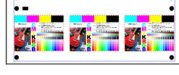
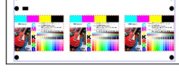
I need a print out with the circles and rectangles for registration for contour cutting.
I attached a picture.
Thank you
Ramon
 

Attachments

  • roland.jpg
    roland.jpg
    24.1 KB · Views: 8

Red Brick

New Member
Red Brick

what crop mark information do you mean?
Sorry for delay. I responded right away but I did not know it had to be thru the forum.
I need a print out with the circles and rectangles for registration for contour cutting.
I attached a picture.
Thank you
Ramon
 

Attachments

  • roland.jpg
    roland.jpg
    24.1 KB · Views: 8

guillermo

New Member
Sorry for delay. I responded right away but I did not know it had to be thru the forum.
I need a print out with the circles and rectangles for registration for contour cutting.
I attached a picture.
Thank you
Ramon

I believe you will have to print the file in the Roland printer first, then you can check the crop mark distance and apply it to the file in illustrator, then print in the HP with the crop marks, then try to cut it in the roland, until you get right on the cut line.
 

Red Brick

New Member
Hi. The problem is my roland does not print anymore. I was hoping I could buy a print from you with the marks so I can recreate in illustrator.
Thank you
 

guillermo

New Member
does not print at all? even if does print some lines, you will see if you can measure it.
were are you located?
I see what you mean with buying a print.... if you can find a place to buy it close to you will be better.

but let me know.

not sure if you can send me a private message to give you my info.
 
Top