• I want to thank all the members that have upgraded your accounts. I truly appreciate your support of the site monetarily. Supporting the site keeps this site up and running as a lot of work daily goes on behind the scenes. Click to Support Signs101 ...

Roland co i uv printer advise

Hey everyone, looking into the roland co-i series printer to print onto phone cases. It will need to print onto slight contours, be very durable ink and adhesion, and highest quality color/print as we can get. Would anyone push me into the roland? Or is there a better option?
 

Attachments

  • IMG_6648.jpg
    IMG_6648.jpg
    379.3 KB · Views: 25
Hey everyone, looking into the roland co-i series printer to print onto phone cases. It will need to print onto slight contours, be very durable ink and adhesion, and highest quality color/print as we can get. Would anyone push me into the roland? Or is there a better option?
Yes, the Roland COI series is a great printer.
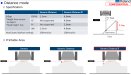
what you referring to is called distance mode. It is basically a quarter inch around. I have attached a document that basically shows this.
If you’re looking for the most scratch resistance, stickiest ink, Roland DGA here in America sells what is called V- Bond ink.
The printer can only be inked one way, which is CMYK, Gloss, Gloss, White, White, however this is great for most instances And is a large color gamut. I have installed three COi printers this year with that inkset.
there is a chance you may need an adhesion promoter or primer that you wipe on your case depending on the material of the product.
I would suggest that you get your Roland rep to print you a sample on your product with the V-Bond ink. The V-bond ink also complies to the toy industry, California Proposition and a safe.
see here:


If not needed the 64” or 30”, this ink can go into the MO series as well.
Please do keep in mind that these Roland flatbed printers are not very fast. However, the quality is far superior to most flatbeds.
I am not even sure if you even need to use the slower “distance “ mode on what you are showing.
looking down in your product, I think the problem with around the camera is going to be an issue as that is much higher than the printing area. I do not think that is going to work. The idea is to get the print head as low as you can to the substrate your printing on.
The smaller up-and-down areas in the middle I think is not going to be an issue.

 

Attachments

  • IMG_6671.jpeg
    IMG_6671.jpeg
    618.8 KB · Views: 14
  • IMG_6672.jpeg
    IMG_6672.jpeg
    1.3 MB · Views: 13
Last edited:
Yes, the Roland COI series is a great printer.
what you referring to is called distance mode. It is basically a quarter inch around. I have attached a document that basically shows this.
If you’re looking for the most scratch resistance, stickiest ink, Roland DGA here in America sells what is called V- Bond ink.
The printer can only be inked one way, which is CMYK, Gloss, Gloss, White, White, however this is great for most instances And is a large color gamut. I have installed three COi printers this year with that inkset.
there is a chance you may need an adhesion promoter or primer that you wipe on your case depending on the material of the product.
I would suggest that you get your Roland rep to print you a sample on your product with the V-Bond ink. The V-bond ink also complies to the toy industry, California Proposition and a safe.
see here:


If not needed the 64” or 30”, this ink can go into the MO series as well.
Please do keep in mind that these Roland flatbed printers are not very fast. However, the quality is far superior to most flatbeds.
I am not even sure if you even need to use the slower “distance “ mode on what you are showing.
looking down in your product, I think the problem with around the camera is going to be an issue as that is much higher than the printing area. I do not think that is going to work. The idea is to get the print head as low as you can to the substrate your printing on.
The smaller up-and-down areas in the middle I think is not going to be an issue.
really appreciate the feedback! How is the print quality and say doing varnish/gloss to add texture on this series printer? I have heard many people say the printers are slow, but what does slow mean? We arent cranking out dozes of billboards at a time. On the smaller size printer doing distance mode, how long would it take to print a full table in the highest quality print mode. Keep in mind, we can fit a ton of phone cases per table print.
 
really appreciate the feedback! How is the print quality and say doing varnish/gloss to add texture on this series printer? I have heard many people say the printers are slow, but what does slow mean? We arent cranking out dozes of billboards at a time. On the smaller size printer doing distance mode, how long would it take to print a full table in the highest quality print mode. Keep in mind, we can fit a ton of phone cases per table print.
The quality is great.The only real way to tell how long a file will take on the full table is to put a file into the VersaWorks rip with this printer installed. I can try this next week. Do you have a Roland dealer that you are working with? They can also provide details And print speeds.
Yes, distance mode slows things down and adding the gloss will also slow it down depending on if you choose a gloss or matte sheen as this may require a complete extra pass As you cannot add the gloss at the same time as CMYK.
Off the top of my head to do a full table in 64” with CMYK HQ distance mode then add gloss/varnish, my guess would be possibly 2 hours.
Again, need to rip a file into VW and calculate the time.
 
  • Agree
Reactions: 1 user
The quality is great.The only real way to tell how long a file will take on the full table is to put a file into the VersaWorks rip with this printer installed. I can try this next week. Do you have a Roland dealer that you are working with? They can also provide details And print speeds.
Yes, distance mode slows things down and adding the gloss will also slow it down depending on if you choose a gloss or matte sheen as this may require a complete extra pass As you cannot add the gloss at the same time as CMYK.
Off the top of my head to do a full table in 64” with CMYK HQ distance mode then add gloss/varnish, my guess would be possibly 2 hours.
Again, need to rip a file into VW and calculate the time.
makes sense, do you know anyone that has a roland co series I could pay to have some samples printed? Or a dealer with a demo unit? Our local dealer in utah doesnt have a unit and there are no co customers here that arent gov contracted companies so we cant go in and sample stuff or send our product to them. I would pay very well for some samples btw.
 
makes sense, do you know anyone that has a roland co series I could pay to have some samples printed? Or a dealer with a demo unit? Our local dealer in utah doesnt have a unit and there are no co customers here that arent gov contracted companies so we cant go in and sample stuff or send our product to them. I would pay very well for some samples btw.
Your dealer can get the samples printer from DGA in Irvine or Atlanta. We do it all of the time
 
I was told their demo shop is being moved and they arent able to print samples currently. I will ask again though.
I emulated a 3“ x 6“ is for a phone case. The maximum number on the bed is 250 which is close to filling up the whole bed. High quality in CMYK only is 106 minutes.
if you have white underneath that which you will probably need on a black case that increases it to 212 minutes.
Add a high quality gloss varnish would be extra 34 minutes.
adding a high-quality matte varnish, would add 51 minutes. This was all I. Regular mode, not Distance.
I hope this helps.
 
Top