• I want to thank all the members that have upgraded your accounts. I truly appreciate your support of the site monetarily. Supporting the site keeps this site up and running as a lot of work daily goes on behind the scenes. Click to Support Signs101 ...

ROLAND LEC-330 Stuck on now Processing

adamfromayr

New Member
Hello all

Ive done some research on this issue and mainly is all about the VP models

I have a LEC-330 And its saying it too often now

Ive tried:

Different file types
New CAT cable
Cleared Versawork files


Does anyone else have this issue with a LEC-330

Or an update on the best way to fix it Cheaply?

I dont want to or cant afford a new board!

Thanks
 

adamfromayr

New Member
I bought the printer maybe 2+ years ago and seemed okay when i got it but i never use it

Before it was in another room and i recall it saying that before so has happened before

As i never use it i want to sell it so im getting it ready to sell it

I was on a long holiday and came back and the Yellow printhead wasnt 100% so i wanted to make it 100% so i can sell the printer

I wish i didn't do this now But i removed the printhead gave it a good clean out (Maybe i got it contaminated)


Here we go,

Reinstalled the cleaned printhead

Fuses kept blowing F2

This is when Worked out 1 x Transistor was bad on the "Head Board"

so i replaced the transistor

this is when i discovered the Mosten board below the keypad had a bad FFC Cable that actually came out by accident, thats when i spotted the bad gold pins on it

So:

Fitted 1 x New transistor on servo board

1 x New FFC Cable on the small board below the keypad

after this:

The SERVO Board started to smoke on one of the large parts!

Got this repaired by a professional who did a great job

Seems to work fine

Fuses are no longer blowing

BUT NOW

Im getting ZERO Yellow from that printhead, I think i blow the printhead?

White ink is going all over the media (see the pink lines to highlight it) thats actually white ink coming out in a large box in a test print?

and im also getting the Now Processing 80% of the time

Summary:

Prints large white area on test print

Zero Yellow

80% of the time trying to print any file format says now processing via Versaworks
 

Attachments

  • DSC05791.jpg
    DSC05791.jpg
    961 KB · Views: 11
  • DSC05790.jpg
    DSC05790.jpg
    395 KB · Views: 11

adamfromayr

New Member
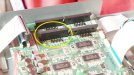
Yellow circled was the part that was smoking before and i think this is because of the yellow printhead being changed and was maube damaged OR it was because the FFC cable that came out by accident on the small mosten board, i put back in not knowing the gold terminal pins were touching! The FFC Cable has been replaced and seems ok now NO fuses blowing anymore, Head board seems ok now,

But yellow printhead Nothing maybe its blown?

White ink printing a large are of white ink when its not supposed to :(
 

damonCA21

Active Member
If you are getting ink through to the yellow head I would guess it has either blown or some other damage has been done to the board when it shorted. Even though the fuses aren't blowing it could still have issues that would explain the white printing when it shouldn't. You also need a new black head as that one is shot
 
  • Agree
Reactions: 1 user

damonCA21

Active Member
Also need a new pinch roller from the look of it. You may be better off selling it spares or repair as its not going to be cheap to get it running perfectly
 
  • Agree
Reactions: 1 users

adamfromayr

New Member
Thats what i was thinking of selling the parts also but i paid 5k for this printer

im sick of Roland printers and their ongoing issues, The black was fine, i think it just needs to be cleaned hopefully

The pinch rollers well spotted i noticed that also today

Selling as parts though is trick also as im not sure what parts are 100% ok so selling them as parts isnt a great idea, i paid over 5k for this dam printer and want it back to normal

I just wish i didnt change the yellow printhead as everything was okay before

Im thinking of sending the head board to my man as maybe i bodged the transistor and if that gets sorted? maybe thats whats making it print loads of white ink out on a test print?

The yellow head i can replace, Pinch roller i also need ASAP
 

cornholio

New Member
These Rolands are very service friendly printers, as long as you know what your doing! You can't blame Roland for your doing.
 
  • Angry
  • Agree
Reactions: 1 users

damonCA21

Active Member
Roland's are pretty reliable as long as they get plenty of use. It's when they aren't used often they get problems, which is the nature of solvent inks.

I would get the board checked though. It could be a transistor problem or another part of the print channel circuit causing the lack of yellow.

The white printing the large block I think is more likely down to a problem with the main processor though as its not a normal fault you see.
 

adamfromayr

New Member
You cant blame me for parts failing all so often on Roland Printers also

I guess its my fault the pinch rollers are worn also? The FFC Cables that were never touched have frayed, The NOW Processing error? Thats my fault is it? Or is it a Known Roland fault?

anyway Thanks Damon im not sure about the white issue but i think i will post a new one regarding that

as originally asked about the now processing but being honest thats the least of my worrys for now

mmmmmm

Ive ordered a new used printhead for the yellow, Going to get the head board and main board looked at by a PCB Soldering pro, but not a Roland Pro

I think i want to get this large white box issue sorted and yellow head not firing, fuses are ok

Maybe transistors
 
  • Agree
Reactions: 1 user

adamfromayr

New Member
And if i cant get it fixed with the other head and boards looked at

i will have to sadly lose the 5k i spent on it

and recoup a small drop of the 5k by selling it for parts:mad:
 

damonCA21

Active Member
Where are you getting the used printhead from as most of them don't work, so may not help you with seeing if the old head has blown, but worth a try
 

damonCA21

Active Member
It can be a nightmare though when lots of things go wrong at once to pinpoint the problem, but checking the boards is a good first step
 
  • Agree
Reactions: 1 user

adamfromayr

New Member
of ebay in the UK if it doesnt work straight away i will send it back

Im careful now with the printheads and know how to remove them carefully and swap them over

The yellow one that i removed MAY Of got damaged when i was cleaning it but i am not sure about what caused all the issues, I can say that the FFC Cables came loose by accident on the small board below the keypad

and i plugged them back in

Then after i was problem-solving i noticed the FFC Cable pins were touching each other the worn glue blue strip had frayed and the small pins were touching

This is maybe why the servo board part started to smoke, thats been repaired and two green LEDs are ok i didn't think its that parts thats causing the issues now

I think its ether the main board or head board thats the cause now,

Yellow head , I've changed over the FFC Cables and also replaced them

It gonna take time and a whole lot of spending money :(
 

adamfromayr

New Member
The grit rollers are also fraying and particles are coming off onto the media

So that is actually a priority now as those particles could damage the other heads when test printing
 
  • Agree
Reactions: 1 user

damonCA21

Active Member
I have never seen pinch rollers disintegrate that badly! Not sure if some ink got on them or someone tried to clean them with cleaning fluid or something, but it is a bit weird
 
Top