• I want to thank all the members that have upgraded your accounts. I truly appreciate your support of the site monetarily. Supporting the site keeps this site up and running as a lot of work daily goes on behind the scenes. Click to Support Signs101 ...

Question Roland SP540v - Black and Magenta print issue

Kris2022

New Member
Hi

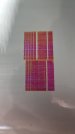
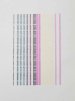
I have run into a serious issue in my sp540v and don't know how to get it fixed or what need to be fixed. Please I really appreciate anyone's comment/advise to find a way to get the printer working. Printer has been working really good for many years until last week when I switched it on and did a test print to see the following test print
IMG_20220117_124418571.jpg

The Yellow and Blue test prints are ok but the Black and Magenta is messed up. I did a 4 colour bar print from versaworks and that looked like below

IMG_20220117_124440407.jpg

So it definitely there is a problem in Black and Magenta print. The annoying thing is the issue is not from a single printhead but from both heads and Black print from first head 1st channel and Magenta print from second head 1st channel so the issue is a combination of both heads. What I have done so far,

1. I swapped the data cables from Carriage Board to Printheads but still the same

2. Put in new data cables from Carriage Board to Printheads but still the same

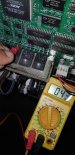
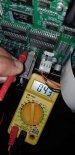
3. Reading forum comments here I did a check on the 8 transistors and they all show 43 on the two end legs of each transistor. I assuming they are not blown?

4. Both F2 and F3 printhead fuse are ok not blown
IMG_20220117_124513475.jpg

_IMG_000000_000000.jpg
Please I really like ssomeone's advice here where to go from here..Thank you in advance!
 

Solventinkjet

DIY Printer Fixing Guide
You're right to be looking at the boards since the issue is affecting both print heads. I would check the trailing cables to make sure there isn't any damage, corrosion, or burn marks and re-seat them to make sure they are perfectly connected. Unfortunately since this happened out of the blue it's more likely a blown component on the main board.
 

Terry01

New Member
Need to see more tests.. forget versa..Do the test from the machine.Check all cables to heads again and then do a test print. Then go into service mode, do a test print there. Go to menu and arrow down until you get to print test. Goto "full" and run the bands from there and post your results
 
Last edited:

ozgraham

New Member
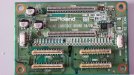
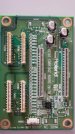
Hi there guys, I am having the same or similar issues with my SP540V. The M/Y head is printing crazy and the B/C head is not printing at all. I have changed the print cables, had the print fuses replaced, still not changing. I have taken out the Print Carriage Board and checked it but not sure of any obvious signs of it being faulty. I have an old SP300 and I removed the Print Carriage Board from that to swap over and try that, but to discover there is one less Pin Connector Socket less on the SP300 board. Please see photo and any advice would be greatly appreciated. TIA
 

Attachments

  • 20260608_160323.jpg
    20260608_160323.jpg
    672.3 KB · Views: 5
  • 6523b1de-c4c3-4cb9-92fa-2e7c8584838a.jpeg
    6523b1de-c4c3-4cb9-92fa-2e7c8584838a.jpeg
    170.1 KB · Views: 6
  • 16865674-85b4-4071-bde8-2601c65597d0.jpeg
    16865674-85b4-4071-bde8-2601c65597d0.jpeg
    81.8 KB · Views: 5
  • f5dda17b-89a5-4036-bd45-351cae8e3381.jpeg
    f5dda17b-89a5-4036-bd45-351cae8e3381.jpeg
    156.1 KB · Views: 6

ozgraham

New Member
Hi there guys, I am having the same or similar issues with my SP540V. The M/Y head is printing crazy and the B/C head is not printing at all. I have changed the print cables, had the print fuses replaced, still not changing. I have taken out the Print Carriage Board and checked it but not sure of any obvious signs of it being faulty. I have an old SP300 and I removed the Print Carriage Board from that to swap over and try that, but to discover there is one less Pin Connector Socket less on the SP300 board. Please see photo and any advice would be greatly appreciated. TIA
 

Jungteam

New Member
Since this issue suddenly occurred with one channel on both heads simultaneously, it seems more like a board issue rather than the heads themselves.

It looks like you’ve already checked everything thoroughly, just like an engineer. You’ve done the cable swap test—though it wasn't very meaningful since the exact same first channel was failing on both heads—and you’ve also replaced the cables with new ones.

This leaves either the heads themselves or the board as the remaining culprits. Realistically speaking, it is highly unlikely for two heads to develop the exact same issue at the very same time. I suspect the board will need to be replaced.
 
Last edited:

damonCA21

Active Member
Since this issue suddenly occurred with one channel on both heads simultaneously, it seems more like a board issue rather than the heads themselves.

It looks like you’ve already checked everything thoroughly, just like an engineer. You’ve done the cable swap test—though it wasn't very meaningful since the exact same first channel was failing on both heads—and you’ve also replaced the cables with new ones.

This leaves either the heads themselves or the board as the remaining culprits. Realistically speaking, it is highly unlikely for two heads to develop the exact same issue at the very same time. I suspect the board will need to be replaced.

One more thing: while it’s not the exact same model, on our company's printers, the onboard LED blinks continuously when there is a problem with the board, which is when these symptoms occur.

To get a better idea of whether it’s the head or the board, could you check the following?

  1. How does the LED on the board behave when all head cables are completely disconnected?
  2. How does the LED behave when the head cables are connected?
Checking this should help us pin down whether the root cause lies with the board or the head side.

Just in case, I am attaching our company's troubleshooting guide for board issues for your reference: https://artjetech.com/print-motion-but-no-ink-output/
That is very bad advice for a Roland printer! If you disconnect the head cables and power up the printer you are likely to blow the main board fuses!
Also the Roland printers don't have any LEDs that blink to show the status of the heads or board. The LEDs will only show if power is present on the board
 

Jungteam

New Member
That is very bad advice for a Roland printer! If you disconnect the head cables and power up the printer you are likely to blow the main board fuses!
Also the Roland printers don't have any LEDs that blink to show the status of the heads or board. The LEDs will only show if power is present on the board
"Based on your advice, I've deleted my comment about the LED.

However, I still really don't understand how simply disconnecting the head cable could blow the board fuse. It just doesn't make sense to me.

Also, it's surprising that the board doesn't even have any LEDs.

If that's the case, it means there's no way to check whether the board is faulty or not on this printer. I don't know which Chinese partner Roland worked with to produce this model,,, but this machine seems very difficult to maintain."
 

cornholio

New Member
Difficult to maintain? We talk about a 20+ year old printer! I just repaired one last week. I also never killed a board in a SP... (Had to fix some customer destroyed boards...) Just switch off the main power, if you see the green led on the carriage board, before you unplug any head cables.
The design of the boards is certainly Japanese and the complete schematics are available. Has nothing to do with Chinese production.(If at all back then...)
 
  • Agree
Reactions: 1 user

Jungteam

New Member
Difficult to maintain? We talk about a 20+ year old printer! I just repaired one last week. I also never killed a board in a SP... (Had to fix some customer destroyed boards...) Just switch off the main power, if you see the green led on the carriage board, before you unplug any head cables.
The design of the boards is certainly Japanese and the complete schematics are available. Has nothing to do with Chinese production.(If at all back then...)

My apologies, I made a mistake as I assumed all printers operate on similar principles. I honestly had no idea it was a 20-year-old model. I will make sure to do more thorough research before replying next time.

To be fair, I have about that much experience myself when it comes to UV printers, but I clearly missed the mark this time. I sincerely apologize if my comment caused any offense.

Seeing that you repair 20-year-old equipment and even fix the circuit boards yourself, it is clear you are a true expert in this field. This has been a good reminder for me to be more careful when speaking about models I don't personally handle, rather than relying on superficial knowledge. Thank you for following through and correcting me.

Just to show that I don’t take printer maintenance lightly either, I’d like to share the troubleshooting site I run below: https://artjetech.com/

Have a great day.
 
Last edited:

damonCA21

Active Member
So, it is 20 years old. Sorry for my poor knowledge about Roland.
Yes, Roland are a major Japanese manufacturer. They don't need to partner with Chinese companies to make or design their products.
Giving advice is great, but only if it is relevant and useful :)
If you disconnect the head cable while there is still charge on the mainboard it will blow the fuses, and can also damage the transistors and other components
 
  • Agree
Reactions: 1 user
Top