
• I want to thank all the members that have upgraded your accounts. I truly appreciate your support of the site monetarily. Supporting the site keeps this site up and running as a lot of work daily goes on behind the scenes. Click to Support Signs101 ...

Need Help Roland VeraCamm SP540v

Frankie Johnson

New Member
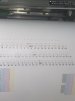
I have replaced the linear encoder, cap unit and print cables. You can see on the photo that it is jogging the bi-direct test strip and the test print. It was running fine when the black dropped. I’m out of ideas and no one near to help. Need some help please!
 

Attachments

  • IMG_3139.jpeg
    IMG_3139.jpeg
    1.3 MB · Views: 29
Technically, you need to go into service mode and run what is called linear encoder to see if it passes. Then you’ll know for sure if you have a problem or not.
 
  • Agree
Reactions: 1 user

JKstorm

New Member
I agree with that. If you know how to get into the service mode and know how to run the encoder test, it could be helpful. I had this same issue. I cleaned the strip according to Jim Hancocks instructions but I also did a cleaning of the sensor using compressed air. (not with a compressor but with a hand held can). I did this about six months ago and I have not had a single problem since. I did however order a new strip as a spare. They are getting hard to get, especially at a good price.
 
  • Agree
Reactions: 1 users

Solventinkjet

DIY Printer Fixing Guide
It looks like the bias adjustment is way off too. Basically, you're heads are crooked. I'd run all the head alignments especially if encoder fixes don't do the trick.
 

Frankie Johnson

New Member
Technically, you need to go into service mode and run what is called linear encoder to see if it passes. Then you’ll know for sure if you have a problem or not.
It passed. I did that as soon as I replaced it. I'm guessing if the sensor is bad, it would not have read the encoder to pass it.
 
Last edited:
Top