• I want to thank all the members that have upgraded your accounts. I truly appreciate your support of the site monetarily. Supporting the site keeps this site up and running as a lot of work daily goes on behind the scenes. Click to Support Signs101 ...

Sp300 yellow not printing!!?

Inkedallegiance

New Member
Hey guys I’m not sure if this is the correct location to post this but I have a sp300 versacamm I changed cartridges out it was printing great before this my black and cyan had pretty much ran out so I replaced all the cartridges as they were all getting low now my yellow don’t print hardly if any I’ll show a test print I wanted to get your guys opinion on what it could be because you guys are very knowledgeable! Thanks in advance- Garrett

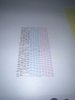
First print you can see the yellow is missing

Second test print it’s broken and scattered

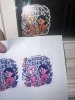
Third was a sticker I made for my little girl top was original ink bottom was replacement
 

Attachments

  • IMG_046A49E4-BF0F-4661-9FBE-C10AA892B096.jpeg
    IMG_046A49E4-BF0F-4661-9FBE-C10AA892B096.jpeg
    1.7 MB · Views: 27
  • IMG_50097CBF-6229-499B-A68D-E057D65CF16E.jpeg
    IMG_50097CBF-6229-499B-A68D-E057D65CF16E.jpeg
    1.4 MB · Views: 19
  • IMG_3780.jpeg
    IMG_3780.jpeg
    1.9 MB · Views: 18

Ewan yu

www.printersign.com--Printhead,parts,supplier
Doesn’t seem like a big issue. It looks like the yellow is just a bit clogged.Try running a few more cleanings. If that doesn’t help, you can pull it and clean it manually.
Worst case, swap the dampers.
You can also try ignoring it and just keep printing for a while to see if it clears up.
 
Top