KristianBIS
New Member
We prepare files in Coreldraw and send them to GoSign to cut on our Summa S2 T 160 and most of the time it works, however I've had a few instances were the output got jumbled in a way I can't figure out. What makes it extra weird is that it seems to get jumbled the same way everytime.
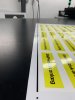
On the attached we were doing rectangular stickers and as you can see the result is skewed.
Now, all corners and all vertical lines seem to be on the right place, but somewhere along the scan direction it does this weird curve/angle. The file is all straight lines and I've had it happen with other jobs aswell.
On this day I cut several jobs back to back withtout issue, then suddenly when doing this job the issue appears. I do a new print and next try it works out.
Mysterious.
Has anyone ever encountered anything similar and do you dare take a guess at how to eliminate it?
Thank you