
-
I want to thank all the members that have upgraded your accounts. I truly appreciate your support of the site monetarily. Supporting the site keeps this site up and running as a lot of work daily goes on behind the scenes. Click to Support Signs101 ...
You are using an out of date browser. It may not display this or other websites correctly.
You should upgrade or use an alternative browser.
You should upgrade or use an alternative browser.
Need Help Summa Regmark
- Thread starter rhill
- Start date

balstestrat
Problem Solver
Inspect the import macro. It needs to match your marks.

Johnny Best
Active Member
what does it cut, the red lines or blue lines
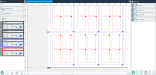
It will cut both, my red is a kiss cut and the blue is a thru cut but my issue it the Regmarks are not reading at markwhat does it cut, the red lines or blue lines
We are unsure what this meansInspect the import macro. It needs to match your marks.

upload the pdf so we can see how its setup, its impossible to tell from a screenshot.
Attachments
balstestrat
Problem Solver
Right click on the import and check the settings. It has to match the marks you have in your file.We are unsure what this means
fine point
New Member
My guess is when you are saving it you didn't check "Preserve Illustrator Editing Capabilities". If you turn it off, the registration marks in your file will be read as an artwork.
But I don't see the reg marks on your screenshot either, so it might be something else.
But I don't see the reg marks on your screenshot either, so it might be something else.
Here... I fixed one. Try this and see if it works in your software.
I dont know all the Summa rules - I havent got to play with our Summa much before I left my job, So maybe this setup is overkill... but I believe its the correct way summa wants it, I remoted into my old jobs computer and tested your file and it didnt read it as regmarks, then I Changed it to how I'd normally set it up, and it did. I put everything on its own layers, named properly like Summa likes it - I also made a Kiss-cut and a Thru-cut swatch so it imports them automatically and you dont need to change it.
Regmark should be "Regmark" on its own Regmark layer... I think that was your main issue?
You should also name your cut lines. "Thru-cut" will auto open it as a thru cut... "Kiss-cut" Will auto open it as a kiss cut. Right now theyre not a swatch, and its just a blue and red CMYK. If you put your image on "Print Data", when you import it into Summa gosign it wont load the print data, so you dont need to delete it and make a second file.
So your layers should look like this - with everything in Regmark being a spot for Regmark...everything in Kiss-cut being a spot for kiss... everything for "Thru-cut" being a spot for Thru-cut...etc.
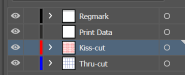
If you're using Illustrator... Get Summa Gosign for it, if you dont have it. Click New from Template... And it'll bring up a window that has all the relevant layers made, as well as put every swatch in the document for kiss/thru cut / etc.
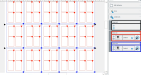
Here it is on the Flatbed software, it rips fine, and you can see the regmarks read as regmarks since they have triangles.
I dont know all the Summa rules - I havent got to play with our Summa much before I left my job, So maybe this setup is overkill... but I believe its the correct way summa wants it, I remoted into my old jobs computer and tested your file and it didnt read it as regmarks, then I Changed it to how I'd normally set it up, and it did. I put everything on its own layers, named properly like Summa likes it - I also made a Kiss-cut and a Thru-cut swatch so it imports them automatically and you dont need to change it.
Regmark should be "Regmark" on its own Regmark layer... I think that was your main issue?
You should also name your cut lines. "Thru-cut" will auto open it as a thru cut... "Kiss-cut" Will auto open it as a kiss cut. Right now theyre not a swatch, and its just a blue and red CMYK. If you put your image on "Print Data", when you import it into Summa gosign it wont load the print data, so you dont need to delete it and make a second file.
So your layers should look like this - with everything in Regmark being a spot for Regmark...everything in Kiss-cut being a spot for kiss... everything for "Thru-cut" being a spot for Thru-cut...etc.
If you're using Illustrator... Get Summa Gosign for it, if you dont have it. Click New from Template... And it'll bring up a window that has all the relevant layers made, as well as put every swatch in the document for kiss/thru cut / etc.
Here it is on the Flatbed software, it rips fine, and you can see the regmarks read as regmarks since they have triangles.
Attachments
Ok, did you draw registration marks by hand or used some utility/macro/app in your design software? It looks to me that they are not at the same distance (they should be equally distanced between them). Moreover, the two bottom marks are not aligned. No way that GoSign could detect them as registration marks. Also in the above example of the flatbed software, registration marks are read as cutting paths (all the shapes have triangles, that is the object orientation, when a regmark is detected is depicted as a target).
If you are using a software as Illustrator/Coreldraw/Inkscape I suggest you to download the Summa GoSign utillity from Summa site. It will add an utility able to put regmarks automatically on your design.
If you are using a software as Illustrator/Coreldraw/Inkscape I suggest you to download the Summa GoSign utillity from Summa site. It will add an utility able to put regmarks automatically on your design.

brettbond
New Member
This is a bit tangential to your current issue, but you can use feachr.it to detect any registration marks, even hand-drawn, odd shapes, whatever
For instance:
I think there's a bit more that applies to signmaking specifically, for instance visually aligning any svg file or gcode file, routing around printed shapes without worrying about extra marks. Please let me know you have a workflow like this where I could help out, I'd like to add some features to support more sign making practices.
Last edited:
