Sign Planner
New Member
Hey everyone! I’m new to Signs101, and honestly, pretty new to sign forums in general.
I’ve been in the signage industry for about 8 years, with a background in design, graphic design, web design, product management, and a bunch of other random things. Basically, a jack of all trades, master of some.
Over the last couple of months, I decided to combine all of those experiences and build something I had wanted to see in the signage industry: a modern sign planning software called Sign Planner at signplanner.org. It was originally called Location Planner, so don’t mind the username, LOL.
TL;DR: I made a sign planning software and anyone on signs 101 can get an extended free trial, on the house!: https://signplanner.org/founders?code=SIGNS101
So here’s the origin story.
I started a project management position at a new sign company, and they introduced me to a software they were using called SignAgent. They explained that you could place signs directly on plans and track them throughout the entire project cycle. At first, I was blown away.
I remember thinking, “How have I worked in signage for eight years and never heard of software that can do all of this?”
Then I actually started using it...
And pretty much everyone around me hated it.
Project managers, designers, and salespeople all complained about how clunky it was, how outdated it felt, how slow it was, how rarely it seemed to be updated, user feature requests were always ignored and especially how long it could take to do something as simple as downloading a PDF plan.
But they kept using it because they didn’t really have another option.
I tried using it myself and honestly struggled with the interface so much that I eventually gave up and thought, “Okay… I’m just going to build my own.”
And that’s basically how Sign Planner started.
The goal wasn’t to reinvent the concept. I actually like the idea behind SignAgent. I just wanted to take that same general workflow and build it into something much faster, cleaner, and easier to use. I wanted to bring it into the 21st century with good design taste and an easy to understand interface and actually make a software that looked like it was it was designed by and for someone in the signage industry. Sign Agent looks like a 90's program created by a developer who briefly spoke with someone in the signage industry, 30 years go...
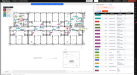
A few of the things I’ve built into Sign Planner so far(check out the pics!):
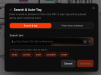
Search & Auto Tag
You can search a PDF plan for specific text and automatically place a particular sign type at those locations. It can turn what would normally be a manual takeoff into something that takes a fraction of the time. It truly feels like magic when youre doing a take off and you have 250 signs placed on the plan in 5 minutes and your message schedule is already populated...
Fast PDF & Message Schedule Downloads
There’s a quick download button for both the PDF and message schedule. Instead of waiting around for minutes, the goal is for it to happen in seconds.
Built-in PDF Editor
You can rearrange and rotate plan sheets, but you can also remove elements from architectural plans that you don’t need. This has personally been one of my favorite features because I used to have to open Illustrator, wait for the file to load(TAKES FOREVER), clean it up, and then go back to what I was doing.(theres a quick demo of this feature in the homepage if you want to check it out)
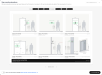
ADA Layout Generator
You can generate ADA-compliant sign layouts directly from the information in your message schedule. Sign tags and dimensions can all be reflected into the sign layouts and downloaded as a PDF for sharing. ADA compliant elevation sheets can also be generated straight from this tool!
3D floor plan Walkthrough!
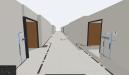
I just added a feature last week that lets you and anyone you share the project with actually walk through the floor plans in a 3D-style environment. You can see the walls, doors, and signs in their actual locations and move around the project as if you’re walking through the space.
It's fully functional, but I've labeled it as beta only because the interface is not quite as easy to understand as I would like it to be.
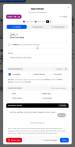
There are also tools for tracking change orders, adding project notes and sign-specific notes, and sharing projects with other people for review and approval and a lot more that I haven’t even mentioned here...
And I have A LOT more on the roadmap.
Currently in development is an iOS app, as well as a more robust client review system where you can share not just the sign plans, but the actual sign layouts with the end user. They’ll be able to add clean, simple comments and markups that can then be sent back to the design team for revisions.
I’ve got plenty more ideas in the works, but that’s where the project is today.
I also put together a dedicated how-to/demo section with beginner tutorials as well as individual videos walking through the different features, so you don’t have to figure everything out yourself.
Everyone here can also get an extended 10-day free trial and poke around with it. https://signplanner.org/founders?code=SIGNS101
And honestly, I’m not trying to convince everyone that they need another piece of software. I built this because I genuinely enjoy solving these kinds of problems and its been a TREMENDOUS HELP at my job and I now trust my software more than the salespeople AND the designers I work with because I have a single source of truth now!
If anyone is interested, I’d be more than happy to jump on a group video call with everyone here and give a live demo, or do a 101 demo if you’d rather see it that way.
I love talking about this stuff, so feel free to reach out or give me some feedback. If it isn’t useful for you, no hard feelings at all. But if it can save you some time, give you a peace of mind(like it does to me) or make part of your workflow easier, then that’s exactly what I was hoping to accomplish! Attached are a few pictures showing you a few screenshots of the app!