• I want to thank all the members that have upgraded your accounts. I truly appreciate your support of the site monetarily. Supporting the site keeps this site up and running as a lot of work daily goes on behind the scenes. Click to Support Signs101 ...

UCJV300-160 Air in subtank causing ink supply issues

RonnyCrack

UCJV300-160
It seems air is getting into my subtank somehow. The other night, she stopped printing and threw an overflow error. Since then, the head has been weeping white ink from channel 8. I've checked the TS valve on channel 8 and it seems to be working fine, o rings look like they're in good shape, cleaned them off and put things back together. Since then, the head has still been weeping white ink quite badly, and I've tried slightly lowering and raising positive pressure to no avail. I took the cover off of the printheads and noticed there is some bubbling happening in the 8th channel white subtank. I'm not sure where this air is coming from. Planning on trying an air purge but I wanted to know if I should be looking into anything else. Been getting some occasional help in the meantime from PDS equipment but the tech is very busy and I figure the more brains I can ask help from, the better. Would love to get this thing back online as soon as possible. Ink is definitely making it to the subtank as it keeps dropping out of the head.

Thanks!
 

RonnyCrack

UCJV300-160
Could be either a bad subtank or 2/3way valve assembly.
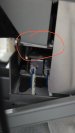
Turns out something is leaking inside the head/carriage and making a damn mess. Going to break into it further tomorrow am and will report back for future people that may run into this. It's dripping out, gunking up the entire rail/tread that moves the carriage, dripping all over the backside of the interior of the carriage. Pretty bad. Where are the 2/3 way valves? TS valves were fine seemingly. Could be subtank related though. Definitely have the subtank filter full of ink so I know that needs replacing either way.
 

Attachments

  • Screenshot_20260324_205106_VLC.jpg
    Screenshot_20260324_205106_VLC.jpg
    706.1 KB · Views: 38

RonnyCrack

UCJV300-160
Might be a ruptured line.
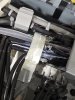
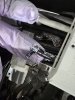
Thankfully turned out not to be a ruptured line, but a white line to the subtank got kinked and the backpressure must have blown it right off. Or does that count as ruptured? Lol. Disconnected and leaked all over the inside of the carriage. Got it mostly cleaned up now and test prints are all working. Have run into a couple ink supply errors but I assume it'll correct itself after enough filling up. Going to keep an eye on it.
 

Attachments

  • 20260325_221204.jpg
    20260325_221204.jpg
    1.1 MB · Views: 29
  • 20260325_221333.jpg
    20260325_221333.jpg
    1.3 MB · Views: 28

Smoke_Jaguar

Man who touches printers inappropriately.
Yeah, those fittings aren't very aggressive when it comes to holding. Any time you have to push them back in, good to cut back the flared bit of plastic and press into a new snug spot.
 

RonnyCrack

UCJV300-160
Yeah, those fittings aren't very aggressive when it comes to holding. Any time you have to push them back in, good to cut back the flared bit of plastic and press into a new snug spot.
Good idea. I'll do that before I put everything back together. I also took them out of the bracket to float above it, because that seems to be what caused the kink. But first, more cleaning :)

Thank you
 

RonnyCrack

UCJV300-160
Yeah, those fittings aren't very aggressive when it comes to holding. Any time you have to push them back in, good to cut back the flared bit of plastic and press into a new snug spot.
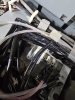
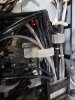
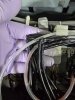
Just kind of a shot in the dark telling/asking you this, but I'm seeing the issue try to repeat itself in realtime every time I try to run a print. The white recirc lines get pulled into the "tread" pulley that pulls the carriage back and forth, and every other line gets pushed out in the opposite direction. I've done some pulling on both sides to even them out, but then within one or two short print jobs, they will be back to being pulled in and pushed out.

Do you have any ideas on how I might be able to solve this? I can't think of anything other than maybe zip tying all of the lines together very tightly, maybe with tape or foam wrapped around them for added grip/protection.

Thanks again!
 

Attachments

  • 20260329_173449.jpg
    20260329_173449.jpg
    1.6 MB · Views: 18

RonnyCrack

UCJV300-160
This next image is from just another couple minutes of printing after that first image. You can see how far in the white recirc lines get pulled. Not sure what's causing this push/pull, and why the 2 white recirc lines are pulled separately from the rest of the lines being pushed out.
 

Attachments

  • 20260329_174950.jpg
    20260329_174950.jpg
    1.6 MB · Views: 19

RonnyCrack

UCJV300-160
As you can see by this next image, I'm then able to get even placement on them again, but as soon as I run a job they'll get skewed back to their improper positions. Sorry to sort of spam my own post, just wanting to show each step of what happens in succession.
 

Attachments

  • 20260329_180712.jpg
    20260329_180712.jpg
    1.5 MB · Views: 20

Smoke_Jaguar

Man who touches printers inappropriately.
There is a foamed clamp that should be pinning the lines in place. If that foam gets worn out, wet or damaged, it will let the lines move more than they should. Can use adhesive weatherstrip foam to replace it if it gets damaged.
 
  • Informative
Reactions: 1 user

RonnyCrack

UCJV300-160
There is a foamed clamp that should be pinning the lines in place. If that foam gets worn out, wet or damaged, it will let the lines move more than they should. Can use adhesive weatherstrip foam to replace it if it gets damaged.
Thank you. I'll get ahold of some weatherstrip or something to replace that foam. It's definitely mangled. Currently wrapped around the mangled foam with electrical tape as a bit of a bandaid fix and it seems to be holding up for now. At least much better than without it. Is this something you've run into with a machine if yours in the past at all? I appreciate the knowledge.
 

Smoke_Jaguar

Man who touches printers inappropriately.
Yup, tape is best avoided, still want movement to be possible between lines as they all have slightly different bend geometry.
 
Top