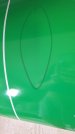
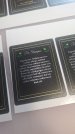
I just purchased a new Mimaki CJV200-130 in May, 2026 and I've been noticing some weird uneven ink placement. And I'm not sure what to do about it, I've done regular maintenance/cleanings. I've been getting this weird banding where the rollers are. And then also this almost gradient like black ink placement on these labels. It's like the ink is uneven. I'm looking for suggestions on what you think it could be because I'm at loss.

-
I want to thank all the members that have upgraded your accounts. I truly appreciate your support of the site monetarily. Supporting the site keeps this site up and running as a lot of work daily goes on behind the scenes. Click to Support Signs101 ...
You are using an out of date browser. It may not display this or other websites correctly.
You should upgrade or use an alternative browser.
You should upgrade or use an alternative browser.
Uneven ink saturation CVJ200-130
- Thread starter JulieJ
- Start date
Black Star Signs
New Member
I have a CJV150-130 and I too get that banding where the wheels are every now and then. It's weird because it isn't consistent at all.
As for the black ink, have you tried reducing your density?
As for the black ink, have you tried reducing your density?

Solventinkjet
DIY Printer Fixing Guide
It looks like the print feed calibration is off for sure. Each pass is overlapping a little too much which gives you that lawnmower effect. Look up in your user manual for "Feed Compensation." It will explain how to do it. It's pretty straight forward.
I'd also look in the media setup settings and lower the pinch roller pressure, especially if it's set to high. Try medium instead. If the roller makes a deep enough impression, it messes with how the ink falls on that area and makes that pattern more noticeable.
The black label looks like the media buckled which also messes with how the ink lands on the vinyl. The left side letters are not printed as crisp as the right because the media in that area was lifting off the platen a little bit so it distorts the image. Make sure you're using as many pinch rollers as possible, space them out as evenly as possible, and make sure the vacuum is turned up all the way. If all of that looks good and you still get buckling, turn the heat down until it no longer buckles.
I haven’t tried that no, but that is something I can look into! Thank you for suggestion.I have a CJV150-130 and I too get that banding where the wheels are every now and then. It's weird because it isn't consistent at all.
As for the black ink, have you tried reducing your density?
Thank you! This was amazing info, I feel like that'll clear it up as it makes sense.It looks like the print feed calibration is off for sure. Each pass is overlapping a little too much which gives you that lawnmower effect. Look up in your user manual for "Feed Compensation." It will explain how to do it. It's pretty straight forward.
I'd also look in the media setup settings and lower the pinch roller pressure, especially if it's set to high. Try medium instead. If the roller makes a deep enough impression, it messes with how the ink falls on that area and makes that pattern more noticeable.
The black label looks like the media buckled which also messes with how the ink lands on the vinyl. The left side letters are not printed as crisp as the right because the media in that area was lifting off the platen a little bit so it distorts the image. Make sure you're using as many pinch rollers as possible, space them out as evenly as possible, and make sure the vacuum is turned up all the way. If all of that looks good and you still get buckling, turn the heat down until it no longer buckles.
Black Star Signs
New Member
My pinch roller settings are on low and I still get that banding from time to time.
Are you using Rasterlink? I've always ran Mimaki printers but I was using Wasatch until this last printer that I purchased two years ago. When I started using Rasterlink, I noticed that it wants to lay down way more ink that Wasatch was. I run all my prints at 20% less density at least.
Are you using Rasterlink? I've always ran Mimaki printers but I was using Wasatch until this last printer that I purchased two years ago. When I started using Rasterlink, I noticed that it wants to lay down way more ink that Wasatch was. I run all my prints at 20% less density at least.