DChorbowski
Pixel Pusher
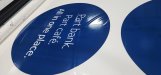
Im getting some frustrating results trying to print a 5 layer graphic onto clear vinyl for a second surface application. Material is 3M IJ3650-114 Clear I have tried just about everything I can think of at this point and I am still getting this uneven layer of ink on the 5th layer. Parts of the image have these darker bands as shown. I cant see these bands in the print till they come past the curing module which leads me to believe its a curing temperature issue and/or vacuum setting.
Originally tried the canned generic clear 5 layer profile and modified from temp and vacuum settings from there. Started at a temp of 203 degrees and incrementally went down 10ish degrees at a time to 158 degrees.
The material seems to be running nice and flat thru the platen. I have done color & optimizer calibrations. Full print head cleaning and alignment as well.
Its rather frustrating as the time it takes to see if any of the changes work is about an hour till it gets past the curing module. Whats also interesting is these bands do not show up on layer 1, only on layer 5. Layer one looks great. Any ideas?
Originally tried the canned generic clear 5 layer profile and modified from temp and vacuum settings from there. Started at a temp of 203 degrees and incrementally went down 10ish degrees at a time to 158 degrees.
The material seems to be running nice and flat thru the platen. I have done color & optimizer calibrations. Full print head cleaning and alignment as well.
Its rather frustrating as the time it takes to see if any of the changes work is about an hour till it gets past the curing module. Whats also interesting is these bands do not show up on layer 1, only on layer 5. Layer one looks great. Any ideas?