• I want to thank all the members that have upgraded your accounts. I truly appreciate your support of the site monetarily. Supporting the site keeps this site up and running as a lot of work daily goes on behind the scenes. Click to Support Signs101 ...

New Product VO-VE: artwork viewer for Windows and Linux (alpha)

dercar

New Member
Titul.jpg

We wanted to see what’s inside files right in their folders, quickly find what we need, and avoid opening heavyweight editors just to take a look. That’s how VO-VE came about. We built it for ourselves and already use it in our daily work.

Now, with a little caution, I’d like to invite fellow professionals to give it a try.

Free (forever), open source (forever), for Windows and Linux (and maybe macOS someday, if there’s interest). Just something we’d like to share with everyone.

It’s still an alpha. We don’t yet have enough experience with it across different real-world environments to confidently call it a beta. So I’d really appreciate specific feedback: where it helped, where it felt awkward, and what doesn’t work.

Download VO-VE · Report an issue

From Russia with love.
 

dercar

New Member
VoVe.gif

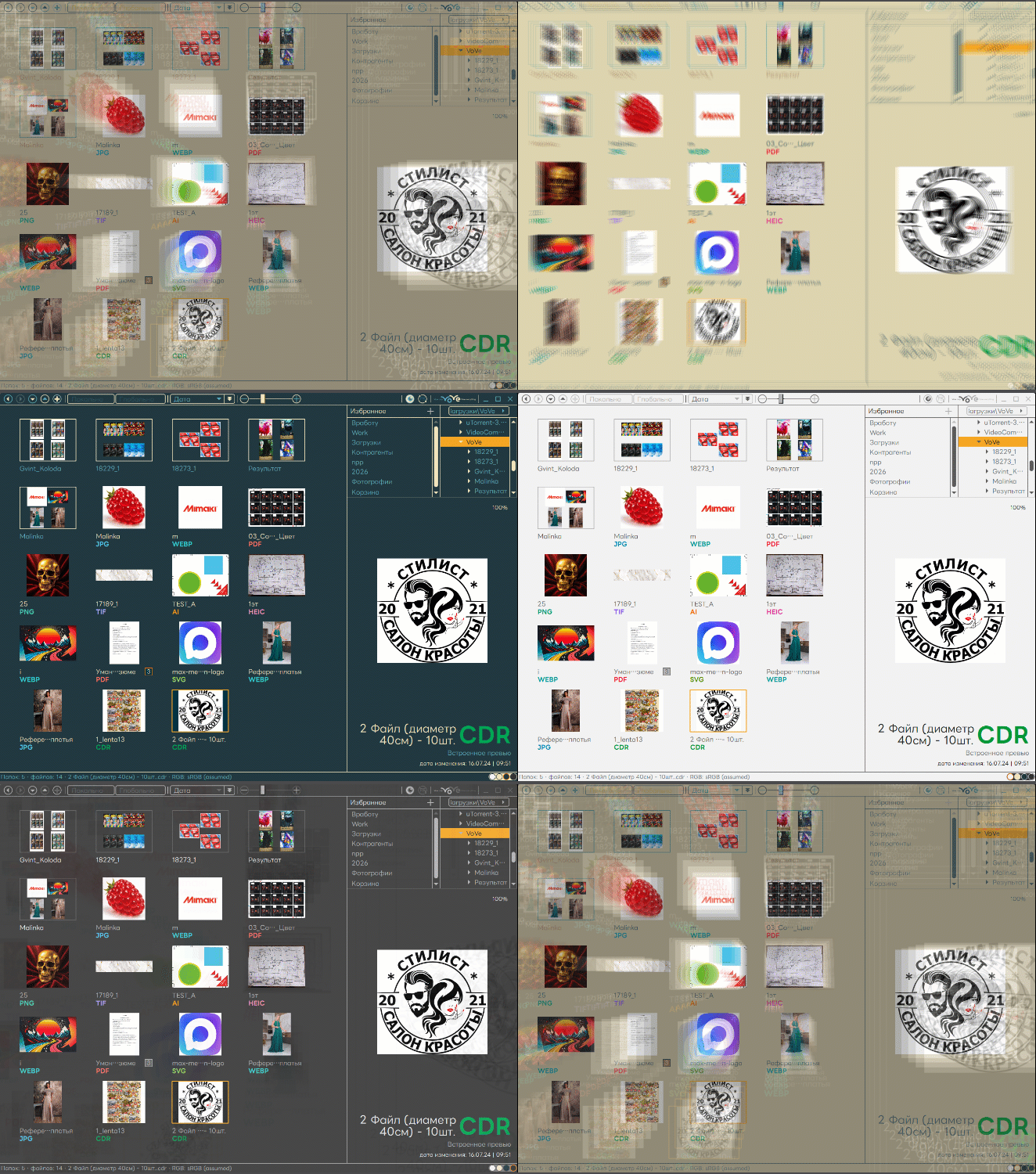
  1. Four pleasant themes for every taste: Twilight, North, Breeze, and Vanilla.
  2. View and preview formats widely used in printing and prepress, including AI, PSD, SVG, EPS, InDesign files, and, of course, our beloved, unforgiving CDR (damn that format).
  3. Double-click a file to open it directly in its native application.
  4. Folder previews showing up to four thumbnails of their contents.
  5. No interface clutter. No unnecessary features. A clean, attractive look with a logical, simple, and responsive interface.
  6. Zoom in and out in the preview pane using the mouse wheel.
  7. Browse multipage PDFs directly in the preview pane. No need to open Acrobat.
  8. Local filename search with instant filtering. And we mean fast.
  9. Global search powered by the outstanding Everything. Find artwork across your drives, including mapped network drives and NAS storage.
  10. Work with local network drives just like regular local drives. Copy, delete, and move files and folders.
  11. Batch renaming.
  12. Copy the full path of a file or folder and paste it into any other application.
  13. Add frequently used locations to Favorites, including printer hot folders.
  14. Rock-solid drag and drop, both into and out of the application. Drag a design file or an entire folder from any file manager into the preview pane, and the folder’s contents immediately appear in the thumbnail pane.
  15. A minimum of tedious, fiddly settings.
  16. Distinctive color coding makes file formats easy to identify in both the thumbnail and preview panes.
  17. Page-count badges for multipage PDFs.
  18. Color profile detection, with profile information displayed in the status bar. CMYK support.
  19. Sort by date, extension, name, or size.
  20. A download size of no more than 20 MB.
  21. No internet connection required. Just like the good old days.
  22. Four languages out of the box.
  23. Open source, so you can modify and customize it.
2026-09-22_16-55-46.PNG

2026-09-22_16-56-19.PNG
 
Top