
-
I want to thank all the members that have upgraded your accounts. I truly appreciate your support of the site monetarily. Supporting the site keeps this site up and running as a lot of work daily goes on behind the scenes. Click to Support Signs101 ...
You are using an out of date browser. It may not display this or other websites correctly.
You should upgrade or use an alternative browser.
You should upgrade or use an alternative browser.
What is your experience with the HP latex printers
- Thread starter Precision
- Start date

ozpall
New Member
At my last job we had a Latex 260 and it was a decent printer the got traded for a 360 which the 360 got better colors and overcoat cartridge, then we got a 365 which is basically the same 360 with minor changes, then we got a 800 series and had trouble with it, it jammed to much and rubbed the media to much, I tried not to use it much; 2 years later we had expired ink on it but still prints, I realized that the drying area was an inch lower on the 800 compared to the 365, I made a jig to where I could print raising the drying module one inch and after that I ran it a lot more, I'm not sure if anyone else had this issue since the people that sold us the 800 could not fix, it is nice to have 3 litter ink on the 800, we did'nt have white ink on it, also the 800 you can turn the overcoat off but not on the 360's
would love to see the Jig, i have the same issue with the 700w jamming and scratching the material specially with perf, banner and gf222 which its "thick" the best thing so far is to crank the vacuum all the way to 100% and crank the inter-pass delay to like 350-400.


Bonzai901
New Member
I no longer work at that place but I can try to get you some pictures sometime next week; all it is is a 1'' think block to set on the right side under the curing module to rest on, on the left side you'll need a 1" thick rectangle to the size of the air duct and on the same left side a metallic tab to trigger the sensor (witch I stick with double side tape), the printer will show a message saying is not a 100% contact HP but as long it let you print is good,would love to see the Jig, i have the same issue with the 700w jamming and scratching the material specially with perf, banner and gf222 which its "thick" the best thing so far is to crank the vacuum all the way to 100% and crank the inter-pass delay to like 350-400.
ozpall
New Member
ok cool, if you happen to get a pic that would be great!I no longer work at that place but I can try to get you some pictures sometime next week; all it is is a 1'' think block to set on the right side under the curing module to rest on, on the left side you'll need a 1" thick rectangle to the size of the air duct and on the same left side a metallic tab to trigger the sensor (witch I stick with double side tape), the printer will show a message saying is not a 100% contact HP but as long it let you print is good,
thank you.
Bonzai901
New Member
I got some pictures herewould love to see the Jig, i have the same issue with the 700w jamming and scratching the material specially with perf, banner and gf222 which its "thick" the best thing so far is to crank the vacuum all the way to 100% and crank the inter-pass delay to like 350-400.
Attachments
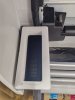

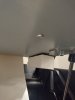
ozpall
New Member
thank you much!I got some pictures here

TEN
Premium Subscriber
We ran a 360 for 7 years, then went to a 700W. The 360 proved to be a reliable printer, many things we liked and a few things we did not but learned work arounds. The 700 has addressed the issues, mainly dimensional stability of prints that were an issue with the 360. We have had techs out a couple of times for the 700 and our experiences with the printer have been great.

dypinc
New Member
630 - Printheads 5 (1 cyan/black, 1 magenta/yellow, 1 light cyan/light magenta, 1 HP Latex Optimizer , 1 HP Latex Overcoat)
700 - Printheads 8 (2 cyan/black, 2 magenta/yellow, 2 light cyan/light magenta, 1 HP Latex Optimizer , 1 HP Latex Overcoat)
Based on the issues we had with the 300 series and 1 light cyan/light magenta printhead (ink starvation and nozzle redundancy) when it came to color consistency I would take a serious look at what your output expectations are before I would go with the 630.
700 - Printheads 8 (2 cyan/black, 2 magenta/yellow, 2 light cyan/light magenta, 1 HP Latex Optimizer , 1 HP Latex Overcoat)
Based on the issues we had with the 300 series and 1 light cyan/light magenta printhead (ink starvation and nozzle redundancy) when it came to color consistency I would take a serious look at what your output expectations are before I would go with the 630.

balstestrat
Problem Solver
You can see it's only one row now. Not 2-CMYK and 1-light like it used to be on gen3.630 - Printheads 5 (1 cyan/black, 1 magenta/yellow, 1 light cyan/light magenta, 1 HP Latex Optimizer , 1 HP Latex Overcoat)
700 - Printheads 8 (2 cyan/black, 2 magenta/yellow, 2 light cyan/light magenta, 1 HP Latex Optimizer , 1 HP Latex Overcoat)
Based on the issues we had with the 300 series and 1 light cyan/light magenta printhead (ink starvation and nozzle redundancy) when it came to color consistency I would take a serious look at what your output expectations are before I would go with the 630.
It's not a problem on 630.

balstestrat
Problem Solver
What's wrong with that?I've got an HP800W, the only thing I don't like is the take up, it's by far the weakest part of the device, outside of that mine runs approx 25-30 hrs a week, with little of no issues,
ozpall
New Member
I've got an HP800W, the only thing I don't like is the take up, it's by far the weakest part of the device, outside of that mine runs approx 25-30 hrs a week, with little of no issues,
still 100x better than my HP360 take up reel.
Jake Indiana
New Member
Dont buy an 800W! I have a 365 that's run like a champ for 8 years. I've had techs come out to fix my HP 800W at least 12 times. I've replaced more than 40 printheads in that time.
Hey everyone! I own an HP Latex 700W that I purchased back in 2021, but I’ve decided to sell it. I only used it for about two weeks in total before storing it away. The cartridges are still 90% full, though they’ve expired, and the same goes for the print heads. If anyone’s interested, feel free to reach out so we can chat about it.
Also, does anyone know if it’s possible to reset the chips on expired cartridges and print heads? I’d really appreciate any advice. Thanks!
Also, does anyone know if it’s possible to reset the chips on expired cartridges and print heads? I’d really appreciate any advice. Thanks!

CMYKing
New Member
I use 2 HP800W daily. I've noticed that the new firmware update mainly just made it so that the maintenance cartridge cannot be used on the older HP latex printers. Seems like planned obsolescence to me considering there is no physical change to the cartridge. Now that I've done the firmware update the ink reservoir fills up much faster where as that never happened before. Now I received a new cartridge and the piece on the side is clearly 3d printed and flimsey compared to the original piece which is solid plastic.
Another thing I don't like is that HP will charge you something like $50 just to talk to a tech. Economically I get it but there should be some discernment in front of the paywall before we decide it's worthy of opening a ticket. I had a squeek sound coming from the right side of the take-up reel. Since here in Eagle land we have a 'right to repair' I may have removed some screws from the right side of the take up reel which loosens the plastic panel so it may be removed. Then I might have disconnected the wiring being fastened to that plastic cover and then removed the plastic gear set that is driven by a small motor which juts out from the main take-up reel housing. The lubricant that comes with the printer can be used on the surfaces that experience friction in order to eliminate that annoying squeek sound... or so I've heard.
The HP800W is pretty easy to use though once you understand the main factors and the sensor placement. technically you can run anything through this printer as long as it's flat and wont warp due to heat but even then I don't see why you couldn't just lower the heat and let the print air dry. You just need to trick the printer into thinking the substrate roll has tension and a few other things.
Another thing I don't like is that HP will charge you something like $50 just to talk to a tech. Economically I get it but there should be some discernment in front of the paywall before we decide it's worthy of opening a ticket. I had a squeek sound coming from the right side of the take-up reel. Since here in Eagle land we have a 'right to repair' I may have removed some screws from the right side of the take up reel which loosens the plastic panel so it may be removed. Then I might have disconnected the wiring being fastened to that plastic cover and then removed the plastic gear set that is driven by a small motor which juts out from the main take-up reel housing. The lubricant that comes with the printer can be used on the surfaces that experience friction in order to eliminate that annoying squeek sound... or so I've heard.
The HP800W is pretty easy to use though once you understand the main factors and the sensor placement. technically you can run anything through this printer as long as it's flat and wont warp due to heat but even then I don't see why you couldn't just lower the heat and let the print air dry. You just need to trick the printer into thinking the substrate roll has tension and a few other things.
balstestrat
Problem Solver
But it's the complete opposite, no?I use 2 HP800W daily. I've noticed that the new firmware update mainly just made it so that the maintenance cartridge cannot be used on the older HP latex printers. Seems like planned obsolescence to me considering there is no physical change to the cartridge. Now that I've done the firmware update the ink reservoir fills up much faster where as that never happened before. Now I received a new cartridge and the piece on the side is clearly 3d printed and flimsey compared to the original piece which is solid plastic.
With the latest updates you can use the new style maintenance cartridge on your older L800 that comes from L830.
All the printers now use the new style that will last longer with the waste tank that you can empty or replace separately.