• I want to thank all the members that have upgraded your accounts. I truly appreciate your support of the site monetarily. Supporting the site keeps this site up and running as a lot of work daily goes on behind the scenes. Click to Support Signs101 ...

Question What's wrong with the width of the Mimaki CJV200-160?

redlamapro

New Member
I bought a new Mimaki CJV200-160. It has a lot of rollers, so I thought I could just keep the material moving. But instead of moving the rollers, I end up moving the roll.

Is this crazy, or am I doing something wrong? I've attached a picture with the instructions and the materials I used. I never had these problems with the Roland.

It feels like they placed the rollers in completely random places, at the very least why place the material further from the print head, it increases the print time.
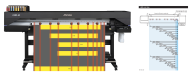
mimaki cjv200-160.png

Are there any Mimaki representatives or engineers here who can answer this question?
 

Smoke_Jaguar

Man who touches printers inappropriately.
Make sure the rollers are set somewhat equally spaced between the marks on the track the rollers slide on. This makes sure they stay in contact with the grit section of the main roller bar. If you are off that area, it might throw an error, or cause the material to wander.
 

redlamapro

New Member
Make sure the rollers are set somewhat equally spaced between the marks on the track the rollers slide on. This makes sure they stay in contact with the grit section of the main roller bar. If you are off that area, it might throw an error, or cause the material to wander.
Of course, I position the roll and rollers so they remain within the contact zone.

Currently, the rollers are in fixed positions, which means I have to move the roll itself to get its edges within the grip zone—which is unnecessary work.

It would be more logical to make one side (for example, the right) the reference point: fix the right roller and holder, and the remaining rollers should be preset to match the width of popular material widths. In that case, I wouldn't have to move anything at all: I positioned the roll, and it immediately falls within the contact zone of the rollers. I wouldn't have to move both holders, just one holder and one roller. Currently, it's like parking a car, where I have to match the width of the roll to the width of the two outer rollers, which are positioned in random locations.

I have attached a picture as an example of how this should ideally be implemented.

Am I the only one who finds this annoying?

IMG_3710.jpeg
 

Solventinkjet

DIY Printer Fixing Guide
It's not mandatory that you have pinch rollers on the edges. As long as the rollers you are using are as evenly spaced as possible and you use the edge guards, you'll be good to go.
 

redlamapro

New Member
For example, here's the standard width of Orafol films. Try not moving the right edge of the holder at all and positioning the roll of each width so that the pressure rollers are exactly at the edges of the material. It won't work! You need to move the entire roll each time to position it on the guide so that the rollers are at the edges of the material. Nonsense! IMG_3711.jpeg
 

redlamapro

New Member
It's not mandatory that you have pinch rollers on the edges. As long as the rollers you are using are as evenly spaced as possible and you use the edge guards, you'll be good to go.
I'm working this way now, but it's still not quite right, because the material needs to stretch evenly along the edges. The printer manual literally states that the distance from the roller to the edge of the material should not be more than 5 mm on EACH side. Even if you find that position, according to the manual, it's impossible to position the other rollers at the same distance to ensure even smoothing of the material. They're self-contradictory.
 

redlamapro

New Member
In the end, I want to say that either they have something to strive for, or I'm a fool, but user experience shows that the best result is only when the rollers are at the edges of the material, and the rest of the rollers are at an equal distance from each other across the entire width of the material, but on this model this is not feasible :(
 

Solventinkjet

DIY Printer Fixing Guide
In my experience, you can move it much further than 5mm without issues. You are definitely not alone in your frustration though. Roland seems to do better at Americanizing their models than Mimaki. Mimaki seems to optimize for Japanese common sizes and then ships them to American where we just deal with it.
 

somcalmetim

New Member
I dont know I have this same annoyance with the Roland vg3...I find it is just as awkward to use 63", 60", 53", 48" materials and end up with different positions for most of them...
Its even more awkward to try and fit smaller material with the requirements to have certain rollers in certain spots...its as if they had no idea what size material came in when they positioned the rollers...
 

redlamapro

New Member
I dont know I have this same annoyance with the Roland vg3...I find it is just as awkward to use 63", 60", 53", 48" materials and end up with different positions for most of them...
Its even more awkward to try and fit smaller material with the requirements to have certain rollers in certain spots...its as if they had no idea what size material came in when they positioned the rollers...
We should write a letter to printer manufacturers, maybe then they'll listen to us... I don't think there's a big difference in material width around the world. Even in official advertising videos, they install the material haphazardly.
 

WizardWorks

New Member
I bought a new Mimaki CJV200-160. It has a lot of rollers, so I thought I could just keep the material moving. But instead of moving the rollers, I end up moving the roll.

Is this crazy, or am I doing something wrong? I've attached a picture with the instructions and the materials I used. I never had these problems with the Roland.

It feels like they placed the rollers in completely random places, at the very least why place the material further from the print head, it increases the print time.

View attachment 182474

Are there any Mimaki representatives or engineers here who can answer this question?



sounds like your feed roller needs to be adjusted to better align with the right edge of the print area.
As far as getting help from Mimaki, easiest way to do that is call their tech support number in Texas.
 

redlamapro

New Member
sounds like your feed roller needs to be adjusted to better align with the right edge of the print area.
As far as getting help from Mimaki, easiest way to do that is call their tech support number in Texas.
The problem isn't that I can't install the material, but that with so many rollers, I still have to move the roll and try to find the position where the roll aligns with the rollers. They even suggest starting the count not from the first roller, but from a specific one, depending on the material width. That's idiotic. Why not just make rollers at a distance from the first roller for each standard material size? It's as if someone drunk wrote the documentation and decided that 1234mm-wide material is more popular than standard 1370mm, etc. I think they use Orajet in Japan too; it's unlikely they have different sizes.
 

somcalmetim

New Member
I assume the small rollers are cost savings...some of our old machines were one giant roller all the way across so you could easily use whatever size of material you want...
 

dercar

New Member
My experience shows that placing the rollers on the very edge is not only unnecessary, but also harmful. Ideally, it should be at least 5 cm. Yes, it's a little scary. But contrary to expectation, the down-to-earth slats do an excellent job of keeping your head from hitting the roll.
 

Andrewmsmith

Graphic Designer/Vinyl Print Output Production
i thought the same in regard to the Mimaki UCJV300-160 at my new place of employment. but after going at it with an optimistically open mind i realized there is a lot of grace with this set up. i have forgotten to move the left most roller over when switching from 60" vinyl to 63" banner and ran 40 feet with no problem. but ultimately i have noticed the outside rollers should be in from the edge (and inch or so).
 

Attachments

  • IMG_20260612_064637_hdr[1].jpg
    IMG_20260612_064637_hdr[1].jpg
    419 KB · Views: 15
  • IMG_20260612_064550_hdr[1].jpg
    IMG_20260612_064550_hdr[1].jpg
    371 KB · Views: 15
  • IMG_20260612_064607_hdr[1].jpg
    IMG_20260612_064607_hdr[1].jpg
    277 KB · Views: 15
Top