• I want to thank all the members that have upgraded your accounts. I truly appreciate your support of the site monetarily. Supporting the site keeps this site up and running as a lot of work daily goes on behind the scenes. Click to Support Signs101 ...

XC-540 alignment problems

JGGraphics

New Member
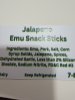
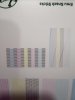
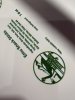
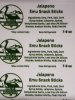
I recently replaced 4 print heads: magenta, yellow, black, and light cyan. I did the adjusting print test calibrations, aligned all the lines as close as possible, but I’m still getting some misaligned prints with these green emu labels I’m trying to print. You can see the wording in the label looks jittered. What am I doing wrong and how to fix this? Thank you in advance.
 

Attachments

  • IMG_6907.jpeg
    IMG_6907.jpeg
    3.2 MB · Views: 30
  • IMG_6908.jpeg
    IMG_6908.jpeg
    1.1 MB · Views: 28

FrankW

Active Member
Looks like that you haven´t aligned the heads well. If the offset is in media feed direction, you should check the vertical alignment.
 
  • Agree
Reactions: 1 user
You need to perform the vertical and the bias in the service menu. Keep in mind that the alignment head which could either be cyan or black depending on your inkset is extremely critical. That is the head that had the screw from underneath. If you moved that one, you will not be aligned with cap tops properly. You have to make sure that that one is in the proper place with the cap tops and then you align the other ones to that. It is usually the cyan head. You should zero out all the user level bIdirection adjustments first and then do everything in service mode on the most common material that you print on.
 
  • Agree
Reactions: 1 user

JGGraphics

New Member
You need to perform the vertical and the bias in the service menu. Keep in mind that the alignment head which could either be cyan or black depending on your inkset is extremely critical. That is the head that had the screw from underneath. If you moved that one, you will not be aligned with cap tops properly. You have to make sure that that one is in the proper place with the cap tops and then you align the other ones to that. It is usually the cyan head. You should zero out all the user level bIdirection adjustments first and then do everything in service mode on the most common material that you print on.
Thank you. So I did the verticals bias adjustments and straightened out the black and cyan vertical lines that were crooked. And now my cyan is sagging below all the other print heads. I tried turning the adjustment screw for light cyan, but nothing seems to be working? See attached
 

Attachments

  • IMG_6950.jpeg
    IMG_6950.jpeg
    1.2 MB · Views: 14
  • IMG_6947.jpeg
    IMG_6947.jpeg
    1.2 MB · Views: 14
Thank you. So I did the verticals bias adjustments and straightened out the black and cyan vertical lines that were crooked. And now my cyan is sagging below all the other print heads. I tried turning the adjustment screw for light cyan, but nothing seems to be working? See attached
The cyan, magenta and light cyan need to go to the rear.
The bracket is stuck by dried ink and you need to free it by pushing down on it with some force and/or put some cleaning solution on it to help remove the stuck ink.
 
Top