• I want to thank all the members that have upgraded your accounts. I truly appreciate your support of the site monetarily. Supporting the site keeps this site up and running as a lot of work daily goes on behind the scenes. Click to Support Signs101 ...

XR-640 Scan Motor 0010 0010 (left side)

davinciimports

New Member
Each time we try to setup media in the printer it beeps when the printheads reach the left side and the screen shows this message and to turn off the printer.
Is this a common error that is a simple replacement part?

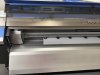
The printhead is currently over the caping station and the printer does perform normal cleaning cycles on its own still.
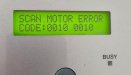
scan motor 0010.jpg
at this point.jpg
 
It is an XR. How old is it? Have you ever had the scan motor replaced? It may be time for the scan moto. Also you need to make sure that both heads travel freely individually with the power off.
could be either pulley as well, but doubtful but they do go bad.
 
  • Agree
Reactions: 1 user

davinciimports

New Member
This XR-640 is from 2013.
We are the original owners, and we have not changed a motor yet.
The heads do travel smoothly and easily by hand back to the capping station, but I have not pushed it to the left manually yet.

edit: I turned off the printer and used the metal pipe tool to lower the capping station, and the printhead carriage moves easily in both directions by hand.

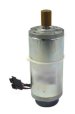
Does this look like the part to try?
Part #6700049030
 

Attachments

  • motor.jpg
    motor.jpg
    11.2 KB · Views: 3
Last edited:
This XR-640 is from 2013.
We are the original owners, and we have not changed a motor yet.
The heads do travel smoothly and easily by hand back to the capping station, but I have not pushed it to the left manually yet.

Does this look like the part to try?
Part #6700049030
Yes that is the correct part #.
First, make sure that both heads are moving freely individually with the power off to rule out linear bearings.
13 year old printer…the motor hours can be checked in service mode.
they are rated for 1500 hours and usually fail around 2400.
 
  • Agree
Reactions: 1 user

davinciimports

New Member
My printheads A/B are in the same carriage or housing and move together as 1 unit. It does seem to move freely.
I have not checked the printer menu for the hours used.

Would that be: Service Menu►Motor Menu►Aging ?
 

damonCA21

Active Member
My printheads A/B are in the same carriage or housing and move together as 1 unit. It does seem to move freely.
I have not checked the printer menu for the hours used.

Would that be: Service Menu►Motor Menu►Aging ?
Checking the hours isn't really necessary. The motor can fail at any time regardless of use, but after 13 years you would expect it to need replacing soon
 
  • Agree
Reactions: 1 users

Solventinkjet

DIY Printer Fixing Guide
Just to add, that error specifically means that what the CPU expected for motor movement didn't match what the encoder sensor signal sent back. So basically, the CPU says move 10 clicks and the sensor only reads 5 in the time allotted so it errors out. That can be due to drag or motor issues as mentioned above. It might also be a bad encoder strip or sensor. Since it's happening in the same position every time, there may be grease, ink splatter, or damage to the strip in that position. Try cleaning it.

At the end of the day, 13 years is old for a motor. It might be as simple as that.
 
Last edited:
  • Agree
Reactions: 1 users
I’m talking about separating the cutter carriage from the printer carriage and making sure that they individually move freely.
check scan motor hours in the service menu under history
 
  • Agree
Reactions: 1 user
Top