• I want to thank all the members that have upgraded your accounts. I truly appreciate your support of the site monetarily. Supporting the site keeps this site up and running as a lot of work daily goes on behind the scenes. Click to Support Signs101 ...

Need Help Blurry text 2 month old machine

Micheal

New Member
I have a brand new xg640 i had the head replaced because some nozzles are missing after that I noticed small text was blurry compared to my old printer however I dont know if it was after replacement or whole time.

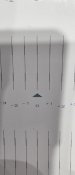
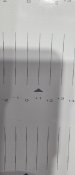
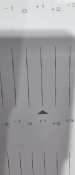
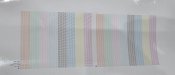
Ive attached my print test and alignment test

And the blurry text its almost like.droplets are being misplaced outside of letter. My friends old roland prints it perfect


Any ideas?
 

Attachments

  • 20251129_102553.jpg
    20251129_102553.jpg
    758.3 KB · Views: 46
  • 20251129_102646.jpg
    20251129_102646.jpg
    602.6 KB · Views: 26
  • 20251129_102639.jpg
    20251129_102639.jpg
    639.5 KB · Views: 24
  • 20251129_102625.jpg
    20251129_102625.jpg
    333.7 KB · Views: 24
  • 20251129_102611.jpg
    20251129_102611.jpg
    687.5 KB · Views: 38

netsol

Premium Subscriber
And it’s not a profile with lower resolution or having head height too high?
possibly static causing overspray (it is winter heating season)
 

Micheal

New Member
No print head is low and calibrated to that height. I doubt it's static i print in this same condition for last few years with my epson there. Ive done all possible setting variations in fact it looks best in low quality with least amount of passes.

Is there a test to see if printhead is installed correctly?
 

dlndesign

New Member
If alignment and profile are correct. Heads are clean. Id try unidirectional but I do not know what size the text is but that would be a workaround until you get the bi directional to work.
 

Micheal

New Member
Same results on uni , text size is acceptable I had my buddy with old roland print and his is crisp compared to my brand new one...
 

Attachments

  • 20251129_104351.jpg
    20251129_104351.jpg
    942.8 KB · Views: 35
Make sure the text isn't in RGB black which is a flood of all 4 colors. I've seen that before if the text is not just 100% black. Even if the heads are aligned perfectly sometimes RGB black is just too much ink
 
Top