• I want to thank all the members that have upgraded your accounts. I truly appreciate your support of the site monetarily. Supporting the site keeps this site up and running as a lot of work daily goes on behind the scenes. Click to Support Signs101 ...

Need Help Correcting color and keeping things consistent.

fguinand

fggr
Curious if anyone has good firsthand experience with an on-site or remote profiling service. Any price range.
Hi. If you have an 1Pro spectrophotometer I could linearize and then build custom ICC Profiles remotely using AnyDesk or TeamViewer. Which RIP do you use?
 

fguinand

fggr
Hi. If you have an 1Pro spectrophotometer I could linearize and then build custom ICC Profiles remotely using AnyDesk or TeamViewer. Which RIP do you use?
Is doable remotely but only if you have the spectrophotometer. I can guide you to take the measurements for color restrictions, linearization and then for the ICC building process. Tell me which Rip do you use, media, if solvent or sub printing process. I’m certified by Printing United in Wide format. Regards. Federico Guinand
 

Jim Hancock

Old School Technician
I have been studying color management for some 25 years, including a multiple year stint in fine art printing. All the profiles I have created in that time frame have had a neutral gray. These are my observations on the subject. The thing to understand about getting good CONSISTENT color is color management is a complete system, not just printer profiles. Printer profiles are obviously the most important element in good color, but you can still get consistent color the majority of the time. You need to treat color management as a system, rather than just having a good printer profile. There are multiple profiles involved in printing - the printer profile, the embedded profile in your file, the working space profile in your design program, the monitor profile, and the input profile of your RIP. These must all be locked in and not changed to have consistent color. You can control all of these, except for determining the embedded profile of files you receive from your customers. However, if you consistently convert those external files to your working space profile when opening them in your design software, you maintain a reasonable control of that aspect. All of the previous suggested techniques are all valid and offer ways to get there. But if you don't implement color management as a system, you are still going to get unexplained color variations at times. To fully understand the nuances of color management, I would suggest getting Bruce Fraser's book - Real World Color Management. It is considered to be the bible of color management and is written in a way that everyone can understand. Short of getting an i1 and making your own profiles, implementing a complete color management system will certainly help. See the attached link.

 
  • Agree
  • Informative
Reactions: 3 users

fguinand

fggr
I have called all around my area and no one can help with color profiling. Everyone is just fixing machines. I would like to know if some that can help with that as well
Hi. If you have an 1Pro spectrophotometer I could linearize and then build custom ICC Profiles remotely using AnyDesk or TeamViewer. Which RIP do you use?

Quote Reply
Report •••

[IMG alt="fguinand"]https://www.signs101.com/data/avatars/m/40/40872.jpg?1569324132[/IMG]

fguinand

fggr​

Hi. If you have an 1Pro spectrophotometer I could linearize and then build custom ICC Profiles remotely using AnyDesk or TeamViewer. Which RIP do you use?
Is doable remotely but only if you have the spectrophotometer. I can guide you to take the measurements for color restrictions, linearization and then for the ICC building process. Tell me which Rip do you use, media, if solvent or sub printing process. I’m certified by Printing United in Wide format. Regards. Federico Guinand
 

Humble PM

Mostly tolerates architects
I have been studying color management for some 25 years, including a multiple year stint in fine art printing. All the profiles I have created in that time frame have had a neutral gray. These are my observations on the subject. The thing to understand about getting good CONSISTENT color is color management is a complete system, not just printer profiles. Printer profiles are obviously the most important element in good color, but you can still get consistent color the majority of the time. You need to treat color management as a system, rather than just having a good printer profile. There are multiple profiles involved in printing - the printer profile, the embedded profile in your file, the working space profile in your design program, the monitor profile, and the input profile of your RIP. These must all be locked in and not changed to have consistent color. You can control all of these, except for determining the embedded profile of files you receive from your customers. However, if you consistently convert those external files to your working space profile when opening them in your design software, you maintain a reasonable control of that aspect. All of the previous suggested techniques are all valid and offer ways to get there. But if you don't implement color management as a system, you are still going to get unexplained color variations at times. To fully understand the nuances of color management, I would suggest getting Bruce Fraser's book - Real World Color Management. It is considered to be the bible of color management and is written in a way that everyone can understand. Short of getting an i1 and making your own profiles, implementing a complete color management system will certainly help. See the attached link.

I've profiled and matched multiple printers, and every media I care about is profiled. It costs me about an hour per media to calibrate and profile, as well as a yard of media, and a squirt of two of ink.

All the lights in my workspace are controlled proofing lights, my workspace neutral, screens by Eizo.
Lighting £1000
Screen £1500
i1pro £2000
RWCMx2 £70

RWCM - a book so good, I've bought it twice (and then found my original copy).
 
  • Agree
Reactions: 1 user
I would suggest getting Bruce Fraser's book - Real World Color Management. It is considered to be the bible of color management and is written in a way that everyone can understand. Short of getting an i1 and making your own profiles, implementing a complete color management system will certainly help.
This book is the best color management resource that I have ever encountered, it is highly recommended reading!
 
  • Agree
Reactions: 1 user

Jim Hancock

Old School Technician
All the lights in my workspace are controlled proofing lights
Yes, I did forget to include the viewing environment in my post! Very important. In the sign trade, if you don't have a color correct lighting system, go outside to evaluate your file output, which makes sense, as most of our trade is meant for outdoors. If you want to see the extreme impact viewing lighting can have, print something you think is correct color indoors, and view it under outdoor lighting. Depending upon your indoor lighting type, you will see a radical difference. Something that looks good under ordinary fluorescent lighting may be unacceptable when viewed outdoors.
 
  • Agree
Reactions: 1 users
RGB Blacks and Grays!! So many people just click to convert RGB stuff to CMYK. But when you do that all the black and gray ends up being a mix of all 4 inks. In Black it is a flood of all 4 and wastes ink and can smear. In Grays it can open you up to the possibility that your printer overall settings are is not perfectly balanced (you like the way it prints!) but your grays will be toned one way or another. For example a 10% black gray tone will end up being converted to 7% each of Mag/Cyan/Yel. You can see the potential for off color grays. Check your grays and try manually correcting them (like in photoshop) to a % of black tone that is the same intensity and your grays will always be gray.
 
  • Informative
  • Agree
Reactions: 1 users

Jim Hancock

Old School Technician
So many people just click to convert RGB stuff to CMYK.
What many people think is it's a CMYK printer, so they should work in CMYK. The only scenario I am aware of that this is true is in offset printing where there are 4 or more plates or screens, one for each color ink. This allows the pressman to fine tune the final color balance at the press by adjusting individual channels. In our world, things work differently. First is the color gamut of the different color spaces. In increasing order, they are CMYK - sRGB - AdobeRGB1998 - ProPhoto. AdobeRGB1998 is probably closest to what sign printers can reproduce. When you convert an RGB file to CMYK, you are stripping away colors that you can probably print. In addition, most RIPs are designed with an RGB input in mind. Also, everyone is working in an RGB environment - the monitor. In addition, every color conversion uses a intermediate color space many people are unaware of - L*a*b color. This color space is used as an intermediate or translation step as it is a color space that contains ALL the visible colors. The point of all this is to work in RGB, as it contains more color than CMYK, your monitor is RGB, work in AdobeRGB1998 as it is larger than sRGB (sRGB was created to allow consistent color across the various manufacturers color monitors, not for printing), and let the RIP handle the conversions, as that's what it is designed to do. I've attached a link from Pantone that gives a good explanation of color spaces, In addition, Pantone swatch books contain RGB values as well as CMYK and HTML values. Here is a link that explains in further detail.
 
  • Agree
Reactions: 2 users

Solventinkjet

DIY Printer Fixing Guide
RGB Blacks and Grays!! So many people just click to convert RGB stuff to CMYK. But when you do that all the black and gray ends up being a mix of all 4 inks. In Black it is a flood of all 4 and wastes ink and can smear. In Grays it can open you up to the possibility that your printer overall settings are is not perfectly balanced (you like the way it prints!) but your grays will be toned one way or another. For example a 10% black gray tone will end up being converted to 7% each of Mag/Cyan/Yel. You can see the potential for off color grays. Check your grays and try manually correcting them (like in photoshop) to a % of black tone that is the same intensity and your grays will always be gray.
The reason RGB works better is because modern printers have a wider gamut than the standard CMYK color space. Since RGB has a far larger gamut than CMYK, when the RIP converts RGB to the printer's actual CMYK space, it can take advantage of the wider gamut of the printer. Designing in standard CMYK basically limits you to an old standard. That's why color correction matters. When you complete a full color correction work flow, you can embed the printer's actual color space in the file, design in CMYK, and it will take advantage of the entire gamut the printer is capable of. It's basically telling the design software, here is the full capability of my printer. A rich black should use all colors and greys do use all colors as well depending on how cool or warm you want it to look. When properly color calibrated, the grey you send from your software is what it will print without having to fuss with it. Those are the advantages of color correction, although it is an investment in time and money which people have to justify based on their own needs. It is very convenient though.
 
  • Agree
Reactions: 1 users

Jim Hancock

Old School Technician
Onyx user. Have you ever profiled a epson f series using onyx to rip & print. If so I got 20 or so $100 questions for you.

If this question is directed to me, I have been using and profiling Onyx for the past 25 years. As to dye sublimation, 15 years experience for both hard and soft substrate materials in a large scale production environment. It's handled a bit differently than vinyl. I would need to know which version of Onyx.
 

Andrew Heiner

New Member
I have advantage with a current subscription. So 25.5? We cannot get ink limiting to work with onyx. Any settings I change it prints 100% ink and super saturate the paper.
 

Jim Hancock

Old School Technician
I have my personal copy of Thrive V19. I don't imagine there is a whole lot of difference in the basic interface and functions. If you would like, I suggest you call me Monday morning to discuss, as it would be much more efficient than here. I'm in Florida, number is in my signature.
 
  • Agree
Reactions: 1 user

LizKeenan

New Member
If your grays are coming out green and you use Versaworks try setting the color to colormetric instead of absolute in file format, and set color profile to sign and display. Also ensure you are using proper spot Pantones. We ended up getting green grays soon after getting our printer from it being left in absolute color and True Rich Standard and it made some insane drift in the grays.

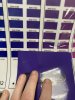
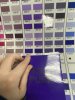
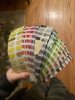
I also found the entire Pantone library online and made a color deck. I realized the internal spot library for Pantone needs the exact name and C or whatever Pantone library color name you need. I also made a deck for the Roland spot colors as well for easy color matching.
 

Attachments

  • IMG_9207.jpeg
    IMG_9207.jpeg
    1.7 MB · Views: 8
  • IMG_9209.jpeg
    IMG_9209.jpeg
    1.5 MB · Views: 8
  • IMG_36DA488C-CCFE-48D2-AD87-66916837C1DB.jpeg
    IMG_36DA488C-CCFE-48D2-AD87-66916837C1DB.jpeg
    2.1 MB · Views: 8
Top