• I want to thank all the members that have upgraded your accounts. I truly appreciate your support of the site monetarily. Supporting the site keeps this site up and running as a lot of work daily goes on behind the scenes. Click to Support Signs101 ...

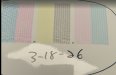
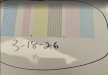
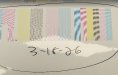
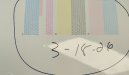
Does my Y test print look okay (XC-540)

davinciimports

New Member
I just changed the K head and still notice some yellow overspray in my prints.
Does this nozzle check look okay? I can't really see the yellow well.

Should I get a close up of the test print on the other side where my peanut jar is covering?
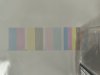
IMG_20260122_162759082_HDR.jpg
 

Solventinkjet

DIY Printer Fixing Guide
You've got a few minor deflections but it should be good. Is the yellow peaking out sharp looking or fuzzy? Did you do the head alignments?
 

davinciimports

New Member
The yellow overspray is kind of peeking out to the right side of the black design that is being printed.
Kind of like a yellow shadow. Since the image is all back lines on a white background, it makes the background off-white instead of white.

Do you think I should redo my head alignments and focus better on my yellow head? (I can't upload new photos right now due to a glitch)
 

Solventinkjet

DIY Printer Fixing Guide
If it's peeking out the side like that, it's either the bi-directional or horizontal alignment that's off. It could be the bias too but since you didn't take the yellow head out, it's less likely.
 

cornholio

New Member
Use a blue led lamp for inspecting the yellow adjustment prints. (Real blue, not the purple or near-UV for inspecting money bills)
 

davinciimports

New Member
The printer has been working great, then the M-head lost the left side. (half head disappeared)
Wouldn't come back.

I changed the magenta captop and both dampers. Left side still disappeared.
Ordered a new print head.

The printer sat and I did my weekly cleaning. Test print was the same. Left half of the magenta test print all missing but right side decent.
The printer sat and I did my weekly cleaning. Test print was the same.

I went to change the head today and did a test print and then both sides of the magenta test print look decent.
Confused but happy.
I did another test print and the magenta was missing the whole left side again. Darn.
Then it came back a little on the next test print.
Then lost a little of that.
Then, gone again.
Then, slight little thin
 

Attachments

  • mg 1.jpg
    mg 1.jpg
    66.7 KB · Views: 15
  • mg 2.jpg
    mg 2.jpg
    62.3 KB · Views: 10
  • mg 3.jpg
    mg 3.jpg
    52.5 KB · Views: 10
  • mg 4.jpg
    mg 4.jpg
    39.5 KB · Views: 11
  • mg 5.jpg
    mg 5.jpg
    55.6 KB · Views: 21

davinciimports

New Member
This is the slight thin odd.

I am about to leave for the night and will return to work tomorrow. I just wanted to post this before leaving.
I guess I should just go ahead and change out the head with the new one on Thursday.
 

Attachments

  • mg 6.jpg
    mg 6.jpg
    47.7 KB · Views: 24

cornholio

New Member
Looks like electrical head failure. But to be sure, id check the following. Connect the cables of the cyan head to the magenta head. Tape the magenta cables, so they don't make contact and don't get caught mechanically during head movements. I'd also swith the magenta dampers on the manifolds of the head. Be sure to make a cleaning before the test print. If the problem stays in the same channel in those tests, replace the head.
 

Jim Hancock

Old School Technician
When you replaced the dampers, did you replace the O-ring on the line connecting to the dampers? It's also possible you have a cracked manifold post. This is usually the cause of this behavior. If you kept the manifold form the previous head, you can flush it out and put it on your magenta head and see if that's you issue.
 

davinciimports

New Member
Changed the head. It is printing great now.

I was nervous to swap cables and play with the heads. I am afraid I will mess up the cables or head when flipping them back and forth.
I have done all the maintenance parts and consumables, but I am kind of new at changing print heads.
I have changed my first and then my second print head using Jim Hancock's phone support.
This is my 4th print head replacement.

I did place new O-rings on each line when I changed the dampers. I didn't cut and shorten the lines because they were not indented this time.
My new o-rings are not cone or funnel shaped though. I am not sure where to get those funnel shaped O-rings. Mine are just regular round o-rings. They seem to be working well.

edit: I didn't try changing the manifold because cleaning solution flushed through when I pulled the head.
 
Last edited:

hybriddesign

owner Hybrid Design
the cracked manifold note is definitely one to look out for. It’s not that obvious as sometimes you have to flex them to see the crack but it’ll cause mystery drop outs and you might end up buying a new head when it’s a cheap manifold replacement. I’m pretty sure I was guilty of that at least once back when we had the same printers as you
 

cornholio

New Member
Cracked manifolds happen mostly in EcoUV inked printers.
A telltale sign is foamy ink in the captop, or in the syringe.(given a good seal of the captop)
 
Top