• I want to thank all the members that have upgraded your accounts. I truly appreciate your support of the site monetarily. Supporting the site keeps this site up and running as a lot of work daily goes on behind the scenes. Click to Support Signs101 ...

got a new modem now Versacamm quits half way through printing, says "Now Processing" and freezes

Kipp

New Member
I've had this issue before but I don't remember how I fixed it! Can anyone help me please.
 
Which model?
Generally, this is a communication between the PC and the printer.
It is rarely the network card on the printer UNLESS it is a VP model.
Otherwise you have something going on either with the ethernet cable a switch a router or the PC itself.
run direct connection from PC to printer.
make sure the computer is set to not go to sleep in the sleep settings mode. Otherwise it can stop sending the data to the printer in the middle.
 

netsol

Premium Subscriber
Via your internet browser on your pc, you should be able to access your router settings will be something like http://192.168.1.1 from there you should be able to check if it is a static or dynamic IP and change in necessary
microsoft has a fetish for saving minute amounts of power, no matter how many problems it causes
first of course google and see if your router/modem has power management. DISABLE IT.

then go to "edit power plan" and for test purposes SET "PUT COMPUTER TO SLEEP" TO NEVER

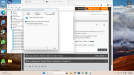
then go to device manager, network adapters and whichever is your active adapter >properties>power 1777823357082.png
REMOVE BOTH CHECKMARKS
 
Top