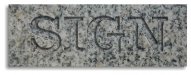
• I want to thank all the members that have upgraded your accounts. I truly appreciate your support of the site monetarily. Supporting the site keeps this site up and running as a lot of work daily goes on behind the scenes. Click to Support Signs101 ...

help with 3D

rrgongora

New Member
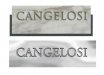
I am no good with 3D objects. Can anyone show me how or allow me to purchase a high resolution file made to look like this chisled marble. My customer gave me this file and I cannot reproduce it for digital print magnetic car signs. The file I was given is not high enough resolution. I've attached it for viewing. I would need to make this without the black shadow and where I can move the text around. The customer does not know if she wants the text centered in the middle or on top.

Thanks to everyone...

Richard
 

Attachments

  • cmg_logo[1].JPG2.jpg
    cmg_logo[1].JPG2.jpg
    23.3 KB · Views: 113

Techman

New Member
do u have photoshop? if so that could be done very easily.

you make a layer with the type on it and move it around anywhere you wish
Corel has soem stone background presets too, use them ...
 

2NinerNiner2

New Member
Richard - one way to get this effect is with the Eye Candy plugins for Photoshop; the 'marble' effect for the background and the 'cutout' effect for the text. These are available for purchase online at www.alienskin.com.
 

rrgongora

New Member
Thanks for your response. I do not have photoshop. I mainly use corel. I tried the backgrounds on corel but I can't get that 3D chiseled look. I've tried different shadows, but can't seem to get it exact. I've attached what I have done.

Richard
 

Attachments

  • cangelositest.jpg
    cangelositest.jpg
    41.6 KB · Views: 86

Colin

New Member
For something like this, the customer should be providing you with the proper file. If you need to re-create it, make sure you charge them for your time.
 

TresL

New Member
Photoshop would be the way to go for that.(Alienskin)
A sharp bevel on the text should also get you closer.
 

cdsgraphic

New Member
You can do it all within CorelDRAW. Here's a sample, no photoshop effects or plugins are needed.

I don't have time to do a tutorial right now... maybe later.

It could use a little more tweaking but the idea is there... :biggrin:
 

Attachments

  • routed lettering in marble.jpg
    routed lettering in marble.jpg
    53.7 KB · Views: 88

rrgongora

New Member
cdsgraphic, that's what I'm looking for. I would appreciate any tutoring later if you get the chance. I will keep checking in.

Thanks all...

Richard
 

Techman

New Member
All you have to do is google the effect. There are litterally hundreds of tuts all over the web for this effect.
 

Mason

New Member
First you arent using the correct shadow, you should be using "inner shadow" it looks like you are using a simple drop shadow which isnt what that is.

Photoshop is the way to go here.
 

Rick

Certified Enneadecagon Designer
Seems like a big hassle to me, and I can reproduce that logo, you are also using the wrong typeface for that recreated logo.
 

rrgongora

New Member
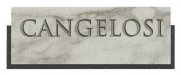
Thanks for all the tips. Especially Mason. That inner shadow hint is what set off the lightbulb. I think this is the best I am going to be able to do.

Thanks again all,

Richard
 

Attachments

  • Graphic1.jpg
    Graphic1.jpg
    43.5 KB · Views: 50
Top