JBurton said:
Oddly enough, removing one of the larger squares in the corner made it unreadable
The three larger squares in the upper corners and lower left corner are vital; a smartphone camera will use them to properly register angle/orientation before processing the code. There is a common smaller square in the lower right that's always present as well.
The QR Code generator in CorelDRAW provides choices for four levels of error correction: high, low, medium and quartile. Obviously the high setting will mean more data spots being recorded into the code.
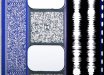
QR Codes remind me of digital audio data printed onto 35mm film prints. Dolby Digital audio was printed in squares of data between the sprocket holes. There was a little Dolby logo in the middle of each data square -kind of like people sticking logos in the middle of QR Codes. Sony's digital audio format was printed on the edges of the film strip. DTS used a time code that looked like Morse code to sync the film print to audio being played on CD-ROM discs. The time code was printed to the right of the old optical analog stereo audio track. The old DTS format is still used on 70mm film presentations now; those modern 70mm prints only have time code and no other audio data on them.