
• I want to thank all the members that have upgraded your accounts. I truly appreciate your support of the site monetarily. Supporting the site keeps this site up and running as a lot of work daily goes on behind the scenes. Click to Support Signs101 ...

RF-640 banding issues

heyskull

New Member
We have a 4 colour RF-640 which we have had from new since 2021 still with the original print head.
This uses Rolands Eco Sol MAX 3 inks.
The test print is as good as the day it was installed (due to keeping it clean and printing lots & lots.)
The Bi-Directional & the Calibration prints are set perfect.
But when printing a print with a lot of black areas I am getting very faded banding but only in the black.
This is so slight I cannot even photograph it.
Is there a internal menu I can access to do some further calibration?
 
Being that you have an RF, it is fairly old and so are the head and dampers.
The head is a consumable item and don’t last forever, it is very possible. You just have a slightly clouded black damper on one of the two black dampers.
The only way we could tell that would be to see the shot counts on the Peck report.
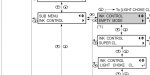
Have you tried the light choke clean. You can find it under manual, sub manual, ink,control light choke clean.
also, the service level nozzle test print will have the microdot test wnice show a lot more than a regular nozzle test using a loupe.
 

Attachments

  • IMG_7104.jpeg
    IMG_7104.jpeg
    70.9 KB · Views: 17
  • Agree
Reactions: 1 user

cornholio

New Member
When i had problems with EcoMax3, it was mostly with yellow. I guess you talk about a composite black, not a pure K100 with preserve primary color setting.
 

heyskull

New Member
Being that you have an RF, it is fairly old and so are the head and dampers.
The head is a consumable item and don’t last forever, it is very possible. You just have a slightly clouded black damper on one of the two black dampers.
The only way we could tell that would be to see the shot counts on the Peck report.
Have you tried the light choke clean. You can find it under manual, sub manual, ink,control light choke clean.
also, the service level nozzle test print will have the microdot test wnice show a lot more than a regular nozzle test using a loupe.
Hi

Could you talk me through how to carry out a light choke clean please?
I have never accessed engineers menu on this machine.
Also how do I show a Peck report & service level nozzle test print?

Thanks
SC
 
Unfortunately, I cannot put you into service mode. You may be able to find it online somewhere.
As far as the peck goes, you can actually get what it’s called a Co Peck report and send that to me and I can read it. You will not be able to read it.
You can find the download for Co Peck here. It is under application resources.


heyskull

New Member
Unfortunately, I cannot put you into service mode. You may be able to find it online somewhere.
As far as the peck goes, you can actually get what it’s called a Co Peck report and send that to me and I can read it. You will not be able to read it.
You can find the download for Co Peck here. It is under application resources.

I will sort this out on Monday thank you.
I do believe this is something to do with the Bi-directional Calibration as the Calibration print changes slightly every time you print it and needs reset.
It is as if the print head is slightly moving on the return print pass.
I am using it in uni-directional and the prints looks amazing and some of the issues with the red colours still looking slightly motley, disappears completley.

SC
 

heyskull

New Member
I changed the profile from Generic Vinyl 2 to Generic Vinyl 2HD and everything is good again.
If I do a print in Generic Vinyl 2 Uni-Directional everything is perfect also, but takes twice as long.
SC
 
Top