
• I want to thank all the members that have upgraded your accounts. I truly appreciate your support of the site monetarily. Supporting the site keeps this site up and running as a lot of work daily goes on behind the scenes. Click to Support Signs101 ...

Roland SP540i error ink cartridge not installed

rcgraphics77

New Member
Hello I am having some issues with a Roland SP 540 I where it gives me an error not recognizing the ink cartridge being installed. It doesn’t happen all the time but it does happen periodically. For example, I’ll be Printing a job and in the middle of it it stops and it says air cartridge uninstalled and it’s the yellow or magenta cartridge. It happens only in the yellow and sometimes with magenta. It also happens when machine is asleep, it will wake up beeping with that error. I have swapped cartridges for new ones and still does it. I need any tips that anybody has us to what I can do or what I need in order to fix this machine. Thank you in advance.
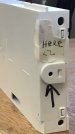
 
As these printers get old, it appears that the cartridge detection sensor starts to fail. You can try taking a long straw and putting it right up the cartridge detection sensor. It is at the back end of the ink cartridge holder, it is a little tiny white square about a millimeter square. If you take a long straw and put it right on top of that and take a can of air at the other end, you can try to blow out the sensor.
the other thing to do that will probably help you is just put a couple pieces of masking tape on to the ink cartridge as in the picture that I have shown here. This just raises the area of the cartridge that contacts the sensor just a little bit and pushes against the sensor better.
yes, all you have to do is walk past the printer and it will start telling you the cartridge is not in there. Or breathe.
 

Attachments

  • IMG_3970.jpeg
    IMG_3970.jpeg
    262.4 KB · Views: 11
  • Agree
Reactions: 1 user

rcgraphics77

New Member
As these printers get old, it appears that the cartridge detection sensor starts to fail. You can try taking a long straw and putting it right up the cartridge detection sensor. It is at the back end of the ink cartridge holder, it is a little tiny white square about a millimeter square. If you take a long straw and put it right on top of that and take a can of air at the other end, you can try to blow out the sensor.
the other thing to do that will probably help you is just put a couple pieces of masking tape on to the ink cartridge as in the picture that I have shown here. This just raises the area of the cartridge that contacts the sensor just a little bit and pushes against the sensor better.
yes, all you have to do is walk past the printer and it will start telling you the cartridge is not in there. Or breathe.
Thank you so much!
 

damonCA21

Active Member
If that doesn't fix it then replacing the ink dock is the easiest option as you can't get the switches just on their own. I have plenty of replacement docks in stock if you need them
 

netsol

Premium Subscriber
my #4 cartridge always seemed to know when i was in a hurry to print something & would go intermittent at the damnedest times
 
  • Agree
Reactions: 1 user
Top