• I want to thank all the members that have upgraded your accounts. I truly appreciate your support of the site monetarily. Supporting the site keeps this site up and running as a lot of work daily goes on behind the scenes. Click to Support Signs101 ...

Suggestions Roland Versacamm VS-540i - Multiple Channels Failed After Damper Replacement (Need Diagnostic Suggestions)

adpower4you

New Member
I’m hoping someone with Roland VS-540i experience can help before I spend some dollars on a new print head.

Printer:
Roland VersaCAMM VS-540i
Was in moderate use before this repair.

Original Issue
The printer originally only had some missing nozzles (primarily Cyan & Light Cyan). The other colors were mostly printing fine with just a few missing nozzles.

What I Replaced:
New captop
New wiper
Replaced 3 of the 4 damper assemblies:
AB
DG
FH
Left CE alone
Primed each new damper individually using a syringe until ink was flowing.
Dampers are fully seated.
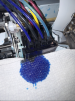
Manifold was removed, cleaned, and reinstalled (Had a lot of cyan ink in the manifold (as pictured)

Maintenance Performed

Normal, Medium, and a few Powerful cleanings.
Overnight cap top soak with Eco-Sol cleaning solution.
Made sure the captop seals and maintains vacuum.
Wiper is sweeping correctly across the head.
Pulled ink through each new damper individually from the cap top side and ink flowed consistently.
Cleaned the manifold and removed all excess ink.
Removed, cleaned (isopropyl alcohol), and reseated the ribbon cable contacts.

Current Problem
Now the nozzle check is dramatically worse than before.
Instead of just Cyan issues, I’m now losing:

Yellow
Cyan
Light Cyan
Black
Light Magenta

The missing channels change slightly between nozzle checks, but overall multiple unrelated channels are affected.

Dampers are installed correctly. Vacuum seems consistent. No obvious air leaks. Ink lines are full. The nozzle plate itself looks clean with no obvious scratches.

One concern I noticed..
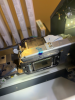
While removing the head, I noticed damage on the gold flex cable attached to the print head.
I don’t remember it looking that bad before the repair, but I can’t say with certainty whether it happened during removal or was already there.

The ribbon cables themselves look visually fine with no obvious tears or kinks.

My Questions
Does this sound more like a damaged print head/flex cable or an electrical issue?
Could a bad ribbon cable cause multiple unrelated color channels to fail like this?
Would you replace the ribbon cables first before replacing the head?
Is there anything else you would test before spending $$$ on a new print head?

I’ve attached photos of:

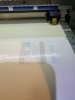
Nozzle checks
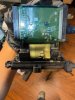
Print head
Flex cable damage
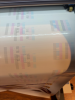
Ribbon cables
Manifold

Any suggestions/ advice from someone who has diagnosed this exact issue on a VS-540i would be greatly appreciated. BE7965E3-0E33-4C04-9B64-6E10FDBEF903.JPEG F416AAB2-1D72-4E15-A718-3DCF0252053F.JPEG 93E25568-1158-440B-A900-EEBC0DB9F314.JPEG E1E9928F-AA40-4E21-B6EE-490A7BD48E09.PNG DF1EA862-4C7D-4AAA-A0D6-3C6C89D34AA1.PNG
 

adpower4you

New Member
Here are some of the additional images for reference
 

Attachments

  • Screenshot 2026-07-14 at 10.37.29 AM.png
    Screenshot 2026-07-14 at 10.37.29 AM.png
    4.4 MB · Views: 9
  • Screenshot 2026-07-14 at 10.36.31 AM.png
    Screenshot 2026-07-14 at 10.36.31 AM.png
    3.8 MB · Views: 8
  • Screenshot 2026-07-14 at 10.36.46 AM.png
    Screenshot 2026-07-14 at 10.36.46 AM.png
    3.2 MB · Views: 8
  • Screenshot 2026-07-14 at 10.36.37 AM.png
    Screenshot 2026-07-14 at 10.36.37 AM.png
    2.4 MB · Views: 8
  • Screenshot 2026-07-14 at 10.41.59 AM.png
    Screenshot 2026-07-14 at 10.41.59 AM.png
    3.4 MB · Views: 12

Solventinkjet

DIY Printer Fixing Guide
With that golden ribbon cable damaged like that, I'm surprised the head is firing at all. That head is cooked for sure. Normally I'd suggest ways to troubleshoot it but this one is pretty open and shut unfortunately.
 
  • Agree
  • First Place
Reactions: 4 users

adpower4you

New Member
With that golden ribbon cable damaged like that, I'm surprised the head is firing at all. That head is cooked for sure. Normally I'd suggest ways to troubleshoot it but this one is pretty open and shut unfortunately.
Thank you for the timely response.
Yes before disassembly, we had a recoverable nozzle issue (Mostly Cyan)
After the head was removed, damper replaced, and reinstalled multiple unrelated channels failed..
Ink was definitely reaching the dampers.
Unfortunately the gold flex cable was the only piece we didn't take a before picture of.
I'm wondering how it got caught and ripped when removing the main damper holders from the manifold
We just assembled everything again, did a normal cleaning, and the head plate seems to be working just fine.
Printed black & magenta
Just the information isn't going to the rest of the nozzles
I'm guessing the gold flex cable relays info to the nozzles.. ?
Cooked ‍
 

Attachments

  • Screenshot 2026-07-14 at 12.07.44 PM.png
    Screenshot 2026-07-14 at 12.07.44 PM.png
    2.2 MB · Views: 10

adpower4you

New Member
According to ChatGPT :

The DX7 head has two separate systems working together:

Ink side: cartridges/lines → paired dampers → manifold → internal ink chambers → nozzle plate.
The dampers regulate ink flow and trap larger air bubbles, while the manifold distributes each ink channel into the head.

Electrical side: the printer’s external white FFC ribbon cables connect the carriage electronics to the green PCB on the head. The green PCB distributes the firing signals to the bonded gold flex circuits. Those gold flex circuits carry the precisely timed drive waveforms to the microscopic piezoelectric actuators inside the head. Each actuator changes shape when energized, creating pressure in its ink chamber and ejecting a droplet through the corresponding nozzle. Epson describes this process as controlling piezoelectric elements with precise voltage waveforms to control ink-droplet ejection.

Therefore, the damaged gold section is not an ordinary removable ribbon cable. It is part of the head’s permanently bonded internal electrical connection. If its fine conductors are torn, it can create open circuits or shorts affecting groups of piezo actuators. Ink may still flow through the head and some nozzles may continue firing, but the affected nozzle groups cannot receive the correct electrical pulses.

That would explain why:

ink reaches the dampers and cap top;
the cap and pump maintain suction;
some black and magenta nozzles still fire;
large, repeatable sections remain absent after soaking and cleaning;
several channels deteriorated immediately after the head was handled.

A hydraulic restriction or trapped air would normally be approached through the dampers, manifold, cap and pump. However, an identical repeatable pattern after verified ink flow is more consistent with nozzles not being electrically actuated. Cleaning cannot repair severed conductors in the bonded flex.

So the damaged gold flex carries the firing waveforms from the head PCB to the piezo actuator array, meaning the head assembly must be replaced if those conductors are torn.

What could have been done to prevent this?
It could have been the gold flex was already slightly torn..
Still confused how that could have happened.
Was supposed to be just a Cyan x Light Cyan damper change.
 

damonCA21

Active Member
As an aside, only use OEM dampers on DX7 heads, they really don't like the cheap chinese ones. Also there is no need to prime them ( this can actually damage forcing ink through them ), let the printer do that.
As solventinkjet says, there is no way the head would function properly with that much damage to the cable. It must have happened when you were working on it as it looks like something has stabbed through it. The cable isn't replacable to it's time for a new head
 

damonCA21

Active Member
Sorry cross posting! It's unlikely the cable was already damaged. Because of where they are on the head, they don't have any real stress put on them as they don't move in relation to the head carriage. The problem with your channels was probably down to a bad damper.
How to stop in the future? Realistically get a tech in who knows what they are doing. The DX7 is a lot more fiddly and more prone to damage than the old DX4 heads and it is easy to damage them if you aren't used to working on them
 

adpower4you

New Member
As an aside, only use OEM dampers on DX7 heads, they really don't like the cheap chinese ones. Also there is no need to prime them ( this can actually damage forcing ink through them ), let the printer do that.
As solventinkjet says, there is no way the head would function properly with that much damage to the cable. It must have happened when you were working on it as it looks like something has stabbed through it. The cable isn't replacable to it's time for a new head
I see the older XC540 I used to have it was always recommended to prime them from what I recall but that's great to know.It must have been some plastic part from the manifold when pulling off because the head itself was definitely handled with care.
 
  • Agree
Reactions: 1 user

Jim Hancock

Old School Technician
The large U-shaped damper retaining clip was likely installed backwards. There is more clearance on one side than the other at the bottom where it covers the circuit boards. If you try to install it reversed, it will gouge and destroy the ribbon cable. You may not notice the resistance when installing the clip as there is inherent resistance due to pushing the clip down over the dampers and locking it in place. Don't ask me how I know this...
 
  • Hilarious!
Reactions: 1 user

AB Rolan

New Member
Make sure your head is flush with the carriage. I don't think it's recommended to remove the adjuster plate. It might not be issue with VS might have just been with 20" style Roland's. Just make sure head and damper are making a proper air tight seal. All nozzles must fall into that damper sealed area as well.
 
Top